KvcKiller — Advanced Process Management Tool for Windows x64: kernel-mode process termination via IOCTL (CVE-2023-52271, wsftprm.sys), IFEO Paralyze via offline hive editing (RegSa
KvcKiller — Advanced Process Management Tool
CLI — terminal demo

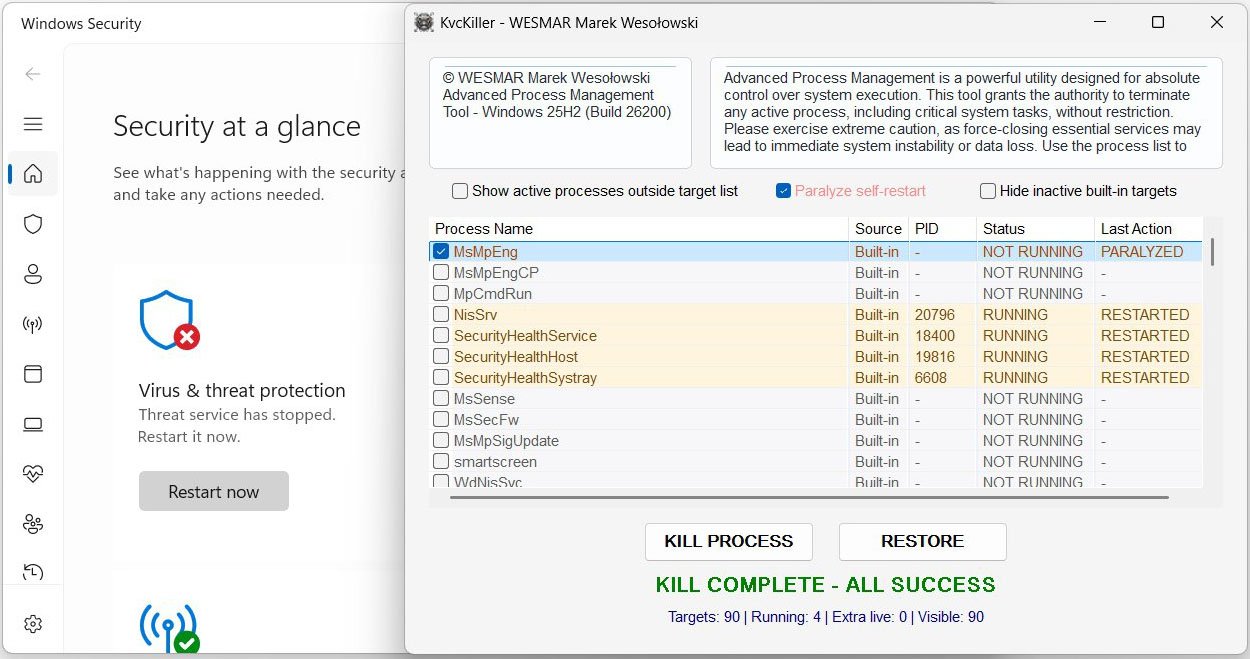
GUI — main window
📚 Table of Contents
- Feature Overview
- Architecture
- Driver Lifecycle
- Kill Flow
- Paralyze: IFEO Offline Editing
- Restore Flow
- Built-in Target List
- GUI Reference
- CLI Reference
- Registry & Configuration
- Module Map
- Build
- The Driver — CVE-2023-52271
- On Microsoft's Habit of Leaving Doors Open
- Project Context
- System Requirements
Feature Overview
KvcKiller terminates AV/EDR processes that protect themselves against user-space TerminateProcess calls by dispatching kills through a kernel driver via DeviceIoControl. Self-protection at ring 3 is irrelevant when the termination signal arrives from ring 0.
Kill Engine
- Kernel IOCTL termination — driver handle opened to
\\.\Warsaw_PM; PID sent viaDeviceIoControl(IOCTL0x22201C); process terminated from ring 0 - Driver stealth loading —
NtLoadDriver/NtUnloadDrivervia direct NTDLL calls; noCreateService, no visible entry inservices.mscduring the session - Privilege escalation —
RtlAdjustPrivilegeforSeLoadDriverPrivilegeandSeDebugPrivilege; TrustedInstaller impersonation for DriverStore writes - Driver embedded in icon — the kernel driver is compressed as an LZX Cabinet archive and appended to
KvcKiller.ico; extracted on demand via the Windows FDI API; no separate.sysfile to distribute or detect
Paralyze Mode
- Injects
Debugger = C:\Windows\System32\systray.exeinto Image File Execution Options for each target process — Windows intercepts every subsequent launch and runs the dummy debugger instead; no AV code ever executes systray.exeis chosen deliberately: it is a legitimate system binary, carries a Microsoft signature, and exits silently when invoked with unexpected arguments- Survives application restart: on next launch, KvcKiller reads IFEO and restores the PARALYZED state in the UI without any separate persistence file
- Reversed by Restore — the IFEO entry is removed before the service is restarted
- Temp files created during the offline hive edit (
C:\Windows\Temp\Ifeo.hiv,.LOG1,.LOG2,.blf,*.regtrans-ms) are cleaned up after each operation
Restore
- Removes the IFEO Debugger entry (unparalyze) before any launch attempt
- Restarts via SCM StartService → ShellExecuteEx (runas) → direct CreateProcess
- Batch restore for all selected targets; path resolved from live
QueryFullProcessImageNameWor HKCU path cache
GUI
- Win32 ListView with 5 columns (Process Name, Source, PID, Status, Last Action), click-to-sort
- Dark / light mode auto-detected; Mica backdrop on Windows 11; animated sine-pulse Paralyze label
- PARALYZED row state: orange color, distinct from red KILLED, persists across restarts
- "Show extra processes" — appends running processes not in the config list
- "Hide inactive built-in targets" — collapses not-running entries with no pending action
- Worker threads for kill and restore; atomic shutdown coordination; UI stays responsive
CLI
Single binary, dual mode — GUI when launched without arguments, headless console tool with arguments. No separate CLI binary.
Architecture
WinMain
  ├─ argc > 1  →  RunCLI (headless, AttachConsole)
  └─ GUI mode
       ├─ WndProc
       │    ├─ WM_CREATE     →  InitListView, RefreshProcessList, timers
       │    ├─ WM_COMMAND    →  KillOnceAction / RestoreAction (worker threads)
       │    ├─ WM_NOTIFY     →  HandleListCustomDraw, sort on LVN_COLUMNCLICK
       │    ├─ WM_CLOSE      →  set g_shutdownPending; defer DestroyWindow if workers active
       │    └─ WM_PAINT      →  PaintHeaderPanels (custom rounded rects)
       ├─ UIHelpers           (fonts, dark mode, Mica, DPI-aware layout)
       ├─ ListViewManager     (columns, custom draw, row flag bits, IFEO cold-start check)
       ├─ ProcessOperations   (worker threads, IFEO paralyze/unparalyze, driver init)
       ├─ ProcessKiller       (FindProcesses, KillProcess, RestoreProcesses)
       ├─ DriverController    (FDI extract → DriverStore → NtLoad → IOCTL → NtUnload)
       └─ ConfigReader        (HKCU registry: target list, path cache, history ring buffer)
Thread Model
Worker threads (KillOnceThreadProc, RestoreThreadProc) are created via CreateThread from WM_COMMAND. g_activeWorkers (atomic int) counts live workers; g_shutdownPending (atomic bool) signals them to exit cleanly. WM_CLOSE defers DestroyWindow until g_activeWorkers == 0 — the window never closes mid-operation. The last worker to exit during shutdown re-posts WM_CLOSE to unblock the message loop.
A WorkerGuard RAII struct placed at the top of every thread proc guarantees g_activeWorkers is decremented on all exit paths, including early returns and exception unwinds.
Cross-thread UI updates use PostMessage(WMU_STATUS_TEXT) with a heap-allocated std::wstring*; the message handler owns and deletes it. g_lastActionByName and g_prevRunningByName are guarded by g_statusLock (CRITICAL_SECTION).
Driver Lifecycle
Driver extraction
The kernel driver binary is stored as an LZX-compressed Cabinet block appended to KvcKiller.ico (the application icon, embedded as MAIN_ICON in the RC file). On each Kill operation, ExtractDriverFromIcon:
- Reads the icon bytes from the PE resource section via
FindResource/LockResource - Scans for the
MSCFCabinet signature within the icon binary - Sets up a
MemoryReadContextand callsFDICopywith all-in-memory FDI callbacks (fdi_read,fdi_seek,fdi_write,fdi_open,fdi_close) - Writes the extracted
.systo the DriverStore path using a HANDLE opened under TrustedInstaller impersonation
NtLoadDriver / NtUnloadDriver are called directly from ntdll.lib — no CreateService, no SCM interaction, no visible service entry.
Kill Flow
| Step | Detail |
|---|---|
| Discovery | CreateToolhelp32Snapshot(TH32CS_SNAPPROCESS) + Process32FirstW/NextW; matched by base exe name, case-insensitive |
| IOCTL | DeviceIoControl(hDriver, 0x22201C, buffer, 1036, nullptr, 0, ...) — PID in first 4 bytes, 1032 bytes zero-padding required by the driver's dispatch handler |
| Confirmation | IsProcessRunning(pid) via WaitForSingleObject(hProcess, 0) — process object is signalled the instant it exits, more reliable than re-snapshotting |
| State | g_lastActionByName[key] = kActionKilled; promoted to kActionParalyzed if IFEO write succeeded |
Paralyze: IFEO Offline Editing
What IFEO Does
Image File Execution Options (HKLM\SOFTWARE\Microsoft\Windows NT\CurrentVersion\Image File Execution Options) is a Windows mechanism originally designed for attaching a debugger to a process at startup. When a Debugger value is present under a process's IFEO subkey, the Windows loader (ntdll!LdrpInitializeProcess) checks for it before transferring control to the image entry point. If found, it launches the registered debugger binary with the original command line appended — and the original process never runs.
KvcKiller writes Debugger = C:\Windows\System32\systray.exe. When the AV service manager issues StartService, the Windows loader intercepts the launch and runs systray.exe instead. systray.exe exits immediately when invoked with unexpected arguments. From SCM's perspective the service "started and exited with code 0", which does not trigger service recovery restart logic. No AV code executed.
systray.exe is chosen over a non-existent path or a custom binary because it:
- Carries a valid Microsoft Authenticode signature
- Is present on every Windows installation
- Exits cleanly without error dialogs or event log entries
Why Direct IFEO Write Fails
Attempting to write Debugger directly to a live IFEO subkey with RegSetValueExW returns ERROR_ACCESS_DENIED (error 5), even from an Administrator process with both SeRestorePrivilege and SeBackupPrivilege enabled.
The root cause is the DACL on individual IFEO subkeys. Microsoft tightens the ACLs on IFEO entries for Defender components so that only NT AUTHORITY\SYSTEM and NT SERVICE\TrustedInstaller hold write access. Security vendors (CrowdStrike, SentinelOne, ESET, Kaspersky) extend this by adding explicit deny ACEs as part of their self-protection stack — blocking writes even from a TrustedInstaller-impersonating token.
The core problem: you cannot reliably write Debugger to live IFEO for protected processes regardless of privilege level. The ACLs are evaluated per-key, not per-privilege.
The Offline Hive Editing Trick
The solution is to never touch the live IFEO key directly. Instead:
Step 1 — RegSaveKeyEx
  Save HKLM\...\Image File Execution Options → C:\Windows\Temp\Ifeo.hiv

  Reads the entire IFEO subtree into a flat hive file on disk.
  Requires SE_BACKUP_NAME — backup privilege bypasses DACL on read.
  The per-subkey ACLs that blocked direct writes are irrelevant here.

Step 2 — RegLoadKey
  Load Ifeo.hiv → HKLM\TempIFEO

  Mounts the saved hive file as a new root key under HKLM.
  The mounted key's effective DACL is inherited from the parent HKLM
  node, NOT from the original IFEO subkey ACLs.
  The calling Administrator process has full KEY_ALL_ACCESS on TempIFEO.

Step 3 — Edit offline
  RegCreateKeyExW / RegSetValueExW / RegDeleteKeyW on HKLM\TempIFEO\...

  All operations succeed — no ACL enforcement from original IFEO DACLs.

Step 4 — RegUnLoadKey
  Unmount HKLM\TempIFEO — flushes all changes to Ifeo.hiv.

Step 5 — RegRestoreKey (REG_FORCE_RESTORE)
  Restore Ifeo.hiv → HKLM\...\Image File Execution Options

  Atomically replaces the entire live IFEO subtree with the modified hive.
  REG_FORCE_RESTORE overrides the target key's DACL.
  Requires SE_RESTORE_NAME.

Step 6 — Cleanup
  Delete C:\Windows\Temp\Ifeo.hiv, Ifeo.hiv.LOG1, Ifeo.hiv.LOG2,
         Ifeo.hiv.blf, *.regtrans-ms
This approach works because RegRestoreKey with REG_FORCE_RESTORE is a legitimate backup/restore API that predates Windows NT 4.0. The SE_BACKUP_NAME + SE_RESTORE_NAME privilege pair is intentionally granted to Administrator accounts to allow system backup software (Veeam, VSS, Windows Backup) to preserve and restore registry hives without DACL interference. Microsoft cannot restrict these privileges without breaking every backup solution on Windows.
IFEO ownership tracking: A value under HKCU\Software\KvcKiller records which IFEO entries were created by KvcKiller versus which already existed. On unparalyze, only KvcKiller-created subkeys are deleted entirely; for pre-existing subkeys, only the Debugger value is removed.
The MsMpEng Phenomenon
MsMpEng.exe (Windows Defender's antimalware engine) is the canonical demonstration case for why Paralyze is necessary alongside Kill.
After a kernel-mode kill, WinDefend detects that MsMpEng.exe exited and issues StartService within milliseconds. SecurityHealthService monitors Defender health independently; SCM service recovery settings specify immediate restart on failure; on Windows 11, Defender processes carry PPL-Antimalware flags.
Without Paralyze, MsMpEng.exe is back within 1–3 seconds of the kill. With Paralyze:
- KvcKiller sends the IOCTL kill —
MsMpEng.exeis terminated at ring 0 WinDefendcallsStartService→ loader checks IFEO → findsDebugger = systray.exe→ runssystray.exe→ exits with code 0- SCM records "service started and exited normally" — recovery restart logic does not trigger
SecurityHealthServicesees a clean exit, does not escalate- Defender stays dead until Restore explicitly removes the IFEO entry and calls
StartService
The same mechanism works for CrowdStrike (CSFalconService), SentinelOne (SentinelAgent), ESET (ekrn), Kaspersky (avp), and all other AV/EDR engines that restart via SCM — because it targets the Windows loader, not the service manager.
Restore Flow
ProcessKiller::RestoreProcesses tries three methods in order, stopping at the first success:
| Method | When used |
|---|---|
| SCM StartService | Process is registered as a Win32 service (covers most AV/EDR) |
ShellExecuteEx with runas |
GUI apps and self-elevating executables |
| CreateProcess | Fallback using the HKCU path cache |
The executable path is resolved from (priority order):
- Live
QueryFullProcessImageNameWon the running PID — updated on every refresh cycle ConfigReader::ReadProcessPathfrom the HKCU path cacheQueryServiceConfigW→lpBinaryPathNamefrom the SCM service entry
IsProcessParalyzed reads HKLM\...\Image File Execution Options\<name.exe>\Debugger directly at restore time, so the correct unparalyze path is taken even when the PARALYZED state was set in a previous session.
Built-in Target List
Compiled into the binary as IDR_DEFAULT_TARGETS RCDATA "KvcKiller.ini" and written to HKCU on first run. The resource loader handles three encodings automatically: UTF-16 LE with BOM, UTF-8 with BOM, and plain UTF-8 / ANSI.
90+ targets across 15 vendors:
| Vendor | Processes |
|---|---|
| Microsoft Defender / Sentinel / Sense | MsMpEng, MsMpEngCP, MpCmdRun, NisSrv, SecurityHealthService, SecurityHealthHost, SecurityHealthSystray, MsSense, MsSecFw, MsMpSigUpdate, smartscreen, WdNisSvc, WinDefend, Sense, SenseIR, SenseCncProxy, MsColleciton, MpNWMon |
| Avast / AVG | AvastSvc, AvastUI, aswEngSrv, aswToolsSvc, avg, avgui, avgsvc, avgidsagent |
| Bitdefender | vsserv, bdservicehost, bdagent, bdwtxag, updatesrv, bdredline, bdscan, seccenter |
| Carbon Black (VMware) | cb, RepMgr, RepUtils, RepWsc |
| CrowdStrike | CSFalconService, CSFalconContainer |
| Cylance (BlackBerry) | CylanceSvc, CylanceUI |
| ESET | ekrn, egui, ema_client, ekrnui, elam |
| FireEye / Trellix | xagt, FireEye |
| Kaspersky | avp, avpui, klnagent, kavfs, kavfsslp, kmon, ksde, kavtray |
| Malwarebytes | mbamservice, mbam, mbamtray |
| McAfee | McAfeeService, McAPExe, mcshield, mfemms, mfeann, mcagent, mctray |
| Norton / Symantec | ccSvcHst, nortonsecurity, symantec, Smc, SNAC, SymCorpUI |
| SentinelOne | SentinelAgent, SentinelMonitor, SentinelServiceHost, SentinelHelperService, SentinelBrowserNative |
| Sophos | SavService, SophosHealth, SophosCleanService, SophosFileScanner, SophosSafestore64, SophosMcsAgent, SophosEDR |
| Trend Micro | TMBMSRV, NTRTScan, TmListen, TmProxy, TmPfw |
Custom targets can be added to HKCU\Software\KvcKiller\Targets or by editing KvcKiller.ini before first run.
GUI Reference
Window Layout
| Panel | Content |
|---|---|
| Header left | © WESMAR Marek Wesołowski · Advanced Process Management Tool – Windows 11 25H2 |
| Header right | Warning / status banner |
| Process Name · Source · PID · Status · Last Action | MsMpEng · Built-in · 4812 · RUNNING · - |
CylanceSvc · Built-in · — · NOT RUNNING · KILLED |
|
MsMpEng · Built-in · — · NOT RUNNING · PARALYZED |
|
| Checkboxes | ☐ Show active processes outside target list |
| ☐ Hide inactive built-in targets | |
☐ [KILL PROCESS] [RESTORE] |
|
| Footer | READY · 90 targets · 3 running · 2 extra |
ListView Columns
| Column | Width | Description |
|---|---|---|
| Process Name | Flexible | Base executable name from CreateToolhelp32Snapshot |
| Source | 60 px | Built-in (from config) or Saved (extra, added dynamically) |
| PID | 68 px | Live PID; — when not running |
| Status | 118 px | RUNNING / NOT RUNNING; color-coded via NM_CUSTOMDRAW |
| Last Action | 120 px | KILLED / PARALYZED / RESTORED / RESTARTED / LIVE / RESTORING / - |
Row Colors (NM_CUSTOMDRAW)
| State | Dark mode | Light mode |
|---|---|---|
| RUNNING | Green text / dark green bg | Green text / light green bg |
| KILLED | Red text / dark red bg | Dark red text / light red bg |
| PARALYZED | Orange text / dark orange bg | Dark orange text / light orange bg |
| RESTORED / RESTARTED | Blue text / dark blue bg | Blue text / light blue bg |
| NOT RUNNING (no action) | Gray text | Gray text |
PARALYZED is evaluated before KILLED in the custom draw chain — the more specific state wins.
Row Flag Bits (LVITEM::lParam)
| Flag | Value | Meaning |
|---|---|---|
kRowFlagRunning |
0x0001 | Process is currently running |
kRowFlagExtra |
0x0002 | Not in config; added by "Show extra" |
kRowFlagKilled |
0x0004 | Was killed this session |
kRowFlagRestored |
0x0008 | Was restored this session |
kRowFlagRestarted |
0x0010 | Restarted on its own after kill |
kRowFlagParalyzed |
0x0020 | Killed and has IFEO Debugger entry blocking restart |
PARALYZED State Persistence
PARALYZED is the only action state that persists across application restarts without a separate persistence file. IFEO is the source of truth. On startup, RefreshProcessList calls IsProcessParalyzed(name) for each not-running process with no stored action. If the IFEO Debugger value is found, the row is initialised with kActionParalyzed and kRowFlagParalyzed.
KILLED state is intentionally not persisted across restarts: when KvcKiller exits, the killed process may already be restarting. Showing a stale KILLED label on next launch without knowing actual current state would be misleading.
Paralyze Label Animation
The Paralyze checkbox label pulses in red using a sine wave tied to GetTickCount64. A 40 ms WM_TIMER invalidates only the label HWND; WM_CTLCOLORSTATIC recalculates the text color each frame:
f = 0.5 + 0.5 * sin(t * 2π / period)
R = lerp(bgR, 255, f * 0.9 + 0.1)
G = lerp(bgG,  40, f * 0.9 + 0.1)
B = lerp(bgB,  40, f * 0.9 + 0.1)
Pure color interpolation, no alpha blending, no GDI+ — compatible with all Win32 themes and both dark/light mode.
CLI Reference
Because KvcKiller is compiled as a /SUBSYSTEM:WINDOWS GUI binary, it cannot simply write to stdout when launched from a terminal. On entry to RunCLI, SetupConsole calls AttachConsole(ATTACH_PARENT_PROCESS) — this attaches to the existing console of the parent process without opening a new window. _setmode(_O_U16TEXT) is set so wprintf outputs correct Unicode on all code pages.
When RunCLI finishes, SendEnterToConsole injects a synthetic VK_RETURN into the console input buffer via WriteConsoleInputW, forcing cmd.exe and PowerShell to redraw their prompts.
KvcKiller.exe -help
KvcKiller.exe -list
KvcKiller.exe -kill <n> [-paralyze]
KvcKiller.exe -restore <n>| Command | Description |
|---|---|
-help |
Print usage and exit |
-list |
Enumerate config targets; show PID and running status for each |
-kill <n> |
Load driver, find process by name, send IOCTL kill |
-kill <n> -paralyze |
Paralyze first (IFEO injection), then kill — order reversed vs GUI mode |
-restore <n> |
Unparalyze if needed, then restart via SCM / ShellExecute / CreateProcess |
CLI vs GUI kill+paralyze order: In CLI mode the IFEO
Debuggerentry is written before the kill so the entry is in place before any watchdog can issue a restart. In GUI mode the kill happens first and paralyze follows immediately after — both happen within the same worker thread before any watchdog can react.
Registry & Configuration
All persistent state lives under HKCU\Software\KvcKiller.
| Key / Value | Type | Content |
|---|---|---|
Targets\List |
REG_MULTI_SZ | All target process names (no .exe), newline-separated |
Paths\<name.exe> |
REG_SZ | Full executable path; updated on every refresh cycle when the process is seen running |
History\Entries |
REG_MULTI_SZ | Ring buffer, max 16 entries. Each entry: YYYY-MM-DD HH:MM:SS \| ACTION \| processName \| fullPath. Newest entry at index 0. |
IFEO ownership tracking uses HKCU\Software\KvcKiller as well — value name <ProcessName.exe>, type REG_DWORD, data 1 marks entries created by KvcKiller. On unparalyze: if the marker is present, the entire IFEO subkey is deleted; if absent (pre-existing entry), only the Debugger value is removed.
Module Map
| Module | Responsibility |
|---|---|
| main.cpp | WndProc, WinMain; header panel custom drawing; WM_CLOSE graceful-shutdown logic; WM_CTLCOLORSTATIC sine-pulse Paralyze animation; timer dispatch |
| DriverController.cpp | Full driver lifecycle: FDI extraction from icon (LZX CAB), TrustedInstaller impersonation, DriverStore drop, SCM registry key, NtLoadDriver / NtUnloadDriver, device handle management, CleanupDriverRegistry |
| ProcessKiller.cpp | CreateToolhelp32Snapshot enumeration; IsProcessRunning via WaitForSingleObject; SendIOCTL / KillProcess; RestoreProcess / RestoreProcesses (SCM → ShellExecute → CreateProcess chain) |
| ProcessOperations.cpp | KillOnceThreadProc / RestoreThreadProc worker threads; WorkerGuard RAII; IFEO offline hive editing (ProcessBatchIfeo); ParalyzeProcessesBatch / UnparalyzeProcessesBatch / IsProcessParalyzed; KillOnceAction / RestoreAction UI triggers |
| ConfigReader.cpp | HKCU registry CRUD: target list (REG_MULTI_SZ), path cache (REG_SZ per process), history ring buffer (max 16); ReadSeedProcessList from RCDATA with 3-way BOM detection |
| ListViewManager.cpp | InitListView, RefreshProcessList, HandleListCustomDraw, HandleListRowClick; sort dispatch; row flag bit management; IFEO cold-start check for PARALYZED state persistence |
| UIHelpers.cpp | CreateUiFont (DPI-aware), AppUseDarkMode, ApplyModernWindowEffects (Mica, rounded corners), CalculateMainLayout, LayoutMainWindow, UpdateStatusText, UpdateProcessCount |
| CLIHandler.cpp | SetupConsole (AttachConsole + fd re-open + _setmode); SendEnterToConsole (WriteConsoleInputW VK_RETURN injection); PrintHelp; RunCLI dispatcher; InitDriverForCli thin wrapper |
| GlobalData.cpp | Definitions for all globals: window/GDI handles, sort state, g_statusLock, g_lastActionByName, g_prevRunningByName, g_shutdownPending (atomic bool), g_activeWorkers (atomic int), WMU_* message IDs |
| Utils.cpp | LoadStr (string resource helper), GetWindowsVersion, IsRunningAsAdmin, EnsureExeName, StripExeExtension |
Build
# Release x64
.\build.ps1

# Clean only (no rebuild)
.\build.ps1 -NoBuild

# Force-clean transient dirs then build
.\build.ps1 -Clean
build.ps1 locates MSBuild via hardcoded VS 2026 paths or vswhere, removes transient directories (.vs, obj, x64, src\obj, src\x64), builds src\KvcKiller.vcxproj with /p:Configuration=Release;Platform=x64 /m, and sets the output file's CreationTime and LastWriteTime to 2030-01-01 00:00:00. This deterministic timestamp prevents compile-time attribution during forensic analysis.
| Setting | Value |
|---|---|
| Toolset | Visual Studio 2026 (v145) |
| Standard | C++20 |
| Architecture | x64 only |
| CRT | Static (/MT) — no VC++ Redistributable needed |
| External DLLs | None |
| Output | bin\KvcKiller.exe |
| File timestamps | Forced to 2030-01-01 00:00:00 (anti-forensic, deterministic builds) |
The Driver — CVE-2023-52271
The kernel driver used is wsftprm.sys (product: wsddprm, version 2.0.0.0), the kernel component of Topaz Warsaw — banking antifraud software developed by the Brazilian company Topaz OFD. The driver carries a valid Authenticode signature from a trusted CA, which is the only reason NtLoadDriver accepts it without a DSE bypass on a stock Windows 10/11 installation.
CVE-2023-52271 describes a vulnerability in wsftprm.sys v2.0.0.0: the driver exposes device \\.\Warsaw_PM to any process on the system and implements an IOCTL handler at code 0x22201C that calls ZwTerminateProcess in kernel context without any privilege validation. Any process that can open the device can terminate any other process — including Protected Process Light (PPL) processes such as Windows Defender on a fully patched, HVCI-enabled, Secure Boot system.
CVSS v3.1 score: 6.5 (Medium) — the scoring reflects a low-privilege attacker; from an Administrator context the impact is unconditional.
BYOVD deployment: KvcKiller extracts the kernel driver into System32\DriverStore\FileRepository, masquerading as a legitimate network adapter component (netadapter.sys). It dynamically scans for the correct version-specific subfolder (netadapter.inf_amd64_*) to blend into the OS structure. The driver is loaded via NtLoadDriver, performs the kill operation via IOCTL 0x22201C, and is immediately unloaded with full cleanup of file and registry artifacts.
IOCTL Details
Input buffer: 1036 bytes — target PID as DWORD in the first 4 bytes, 1032 bytes zero-padding required by the driver's dispatch routine. No output buffer. The driver invokes ZwTerminateProcess from ring 0, bypassing all user-space self-protection callbacks and PROCESS_TERMINATE handle restrictions enforced by PPL.
Privilege Requirements
| Operation | Required privilege |
|---|---|
| Load / unload kernel driver | SeLoadDriverPrivilege |
| Write driver to DriverStore | TrustedInstaller impersonation |
Save IFEO hive (RegSaveKeyEx) |
SE_BACKUP_NAME |
Restore IFEO hive (RegRestoreKey) |
SE_RESTORE_NAME |
| Query process image path | PROCESS_QUERY_LIMITED_INFORMATION |
All privileges are available to a standard Administrator-elevated process on Windows 10/11.
What KvcKiller Does Not Do
- Does not disable DSE or patch kernel callbacks
- Does not write to memory of other processes
- Does not install persistent services, scheduled tasks, or startup entries
- Does not make network connections
- Does not exfiltrate or store credentials
- The kernel driver is unloaded and its registry key cleaned up after every Kill operation
On Microsoft's Habit of Leaving Doors Open
There is a recurring pattern in Windows security architecture: a team ships a powerful API to solve a legitimate infrastructure problem, another team later builds a security boundary that the API quietly walks straight through, and nobody closes the gap because closing it would break the legitimate use case. KvcKiller is built almost entirely from this pattern.
The IFEO Problem That Cannot Be Fixed
HKLM\SOFTWARE\Microsoft\Windows NT\CurrentVersion\Image File Execution Options is the mechanism that lets Windows redirect any process launch to a debugger before the original binary gets control. Microsoft tightened the DACLs on individual IFEO subkeys so that security software entries — Defender, CrowdStrike, SentinelOne — cannot be modified by Administrator. A direct RegSetValueExW returns ERROR_ACCESS_DENIED.
The answer to this hardening is the Windows registry backup API, which predates the hardening by about twenty years.
RegSaveKeyEx reads any registry subtree into a flat hive file, bypassing DACL checks entirely because SE_BACKUP_NAME is explicitly designed to override object security for backup purposes. RegLoadKey mounts the file under a new root where the calling process has full control. RegRestoreKey with REG_FORCE_RESTORE writes the modified hive back over the live key, again bypassing the target DACL because SE_RESTORE_NAME is explicitly designed to override object security for restore purposes.
Both privileges are granted to Administrators by default. Microsoft cannot revoke them without breaking every backup product on the platform — Veeam, Acronis, Windows Server Backup, VSS. The security team hardened IFEO. The infrastructure team shipped the escape hatch decades earlier and it is load-bearing. The result: a completely legitimate sequence of documented API calls, requiring no shellcode, no kernel patch, no signature bypass — writes to a key that Microsoft explicitly marked as protected against Administrator writes.
This is not a bug in the backup API. It works exactly as designed. That is the point.
The Broader Catalogue
Accessibility features as debugger proxies. IFEO's Debugger mechanism was widely abused by replacing sethc.exe (Sticky Keys), Magnify.exe, or Narrator.exe with cmd.exe — accessible from the Windows lock screen before any authentication. The technique has been documented since at least 2008. Microsoft's fix was to add image file hash validation for specific accessibility binaries. The IFEO mechanism itself was not changed.
UI Automation as a Tamper Protection bypass. The Windows Security application that controls Defender's Tamper Protection toggle is an ordinary UWP window. Its toggle controls are fully accessible via IUIAutomationTogglePattern. An Administrator process can open the Windows Security window invisibly (opacity 0, DWM cloaking, off-screen positioning), find the Tamper Protection toggle by automation ID, invoke it, and close the window — no registry write, no service call, no kernel interaction. Tamper Protection is now off. The entire operation uses Microsoft accessibility infrastructure that cannot be removed without breaking screen readers.
This exact technique is implemented in WinDefCtl — a companion utility that disables Defender's Real-Time Protection and Tamper Protection through UI Automation alone. No privileges beyond Administrator. No kernel driver. No registry manipulation.
SMSS, BootExecute, and the pre-security boot window. HKLM\SYSTEM\CurrentControlSet\Control\Session Manager\BootExecute is a REG_MULTI_SZ value that SMSS reads and executes during the native phase of Windows boot — before the Win32 subsystem initialises, before the SCM starts, before any security service or EDR agent has loaded. Entries run as native subsystem applications with SYSTEM privileges in an environment where the entire security stack simply does not exist yet.
KernelResearchKit explores this space. BootBypass(FastReboot) is a native subsystem application deployed via BootExecute that patches Driver Signature Enforcement by manipulating kernel code integrity callbacks — before Windows Defender, before any EDR agent, before the Win32 subsystem itself.
The offset of the DSE control flag (ci.dll!g_CiOptions) in any given Windows build is resolved dynamically from Microsoft's own symbol server (https://msdl.microsoft.com/download/symbols). Microsoft publishes full PDB files for every Windows component to support crash dump analysis, WinDbg, and Visual Studio debugging. Those PDB files contain the precise byte offsets of every internal structure and global variable in the kernel, for every build ever shipped. The symbol server is effectively a changelog of exploitable offsets, maintained and hosted by Microsoft.
KvcKiller is a demonstration that the surface exists and is accessible to any sufficiently motivated Administrator-level process. The techniques are not novel individually — they are documented in CVEs, security research, and Microsoft's own API documentation. The combination assembled here is the contribution.
Project Context
KvcKiller is part of a broader set of tools exploring the gap between Windows security guarantees and Windows API capabilities:
- KVC — the flagship framework. KvcKiller will be integrated as a module into KVC, providing kernel-mode process termination as one component of a larger capability set.
- WinDefCtl — Defender Real-Time Protection and Tamper Protection control via UI Automation API. No kernel driver, no registry writes — Microsoft's own accessibility infrastructure used to click the toggle that disables the security software.
System Requirements
| Component | Requirement |
|---|---|
| OS | Windows 10 or later (Windows 11 recommended — Mica backdrop) |
| Privileges | Administrator (elevated token) |
| Architecture | x64 |
| Dependencies | None — static CRT, no VC++ Redistributable |
| Compiler | Visual Studio 2026 (v145), C++20 (build only) |
Add a comment