2026-04-19 — Initial Release v1.0.0.1
UEFIExtract is a Windows x64 utility for parsing and extracting UEFI firmware images. It builds a full tree of Firmware Volumes, FFS files, and sections — with transparent decompression of Tiano and LZMA-compressed sections. Supports IFR/HII package extraction, BIOS setting offset search (
biosfind), Intel FIT parsing, and live BIOS flash read via FPTW64 (readbios). Runs in both GUI and CLI mode from the same binary.
UEFIExtract — UEFI Firmware Parser and Extractor
📚 Table of Contents
- Overview
- Architecture
- CLI Reference
- GUI Reference
- Firmware Parsing
- NVRAM Stores
- Compression Support
- Vendor Wrapper Detection
- Dell PFS Packages
- IFR Extraction
- PE/TE Analyzer
- BIOS Setting Finder
- Search Engine
- Intel FIT Parser
- Live UEFI Variables (vars)
- Live BIOS Read (readbios)
- Dump Modes
- Report Generator
- Surgical Patching
- Build System
- Source Code Structure
- Error Codes
- Troubleshooting
Overview
UEFIExtract parses UEFI firmware images into a structured tree of nodes and provides multiple extraction and analysis operations on that tree.
| Capability | Description |
|---|---|
| Firmware tree parsing | Full Volume → File → Section hierarchy from raw .rom, .bin, or vendor update packages. Volumes are found by signature sweep at any offset, including inside raw and pad files where vendors nest them |
| Transparent decompression | EFI Standard (Tiano) and LZMA sections decoded automatically during parsing |
| Dell PFS extraction | Reads a Dell BIOS update executable directly: zlib containers, nested PFS, and Intel BIOS Guard blocks reassembled at the addresses they declare |
| NVRAM store parsing | VSS, VSS2, FTW, Phoenix EVSA and AMI NVAR stores walked into variable nodes |
| IFR / HII extraction | Detects EFI and UEFI IFR protocol variants; dumps human-readable form text |
| BIOS setting finder | Text-query search over decoded IFR output to locate setup_var variable offsets, annotated with the values the running machine currently holds |
| Live UEFI variables | vars: lists the firmware variables of the running system, Setup / SaSetup / CpuSetup included |
| Intel FIT parsing | Reads microcode revisions, Startup ACM, TPM policy, and BootGuard KM/BP entries |
| Live flash read | readbios: detects Intel PCH via SetupAPI, extracts matching FPTW64 from bundled archive, dumps BIOS region. Parsing of .rom files works on any UEFI FFS image regardless of CPU vendor. |
| Targeted GUID extraction | Extract a specific FFS file by GUID, with optional section type filter and dump mode selection |
| Surgical patching | Replace a node's body in-place; recomputes FFS integrity checksum when FFS_ATTRIB_CHECKSUM is set |
| GUI + CLI | Single binary: no arguments → GUI (Win32, DWM/Mica); any other argument → CLI |
What UEFIExtract Does NOT Do
- ❌ No re-compression —
PatchNode()replaces body bytes in-place at original size; compressing and rebuilding a section is not supported - ❌ No live flash read on AMD —
readbiosrequires Intel PCH + MEI; parsing a.romfile from any platform (Intel, AMD, ARM) works normally viaFfsParser - ❌ No Linux / macOS — Windows x64 only (Win32, SetupAPI, DWM)
- ❌ No variable writing —
biosfindandvarsread and locate; writing is left to external tools (e.g.setup_var,UnderVolter) - ❌ No LZMA/F86 x86 filter — the F86 variant decompresses, but the branch filter is not reversed; the affected node says so instead of presenting the bytes as correct
- ❌ No XZ-based Dell packages — the zlib/PFS form is handled; the XZ variant is not
- ❌ No Dell PFS on Windows 10 — that path needs
archiveint.dllfor its zlib inflate. Everything else works without it
Architecture
reassemble BIOS Guard blocks] PFS -->|No| VD{Vendor wrapper?} VD -->|MZ / Capsule / HPQOEM| VS[UnwrapVendor — skip to FV payload] VD -->|None| FP[FfsParser::Parse] DP --> FP VS --> FP FP --> SWEEP[Sweep for _FVH at any offset] SWEEP --> FV[Firmware Volumes FFSv1/v2/v3] SWEEP --> NV[NVRAM Volume] NV --> ST[Stores: VSS / VSS2 / FTW / EVSA / NVAR] ST --> TREE[TreeNode] FV --> FF[FFS Files incl. FFSv3 large files] FF --> RAW{Raw or pad file?} RAW -->|Yes| SWEEP RAW -->|No| SEC[Sections] SEC --> COMP{Compressed?} COMP -->|Tiano| TD[EFI Standard decompress] COMP -->|LZMA| LD[LZMA decompress] COMP -->|None| TREE TD --> TREE LD --> TREE TREE --> GUI[GUI: tree view + hex + details] TREE --> CLI{CLI command} CLI --> DUMP[dump / all] CLI --> RPT[report] CLI --> GCS[guids] CLI --> IFR[ifrscan] CLI --> BF[biosfind + live values] CLI --> TGUID[GUID targeted extraction] VARS[vars: live UEFI variables] --> BF CLI --> RB[readbios: PCH detect + FPTW64]
CLI Reference
The binary uses WinMain as its entry point. When launched with arguments it calls AttachConsole(ATTACH_PARENT_PROCESS) or AllocConsole() as needed, then routes through RunCli(). Version string is 2.0.0.
UEFIExtract {-h|--help|-v|--version}
UEFIExtract <image>
UEFIExtract <image> all
UEFIExtract <image> dump
UEFIExtract <image> report
UEFIExtract <image> guids
UEFIExtract <image> ifrscan [-o <dir>]
UEFIExtract <image> biosfind <query> [-o <txt>]
UEFIExtract <image> <GUID> [-o <outfile>] [-m <mode>] [-t <type>]
UEFIExtract vars [<filter>] [-n] [-o <txt>]
UEFIExtract readbios [-o <output.rom>]| Command | Output |
|---|---|
<image> |
Report (.report.txt) + GUID CSV (.guids.csv) + leaf dump (.dump\) |
<image> all |
Report + GUID CSV + full dump with subdirectories |
<image> dump |
Extraction only — no report, no GUID CSV |
<image> report |
Text report only |
<image> guids |
GUID CSV only |
<image> ifrscan [-o <dir>] |
Scans all tree nodes for IFR; prints matches; optionally dumps .ifr.txt files to <dir> |
<image> biosfind <query> |
Finds BIOS setup variable candidates from IFR; see BIOS Setting Finder |
<image> <GUID> ... |
Targeted extraction — accepts multiple GUIDs, each with its own -o, -m, -t |
vars [<filter>] |
Lists the live UEFI variables of the running machine; see Live UEFI Variables |
readbios |
Detect PCH, run FPTW64, dump BIOS region, then parse and report |
vars Flags
| Flag | Description |
|---|---|
<filter> |
Case-sensitive substring; only matching variable names are listed |
-n |
Names and GUIDs only — skips reading each variable's contents, which is much faster |
-o <txt> |
Also write the listing to a file |
Targeted GUID Extraction Flags
| Flag | Values | Description |
|---|---|---|
-o <path> |
file or directory path | Output path for this GUID target |
-m <mode> |
all body header unc_data info file |
Data to extract; see Dump Modes |
-t <type> |
hex byte, e.g. 0x10 |
Filter by EFI section type; 0xFF = no filter (default) |
Multiple GUIDs can be listed on one command line; each reads its own -o/-m/-t after it.
Console Attach Strategy
The binary is compiled as a GUI subsystem application (WinMain). When invoked from a shell with arguments, it calls AttachConsole(ATTACH_PARENT_PROCESS). If that fails (e.g. an elevated process that lost its parent), it falls back to AllocConsole(). Stdout, stderr, and stdin are reopened to CONOUT$ / CONIN$ accordingly.
After CLI work completes, if the console was attached (not allocated), the function InjectEnterToConsole() writes a synthetic VK_RETURN key-down + key-up pair into the console input buffer via WriteConsoleInputW. This causes the parent shell (CMD, PowerShell) to redraw its prompt — without it, the cursor blinks indefinitely because the shell already printed the prompt before the GUI-subsystem process returned. If the console was allocated (new window), FreeConsole() is called instead so the window closes cleanly.
0 on success. Non-zero ErrorCode value on failure (see Error Codes).
GUI Reference
Launched when no arguments are passed (or with --gui / -g). Built on ModernWindow — a Win32 window class with DWM Mica styling. Defaults to dark mode; toggleable at runtime via Dark Mode button.
Controls
| Control | Description |
|---|---|
| Open | File open dialog (BrowseForFile) — loads a firmware image |
| Dump | Dumps the currently selected node using the Current dump mode |
| Report | Generates text report for the loaded image |
| Read BIOS | Runs the readbios pipeline; requires the data archive next to the EXE |
| Dark Mode | Toggles SetDarkMode(bool) — updates DWM attributes and repaints all controls |
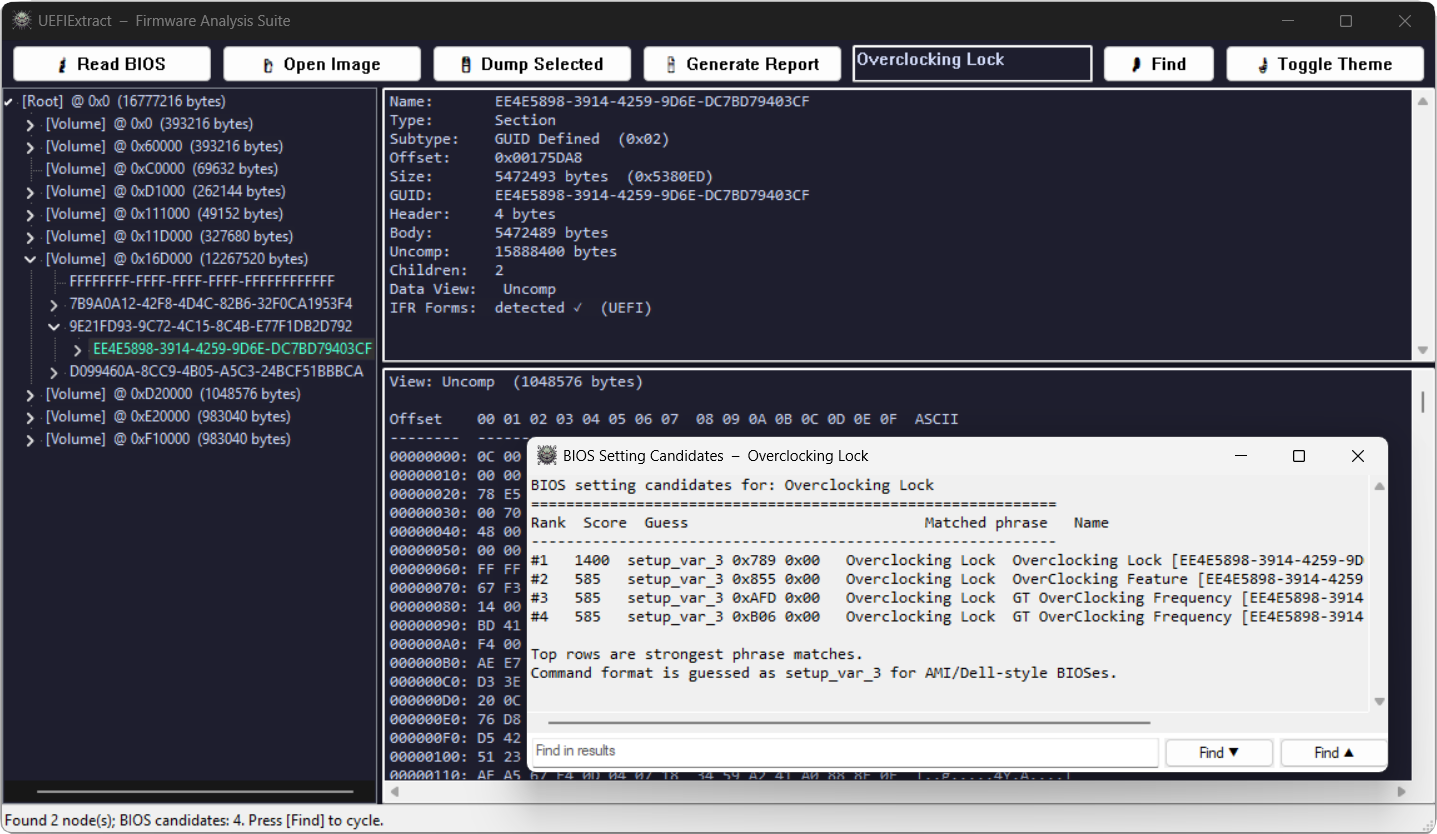
| Search box + Search | Runs SearchEngine::SearchAll() over the tree; results are highlighted and cycled |
| Tree | Hierarchical view of all parsed nodes (Volume / File / Section / FreeSpace) |
| Details pane | Shows node type, subtype, offset, size, GUID, name, info strings, and IFR text if applicable |
| Hex pane | Raw hex dump of the selected node's data |
| Progress bar | Used during readbios FPTW64 execution; updated via WM_APP+1 message |
| Status bar | Running status messages |
Context Menu (right-click on tree node)
| Action | Description |
|---|---|
| Extract IFR | Calls ExtractIFR() on the node's best available data view; shows result in details pane |
| Dump Node | Dumps the selected node to disk using a folder browser |
| Replace Body | Opens a file dialog, loads the file as new body data, calls FirmwareImage::PatchNode() |
IFR Visual Hinting and Text Cache
Nodes that contain detectable IFR packages are indicated in the tree using a lazy-evaluated cache (m_ifrCache). Detection uses IsIfrCandidate() which scans the first 2 MB of a node's data for EFI/UEFI IFR protocol markers. The cache is keyed by TreeNode* and is cleared on each image reload in PopulateTree().
A separate m_ifrTextCache stores the full ExtractIFR() text output per node. On the first access (e.g. via Extract IFR or a biosfind search), the text is parsed once and stored. All subsequent accesses for the same node return the cached string immediately — avoiding repeated IFR decode passes during interactive search.
Splitters
Two draggable splitters: vertical (m_splitX, default 300 px) separating the tree from the right panes; horizontal (m_splitY, default 220 px) separating details from hex. Minimum pane width/height: 80 px / 40 px.
Firmware Parsing
FirmwareImage
FirmwareImage::FromFile() reads the entire file into a ByteBuffer, runs vendor detection, and strips the wrapper if found (see Vendor Wrapper Detection). The buffer is then handed to FfsParser::Parse(). Decompressed section data is stored in m_ownedBuffers; TreeNode objects hold non-owning ByteView spans into these buffers.
FfsParser
Scans the image for Firmware Volume headers (_FVH signature 0x4856465F). For each valid volume, enumerates FFS files and recurses into sections. Decompression is triggered inline when a Compression or GUID-Defined section is encountered.
Node Tree
Each node carries:
| Field | Type | Description |
|---|---|---|
type() |
NodeType |
Root, Volume, File, Section, FreeSpace — free space between FFS files within a volume is represented as a distinct node type, not silently discarded |
subtype() |
uint8_t |
Cast to VolumeSubtype, FileSubtype, or SectionSubtype |
offset() |
uint64_t |
Byte offset within the firmware image |
size() |
uint64_t |
Total node size in bytes (includes header) |
guid() |
Guid |
EFI GUID (16 bytes, little-endian layout); valid if hasGuid() is true |
name() |
std::wstring |
GUID string or human-readable name |
text() |
std::wstring |
User Interface section string (module name) |
info() |
std::wstring |
Supplemental info (version string, dependency expression, etc.) |
header() |
ByteView |
Non-owning view of the raw header bytes |
body() |
ByteView |
Non-owning view of the payload bytes |
tail() |
ByteView |
Non-owning view of any trailing bytes |
uncompressedData() |
ByteView |
Non-owning view of decompressed data (empty if section is not compressed) |
Volume Subtypes
| Subtype | String | Filesystem GUID |
|---|---|---|
Ffs1 |
FFSv1 |
{7A9354D9-0468-444A-81CE-0BF617D890DF} |
Ffs2 |
FFSv2 |
{8C8CE578-8A3D-4F1C-9935-896185C32DD3} |
Ffs3 |
FFSv3 |
{5473C07A-3DCB-4DCA-BD6F-1E9689E7349A} |
Nvram |
NVRAM |
{FFF12B8D-7696-4C8B-A985-2747075B4F50} |
An NVRAM volume carries no FFS file stream; its body is handed to the NVRAM store parser instead.
A volume is named by the FvName GUID from its extended header when one is present, and by its filesystem GUID otherwise. The extended header normally lives inside a pad file, which is why it appears in the tree as one.
File Subtypes
| Subtype | Notes |
|---|---|
| Raw | |
| FreeForm | |
| SecurityCore | SEC phase |
| PEICore | Pre-EFI Init core |
| DXECore | Driver Execution Environment core |
| PEIM | PEI module |
| Driver | DXE driver |
| Combined PEIM/Driver | |
| Application | UEFI application |
| SMM | System Management Mode driver |
| VolumeImage | Embedded FV |
| Combined SMM | |
| MM Core | |
| MM Standalone | |
| MM Combined | |
| Pad | Padding file |
Section Subtypes
| Type | Subtype | Notes |
|---|---|---|
0x01 |
Compression | Tiano payload, or an uncompressed section stream when the declared type is 0x00 |
0x02 |
GUID Defined | GUID-tagged; decompressed for LZMA and Tiano GUIDs, parsed through when no processing is required |
0x03 |
Disposable | |
0x10 |
PE32 | x64 PE image |
0x11 |
PIC | Position-independent code |
0x12 |
TE | Truncated PE (terse executable) |
0x13 |
DXE Dependency | Dependency expression for DXE phase |
0x14 |
Version | Version string (read into node.info()) |
0x15 |
User Interface | Module name string (read into node.text()) |
0x16 |
Compatibility16 | Legacy CSM payload |
0x17 |
Firmware Volume Image | Nested FV — recursed into |
0x18 |
Freeform GUID | |
0x19 |
Raw | |
0x1B |
PEI Dependency | |
0x1C |
MM Dependency | Formerly SMM Dependency |
Section type numbers are listed explicitly because they are easy to get wrong: EFI_SECTION_FIRMWARE_VOLUME_IMAGE is 0x17, not 0x16. Treating it as 0x16 mislabels it as a freeform section and, worse, never descends into the volume it carries — which on a typical image hides the bulk of the firmware.
Sections larger than 16 MB use the extended header form, signalled by a size field reading 0xFFFFFF with the real length in a following 32-bit field.
NVRAM Stores
A volume whose filesystem GUID is {FFF12B8D-7696-4C8B-A985-2747075B4F50} holds variable stores rather than FFS files. This is where BIOS settings live, so NvramParser.cpp walks it into Store and Variable nodes.
| Store | Recognised by | Contents parsed |
|---|---|---|
| VSS / $SVS | Signature $VSS or $SVS, then a 32-bit store size |
Variables |
| VSS2 | Store GUID {DDCF3617-3275-4164-98B6-FE85707FFE7D} |
Variables |
| VSS2 auth | Store GUID {AAF32C78-947B-439A-A180-2E144EC37792} |
Variables, authenticated header form |
| FTW | Working block GUID {9E58292B-7C68-497D-A0CE-6500FD9F1B95} |
Header only; write queue length reported |
| Phoenix EVSA | Entry type 0xEC whose payload names itself EVSA |
GUID, Name and Data entries |
| AMI NVAR | NVAR signature at the start of a run of entries |
Entry chain |
Regions between stores are recorded as free space or as an unrecognised region, so the whole volume is accounted for rather than silently skipped.
Variable headers
VSS variables come in two layouts — a plain 32-byte header and an authenticated 60-byte one — and the classic $VSS store does not say which it uses. Both are tried, and the one whose name length, data length and terminator land inside the store is accepted.
EVSA cross-referencing
EVSA splits a variable across three entry types: a GUID entry, a Name entry, and a Data entry that refers to both by numeric id. The store is therefore walked twice — once to collect the id-to-GUID and id-to-name mappings, once to emit nodes — so a data entry is labelled with the name and GUID it actually belongs to instead of a bare id.
A caveat worth stating
Variable stores inside a BIOS update image are empty by construction: settings live in flash, not in the update package. Every capsule, ISO and vendor executable will show these stores as present but blank. Populated stores appear only in a dump read from a live machine — or, more conveniently, through live UEFI variables.
Compression Support
| Algorithm | Trigger |
|---|---|
| EFI Standard (Tiano) | Compression section with a non-zero compression type, or a GuidDefined section tagged with the Tiano GUID {A31280AD-481E-41B6-95E8-127F4C984779} |
| LZMA | GuidDefined section tagged {EE4E5898-3914-4259-9D6E-DC7BD79403CF}; uses LZMA SDK (7-Zip) v24.x |
| zlib (inflate) | Dell PFS containers; see below |
| (pass-through) | Compression section declaring type 0x00, and GuidDefined sections whose attributes do not set PROCESSING_REQUIRED (CRC32-guided and similar) — the payload is a plain section stream and is parsed directly |
Decompressors are called from FfsParser and the result is stored as an owned ByteBuffer in FirmwareImage::m_ownedBuffers. The node's uncompressedData() view points into that buffer.
The LZMA implementation bundles the LZMA SDK C files (LzmaDec.c, Bra.h, 7zTypes.h) directly in the source tree under src/Compression/SDK/C/.
zlib without a bundled zlib
Dell PFS containers are zlib streams, but no zlib sources are vendored for them. archiveint.dll — the libarchive that ships inside Windows, and the same library the live BIOS read already uses for its 7z handling — is used instead.
That DLL does not re-export raw inflate entry points, so the stream is re-framed: a zlib stream and a gzip stream carry the same deflate payload behind different framing, so the two-byte zlib header is replaced with a minimal gzip header and the result is read back through libarchive's gzip filter and its raw format. The gzip trailer cannot be computed without first decompressing, so the trailing integrity check is expected to fail; that check is not what guards this path. Every caller validates the inflated bytes against the structure it expects — a PFS container header, and ultimately the firmware volumes themselves — which is a stronger test than a checksum.
The consequence is a dependency: Dell PFS extraction requires Windows 11, where archiveint.dll is present. Everything else — parsing, IFR, biosfind, reports, dumps — degrades gracefully and continues to work without it.
Not supported
LZMA/F86 ({D42AE6BD-1352-4BFB-909A-CA72A6EAE889}) decompresses, but the x86 BCJ branch filter is not reversed, so instruction bytes in the result are not restored to their original form. The node's info() says so rather than presenting the data as correct.
Vendor Wrapper Detection
VendorLoader.hpp detects known firmware packaging formats before the FFS parser runs:
| Wrapper | Detection Criterion | Unwrap Strategy |
|---|---|---|
| Dell PFS | PFS marker followed by a zlib stream, or a bare PFS.HDR. container |
Full container walk — see Dell PFS Packages |
| Dell/HP/Lenovo EXE | First two bytes are MZ |
Scan 512-byte-aligned offsets for Intel FD magic (5A A5 F0 0F at offset+16) or an FV header whose _FVH signature sits at offset+0x28 |
| UEFI Capsule | First 16 bytes match GUID {3B6686BD-0D76-4030-B70E-B5519E2FC5A0} |
Skip capsule header (HeaderSize at offset 16) |
| HP HPQOEM | First 6 bytes are ASCII HPQOEM |
Same scan as EXE wrapper |
If unwrapping succeeds, only the inner payload is parsed; FirmwareImage::wrapperInfo() holds a description of what was unwrapped.
Note that the FFS parser also sweeps for firmware volumes on its own, at any offset and inside raw and pad files. Unwrapping is therefore an optimisation and a labelling step rather than a precondition: an image whose wrapper is not recognised still parses, as long as its volumes are stored uncompressed.
Dell PFS Packages
A Dell BIOS update executable does not store its firmware at any offset a signature scan can reach. The payload sits behind four layers:
PE executable
└── zlib stream (Dell PFS marker)
    └── PFS container  (PFS.HDR. … PFS.FTR.)
        └── entries, themselves PE files with their own PFS containers
            └── Intel BIOS Guard blocks — the system BIOS, split up
DellPfs.cpp walks all of it. Two details matter:
Several containers per level. Dell keeps utilities and firmware in separate zlib streams side by side, so every stream in a blob is followed, not just the first.
BIOS Guard blocks are not stored in address order. Each block carries an Intel BIOS Guard header stating ScriptSize and DataSize, followed by a script whose first 0x51 instruction gives the flash offset the block belongs at. Concatenating blocks in storage order produces a corrupt image; placing each at its declared address reproduces the original exactly.
Reassembly is refused unless the blocks account for themselves completely: every block's 0x30 + ScriptSize + DataSize must equal its length, every address must be unique, and together they must tile the image with no gap and no overlap. Arbitrary data cannot satisfy those conditions simultaneously.
| Stage | Mechanism |
|---|---|
| Locate container | Dell PFS marker (10 fixed bytes, one vendor byte, then a zlib header) |
| Inflate | WinArchive::InflateZlib — see Compression Support |
| Walk entries | PFS.HDR. header, entries with revision 1 (0x48) or revision 2 (0x58) headers |
| Recurse | Entry data that is a PFS container, or carries zlib streams, is followed |
| Reassemble | BIOS Guard blocks placed at the address each one declares |
| Select | The largest recovered payload containing firmware volumes |
The XZ-based Dell package variant is not handled; only the zlib/PFS form is.
IFR Extraction
Internal Forms Representation (IFR) is the binary encoding of UEFI HII setup forms stored inside firmware.
Protocol Detection
IFRBridge::DetectProtocol() distinguishes two variants:
| Protocol | Identifier |
|---|---|
EFI |
Legacy EFI IFR encoding |
UEFI |
PI/UEFI IFR encoding (UEFI 2.1+) |
IsIfrCandidate() limits scanning to the first 2 MB of any node's data as a fast pre-filter before committing to full extraction.
ifrscan Output Format
[N] IFR <Protocol> <NodeType> / <SectionSubtype> @ 0x<offset> size=0x<size> data=<body|uncompressed> <displayName>With -o <dir>, each match is saved as <displayName>.ifr.txt. A ifrscan_summary.txt index is always written to the output directory.
PE/TE Analyzer
PeAnalyzer runs automatically in the GUI details pane (UpdateDetailsPane) whenever a PE32 or TE section node is selected. It parses the image header and displays:
| Field | PE32 | TE |
|---|---|---|
| Image type | Image: PE32 (x86) or PE32+ (x64) |
Image: TE (x64) etc. |
| Entry RVA | Entry RVA: 0x<addr> from AddressOfEntryPoint |
Entry RVA: 0x<addr> adjusted for TE stripped header offset |
TE (Terse Executable) is a stripped PE format used by PEI and some DXE modules to minimise image size. The analyzer handles both formats via separate AnalyzePe() and AnalyzeTe() functions. This is independent of IFR detection — it activates on section type alone.
BIOS Setting Finder
biosfind automates the lookup of BIOS setup variable offsets from IFR text. This is the equivalent of manually grepping IFR dumps for CFG Lock, overclocking settings, or any other NVRAM variable.
Query Parsing
The query string is split on ,, ;, \n, and \r. Each phrase is independently normalized (lowercased, non-alphanumeric replaced with spaces) and tokenized. Generic tokens (lock, setting, option, feature, mode, state, enable, disable, support, control) carry a scoring penalty.
Scoring Algorithm
| Match Type | Base Score |
|---|---|
| Exact normalized match | 1400 |
| Prefix match | 1200 |
| Substring match | 1050 |
| All query tokens matched | base + 420 |
| Per matched token | +110 |
| Per word-boundary (prefix) token | +35 |
| Per generic token matched | −90 |
Minimum score threshold for a candidate to be included: 260.
Candidate Extraction
Candidates are extracted from IFR text using two regular expressions:
(Setting|Checkbox|Numeric|Password):\s+(.+?),\s+Variable:\s+0x([0-9A-Fa-f]+)
Numeric:\s+(.+?)\s+\([^)]*\),\s+Variable:\s+0x([0-9A-Fa-f]+)
Variable: 0x0 entries are always discarded. Deduplication key: kind:offset:name.
Output Format
#Rank Score setup_var_3 0x<offset> 0x00 <matchedPhrase> <name> [<nodeName> | <protocol>]Up to 24 candidates are printed; additional results are indicated by a count message. The command format shown (setup_var_3) is a heuristic for AMI/Dell-style BIOSes.
Live Values
When the machine's own UEFI variables are readable, a second block follows the table showing what each candidate offset currently holds:
Live values on this machine
---------------------------
#1   VT-d            SaSetup[0x52]=0x01  CpuSetup[0x52]=0x00  Setup[0x52]=0x00
IFR gives the offset of a setting but not which variable store holds it, so the value is shown for every setup variable large enough to contain that offset, and the output says as much rather than picking one and hoping. In the example above SaSetup is the right store — VT-d is a System Agent setting — and 0x01 means enabled.
This turns a guessed offset into a value that can be checked against the firmware setup screen before anything is written. The block is omitted when the variables cannot be read, which is the case without Administrator rights, on a legacy-BIOS boot, or when the image belongs to a different machine than the one running the tool.
Search Engine
SearchEngine supports four pattern kinds, all auto-detected from the query string:
| Kind | Detection | Matching |
|---|---|---|
| GUID | String length ≥ 36, dashes at positions 8/13/18/23 | 16-byte EFI little-endian layout (Data1 LE, Data2 LE, Data3 LE, Data4 BE) |
| Hex | All space-separated tokens are exactly 2 hex digits or ?? |
Exact bytes with optional ?? wildcard positions |
| ASCII | Fallback for non-GUID, non-hex input | Case-insensitive byte scan |
| Unicode | Paired with ASCII for plain-text queries | Case-insensitive UTF-16LE scan |
Plain text queries (AutoDetectAll) generate both an ASCII and a Unicode pattern and search with both simultaneously.
Matching Details
- Exact hex without wildcards — uses
std::boyer_moore_horspool_searcherfor fast bulk scan. - Wildcards (
??) — linear scan with per-byte mask check. - Case-insensitive ASCII —
std::tolowerper byte against lowercased pattern bytes. - Case-insensitive Unicode — 2-byte wide-char units folded via
std::towlower.
Search Scope
Each node is searched across three data views:
body()— raw payloadheader()— only whensearchHeaders = trueuncompressedData()— if non-empty (decompressed content)
Node metadata (name(), text()) is also checked for text and Unicode patterns; metadata matches report matchOffset = 0.
Intel FIT Parser
FitParser.hpp locates and decodes the Intel Firmware Interface Table present in SPI flash images.
FIT Pointer Location
The FIT pointer is a 64-bit physical address stored at image_base + image_size - 0x40. The image is assumed to map to the physical range [0x100000000 - image_size, 0x100000000).
FIT Entry Types
| Type Code | Name | Notes |
|---|---|---|
0x00 |
Header | Entry count in Size[23:0] |
0x01 |
Microcode | Reads CPUID (offset +12), revision (offset +4), date (offset +8). Date is BCD-encoded: bits [31:24] = month, [23:16] = day, [15:0] = year — displayed as Date=MM/DD/YYYY |
0x02 |
Startup ACM | Size in 64-byte granules from Size[23:0] |
0x07 / 0x08 |
BIOS Startup Module | Physical address only |
0x0C |
TPM Policy | Presence flag |
0x10 |
BootGuard KM | Key Manifest physical address |
0x11 |
BootGuard BP | Boot Policy physical address |
BootGuard Status
| Condition | Output |
|---|---|
| Both KM and BP entries present | BootGuard: ENABLED (KM + BP present) |
| Only one of KM / BP | BootGuard: PARTIAL |
| Neither present | BootGuard: not detected |
FIT output is appended to the GUI details pane when an image is loaded.
Live UEFI Variables
vars reads the firmware variables of the machine it runs on. This is the practical answer to a problem that has no other solution on recent hardware: the variable stores in an update image are always blank, and a flash dump needs an Intel Flash Programming Tool build that matches the chipset — which for platforms newer than the last public CSME release simply does not exist outside OEM channels.
Windows exposes the variables directly, so none of that applies. There is no chipset support matrix, no SPI access, and no vendor tooling.
Mechanism
| Step | Call |
|---|---|
| Enable privilege | AdjustTokenPrivileges for SE_SYSTEM_ENVIRONMENT_NAME |
| Enumerate | NtEnumerateSystemEnvironmentValuesEx, information class 1 |
| Read contents | GetFirmwareEnvironmentVariableExW per variable, buffer grown on demand |
Administrators hold SE_SYSTEM_ENVIRONMENT_NAME but it is disabled in the token by default, which is why an elevated process still gets ERROR_PRIVILEGE_NOT_HELD until it is switched on explicitly.
Enumeration returns a chain of records: a 32-bit offset to the next record, a vendor GUID, and a NUL-terminated wide name. A zero offset marks the last one.
Output
UEFIExtract.exe vars Setup

SaSetup      {72C5E28C-7783-43A1-8767-FAD73FCCAFA4}    853 B  attr 0x00000007
CpuSetup     {75E3088B-88BB-490F-AA29-FAA83244E8E3}   1311 B  attr 0x00000007
Setup        {EC87D643-EBA4-4BB5-A1E5-3F3E36B20DA9}   1330 B  attr 0x00000007
PchSetup     {4570B7F1-ADE8-4943-8DC3-406472842384}   2281 B  attr 0x00000007
Requires Administrator rights and a UEFI-booted system; a legacy-BIOS boot has no variables to enumerate.
Live BIOS Read
readbios reads the BIOS SPI flash region from a running Intel platform using Intel's Flash Programming Tool (FPTW64).
Prerequisites
| Requirement | Details |
|---|---|
| Administrator rights | Required for Intel MEI driver access via SetupAPI |
| Intel platform | PCH detection queries PCI devices via SetupAPI |
data archive |
Must be present next to UEFIExtract.exe; download from https://kvc.pl/data |
Execution Flow
DetectPch()— scans PCI devices, returnsPchInfowithfptwName(e.g.FPTW64_CSME_v12r38.exe) andmeVersionstring.RunFptw()— extracts the matching FPTW64 executable from the bundled in-memory 7z archive, runs it, monitorsstdoutfor percentage lines (progress callback 0–100).- On success, the dumped ROM is saved (default:
bios_dump.romnext to the EXE, or-o <path>). - The ROM is then parsed by
FfsParserand a report + dump are generated automatically.
CLI Progress Display
The prefix Reading BIOS: is printed once. A 7-character dynamic suffix (NNN% <spinner>) is updated at 100 ms intervals by backspacing over the previous value. The spinner characters are -\|/.
Chipset Coverage
PchDetect maps the PCI device ID of the LPC/eSPI controller to the FPTW64 build that supports it, from Sandy Bridge through Lunar Lake. Because Intel revises these tools without changing what they do, an exact filename match is not required: if FPTW64_CSME_v19r1.exe is absent, any archive entry beginning FPTW64_CSME_v19 is accepted.
There is a hard limit that no amount of detection can work around. Intel's last publicly released CSME System Tools branch is 16.x, so platforms newer than Raptor Lake have no obtainable FPTW64. On Meteor Lake and Lunar Lake the tools that do exist answer:
Error 39: PCH is not supported.
Error 623: Unknown hardware platform.
The device IDs are mapped and the code is ready, but the tool itself is not available outside OEM channels. For reading current settings on such a machine, vars does the job without any Intel tooling at all.
Common Failure Causes
- Not running as Administrator
- MEI driver not installed or disabled in BIOS
- Flash descriptor has BIOS region read protection enabled (common on locked OEM systems)
- No FPTW64 build exists for the platform — see Chipset Coverage above
Dump Modes
FirmwareDumper supports six extraction modes controlled by DumpOptions::mode:
| Mode | Enum | Files Written |
|---|---|---|
Current |
Default (no second arg) | Header + body for leaf nodes; .info.txt for all |
All |
all |
Header + body + uncompressed + .info.txt; creates subdirectories per node |
Header |
header |
Raw header bytes only |
Body |
body |
Raw body bytes only |
Uncompressed |
unc_data |
Decompressed data (falls back to body if not compressed) |
Info |
info |
.info.txt text summary only |
File |
file |
Complete FFS file (header + body + tail) |
File Naming
FileNamingStrategy generates names from the node's text, name, or GUID string. Illegal filesystem characters are stripped. Collisions are resolved by appending a counter suffix. Extended names are enabled by default.
Filters
DumpOptions::guidFilter — if non-empty, only nodes whose GUID string matches are dumped.
DumpOptions::sectionTypeFilter — if not 0xFF, only sections whose raw type byte matches are dumped.
Report Generator
ReportGenerator produces two output formats from the parsed tree:
| Output | File | Format |
|---|---|---|
| Text report | <image>.report.txt |
Indented tree with node type, subtype, offset, size, GUID, name, text, info; UTF-8 |
| GUID CSV | <image>.guids.csv |
One row per node that has a GUID: GUID, NodeType, Name; UTF-8 |
Both are generated by the default <image> command and by <image> all. Each can be requested independently with the report or guids sub-commands.
Surgical Patching
FirmwareImage::PatchNode() replaces a node's body bytes in the original buffer.
Constraints
newBody.size()must be ≤node.body().size(). Expansion is not supported.- Bytes from
newBody.size()tonode.body().size()are filled with0xFF(erased flash state).
Checksum Update
When the FFS file header has FFS_ATTRIB_CHECKSUM (bit 0x40) set in the Attributes byte (offset 19 of the 24-byte FFS header), the IntegrityCheck.File byte (offset 17) is recomputed:
IC1 = (uint8_t)(0 - sum_of_all_body_bytes)This maintains the invariant sum(body) + IC1 = 0 mod 256. The IntegrityCheck.Header byte (offset 16) is computed over the header with IC1 = 0 and is therefore unaffected by body changes.
The GUI exposes this via the Replace Body context menu item.
Build System
| Property | Value |
|---|---|
| Project file | UEFIExtract.vcxproj |
| Toolset | MSVC v145 (Visual Studio 2026) |
| Standard | C++23 (std::expected, std::format, std::span) |
| Platform | x64 |
| Configuration | Release |
| Output | bin\x64\Release\UEFIExtract.exe |
| Subsystem | Windows GUI (WinMain) — CLI attaches/allocates console at runtime |
| Build script | build.ps1 (PowerShell) — locates Visual Studio via vswhere.exe, calls MSBuild with /t:Rebuild /m /v:minimal. The /t:Rebuild target always performs a clean build (delete + compile), never an incremental build. Cleans obj\ on success. |
Building
.\build.ps1Requires Visual Studio 2026 with the C++ Desktop workload and vswhere.exe present in %ProgramFiles(x86)%\Microsoft Visual Studio\Installer\.
Dependencies
All build-time dependencies are bundled in the source tree; no package manager or external download is required to compile.
| Dependency | Location | Purpose |
|---|---|---|
| LZMA SDK (7-Zip) | src/Compression/SDK/C/ |
LZMA decompression |
| EFI Tiano decompress | src/Compression/EfiTianoDecompress.c |
Tiano/EFI standard decompression |
| Win32 / DWM | System | Window management, console, PCH detection |
archiveint.dll |
System (Windows 11) | zlib inflate for Dell PFS, 7z for the live BIOS read |
archiveint.dll is the libarchive that ships inside Windows 11. It is loaded at run time, never linked, and its absence is not fatal: only Dell PFS extraction and readbios depend on it, and both report a clear error rather than failing obscurely. No zlib sources are vendored — see Compression Support for how a zlib stream is read through a library that does not export inflate.
Source Code Structure
src/
├── main.cpp                     Entry point: mode dispatch, console attach/inject-Enter
├── CliRunner.cpp / .hpp         CLI command parsing and dispatch
├── Analysis/
│   ├── BiosSettingFinder.hpp    biosfind: query parser, scorer, candidate extractor
│   ├── FitParser.hpp            Intel FIT parser (header-only)
│   ├── PeAnalyzer.cpp / .hpp    PE/TE image analysis helpers
│   └── SearchEngine.hpp         Multi-pattern search engine (header-only)
├── Common/
│   ├── ErrorHandling.hpp        ErrorCode enum, Result<T> = std::expected<T, ErrorCode>
│   ├── GuidUtils.hpp            GUID ↔ string conversion
│   ├── StringUtils.cpp / .hpp   UTF-8 / wide string conversion
│   ├── Types.hpp                ByteBuffer, ByteView, Guid, String type aliases
│   └── WinApiUtils.cpp / .hpp   File I/O, directory creation, full path resolution
├── Compression/
│   ├── EfiTianoDecompress.c / .h   EFI standard (Tiano) decompressor
│   ├── LzmaDecompress.c / .h       LZMA wrapper
│   ├── UefiDecompressor.cpp / .hpp High-level decompress API
│   ├── WinArchive.cpp / .hpp        Binding to the in-box Windows libarchive; zlib inflate
│   └── SDK/C/                      LZMA SDK (7-Zip) C sources
├── Dumper/
│   ├── FileNamingStrategy.cpp / .hpp  Node → filename generation with collision avoidance
│   └── FirmwareDumper.cpp / .hpp      Tree walk → file extraction
├── Firmware/
│   ├── DellPfs.cpp / .hpp       Dell PFS containers + Intel BIOS Guard reassembly
│   ├── FfsParser.cpp / .hpp     FV + FFS + Section recursive parser
│   ├── FirmwareImage.cpp / .hpp Image load, buffer ownership, PatchNode()
│   ├── NodeType.cpp / .hpp      Node type and subtype enums
│   ├── NvramParser.cpp / .hpp   VSS / VSS2 / FTW / EVSA / NVAR variable stores
│   ├── TreeNode.hpp             Node data model (type, GUID, views, children)
│   └── VendorLoader.hpp         Vendor wrapper detection and stripping (header-only)
├── IFR/
│   ├── EFI.cpp / .h             EFI IFR protocol decoder
│   ├── IFRBridge.cpp / .hpp     Protocol detection, ExtractIFR() entry point
│   ├── UEFI.cpp / .h            UEFI IFR protocol decoder
│   └── util.h                   IFR utility types
├── Report/
│   └── ReportGenerator.cpp / .hpp  Text report and GUID CSV generation
├── UI/
│   ├── MainWindow.cpp / .hpp    Application main window: controls, tree, hex, search, IFR
│   └── ModernWindow.cpp / .hpp  Win32 base window with DWM/Mica styling
└── Utils/
    ├── FptwRunner.cpp / .hpp    FPTW64 extraction from 7z archive + execution + progress
    ├── PchDetect.cpp / .hpp     Intel PCH detection via SetupAPI
    └── UefiVariables.cpp / .hpp Live UEFI variable enumeration and reading
Error Codes
RunCli() and most internal operations return or propagate these codes as process exit values:
| Code | Numeric | Meaning |
|---|---|---|
Success |
0 | Operation completed successfully |
FileNotFound |
1 | Input file does not exist |
FileOpenFailed |
2 | File could not be opened |
FileReadFailed |
3 | Read error during file load |
FileWriteFailed |
4 | Could not write output file |
DirCreateFailed |
5 | Output directory creation failed |
InvalidParameter |
8 | Null pointer or out-of-bounds argument |
ItemNotFound |
9 | GUID target not found in tree |
ParseError |
10 | No FFS volumes found, or tree root unavailable |
UnsupportedFormat |
11 | Unrecognised firmware format |
BufferTooSmall |
12 | PatchNode: new body larger than original |
Troubleshooting
"No UEFI firmware volumes found"
Symptom: CLI prints the error and exits with ParseError.
Solutions:
- Verify the file is a raw UEFI SPI dump, not a compressed update package. Try the vendor's own extraction tool first if the file has an
.exeor.cabextension. - If it is an EXE-based update, UEFIExtract's vendor unwrapper scans 512-byte-aligned offsets for
_FVHor Intel FD magic. A non-standard update format may not be detected — in that case extract the raw ROM manually with 7-Zip orbinwalk. - Confirm the file is not truncated: a typical full BIOS dump is 4–32 MB.
IFR Scan Returns No Matches
Symptom: ifrscan reports No IFR matches found.
Solutions:
- Some BIOS images store HII resources only in compressed sections. Verify the image parsed correctly and that the report shows
CompressionorGUID Definedsections — these are decompressed automatically and should contain IFR. - Very old BIOSes (pre-UEFI) may use vendor-specific form encoding not covered by EFI or UEFI IFR protocols.
biosfind Returns No Candidates
Symptom: Command exits with No BIOS setting candidates found.
Solutions:
- Run
ifrscanfirst to confirm IFR is present at all. - The minimum score threshold is 260. Try a shorter or more specific query — single distinctive words outperform phrases containing generic tokens (
lock,enable,mode). - If multiple phrases are needed, separate them with commas:
UEFIExtract image.rom biosfind "CFG Lock, overclocking lock".
readbios Fails: PCH Not Detected
Symptom: Error: Intel PCH not detected via SetupAPI.
Solutions:
- Run only on Intel platforms. AMD systems are not supported.
- Confirm Intel MEI/ME driver is installed (visible in Device Manager as "Intel Management Engine Interface").
- Some virtualized environments do not expose the PCH PCI device — run on physical hardware.
readbios Fails: FPTW64 Error
Symptom: Error: FPTW64 failed to dump BIOS.
Solutions:
- Run
UEFIExtract.exeas Administrator. FPTW64 requires direct hardware access. - Confirm
dataarchive is present next to the EXE. If missing, download fromhttps://kvc.pl/data. - Some platforms have the BIOS region locked in the flash descriptor. In that case FPTW64 exits with a region access error — the lock can sometimes be lifted by enabling an OEM unlock option in BIOS settings, or by using an unlocked descriptor (advanced, hardware risk).
GUID Targeted Extraction: 0 Items Dumped
Symptom: [+] Target {GUID} dumped 0 items to: ...
Solutions:
- Verify the GUID string format:
XXXXXXXX-XXXX-XXXX-XXXX-XXXXXXXXXXXX. Curly braces are accepted but not required. - Run
guidssub-command first to obtain the exact GUID strings present in the image:UEFIExtract image.rom guids. - Check
-t <type>filter — if set, only matching section types within the file are extracted. Omit-tto extract everything.
Patched Image Fails to Boot
Symptom: After Replace Body, the firmware does not boot.
Considerations:
- Only the body bytes and the FFS
IntegrityCheck.Filefield are updated. Secure Boot signatures and other integrity measurements (BootGuard BP hash) are not recomputed — a modified image will fail measured boot on BootGuard-protected platforms. - The replacement body must fit within the original body size. Larger bodies are not supported.
- Decompressed section contents cannot be re-compressed — patching works only on uncompressed sections.
License
Apache License 2.0
Full text available in project repository (LICENSE file).
Disclaimer
WARNING: This tool accesses raw firmware data and can interact with system hardware (FPTW64 flash read). It is provided for research, analysis, and educational purposes. Incorrect use — especially with
readbioson locked or production systems — may result in system instability. Use at your own risk.
All trademarks, logos, and brand names are the property of their respective owners. Intel, Management Engine, and related marks are trademarks of Intel Corporation.
Last updated: 2026-04-19
Add a comment