2026-08-03 — ARM64 (AArch64) native binary added
cmdt_arm64.exeis now included in the release archive. A third native assembly binary, hand-written in A64 (AArch64) instructions assembled byarmasm64.exe— not a recompile of the x64 sources. Runs natively on ARM64 Windows (Surface Pro X, Snapdragon-based devices, ARM64 VMs). Same complete feature set as x64 and x86: GUI with Shift+Minimize tray, dark mode, Mica, PerMonitorV2 DPI, CLI relay with separate stdout/stderr streams, context menu integration, Sticky Keys IFEO hook, Defender exclusion management via WMI, 34-entry privilege table, 30-second token cache,.lnkresolution, drag-and-drop with UIPI bypass, UAC self-elevation. Release size: 35.50 KiB (36,352 bytes) (enforced limit<40 KiB).2026-07-17 — console subsystem, Shift+Minimize tray, system-aware dark mode, window.asm split
Both
cmdt_x64.exeandcmdt_x86.exenow link as/subsystem:console.cmd.exechecks the PE subsystem field before the child's code runs — a GUI-subsystem process is never waited on, which was the root cause of the glued-output/blank-double-prompt symptom some users saw after-clicommands. Console subsystem fixes it:cmd.exenow waits synchronously and prints its next prompt only after CMDT exits. A no-argument Explorer launch hides the newly-created, process-private console immediately after checkingGetConsoleProcessList— no secondCreateProcessW, noDETACHED_PROCESStrick. A console shared with an existing terminal is never hidden.Shift+Minimize hides CMDT in the notification area. A normal minimize stays on the taskbar; hold Shift while clicking Minimize to hide to tray instead. Double-click restores; right-click gives Restore and Exit.
tray.asmis a new standalone module on both architectures. It registersTaskbarCreatedand allows it through UIPI so an elevated CMDT can republish its icon after Explorer restarts.CLI relay correctness tightened. stdout and stderr now travel through separate temporary files (
-outfile/-errfile) — previously both streams went to one file, so2>err.txtwithout touching stdout interleaved both streams into the same target. relay-mode stdin is now an inheritableNULhandle (wasNULL, which caused some console-aware targets to refuseCREATE_NO_WINDOW). The launched command's real exit code now propagates to CMDT and the calling script (%ERRORLEVEL%/$LASTEXITCODE).Dark mode now covers the full client area. Previously "dark mode" applied only
DWMWA_USE_IMMERSIVE_DARK_MODEto the title bar.SetWindowThemeplusWM_CTLCOLOR*handlers now switch the ComboBox, buttons, status label, and client background. Runtime-resolved UxTheme ordinal 135 uses value1(AllowDark), not2(ForceDark), so native popup menus follow the system theme correctly. Mica combined with explicit light/dark client painting prevents expose of an uninitialized DWM surface on minimize/restore.
window.asmsplit into six focused.incfiles on both architectures:window_lifecycle.inc(DPI),window_theme.inc(dark mode),window_commands.inc(RunCommand),window_dispatch.inc(WndProc dispatch),window_events.inc(WM_SIZE/input/teardown),window_mru.inc(MRU). MASM assembles each architecture as one translation unit; no new runtime call boundaries.2026-07-13 — PerMonitorV2 DPI scaling actually implemented, double-UAC-prompt regression fixed, build script fixed for newer VS, version 1.0.0.2
The GUI actually scales on PerMonitorV2-aware displays now. The manifest declared
dpiAwareness=PerMonitorV2since early builds, but nothing in the code scaled to match it — every control coordinate was a raw 96-DPI pixel constant. On a scaled display the window and its controls rendered tiny, with text and buttons cramped or clipped. Fixed:GetDpiForSystem/GetDpiForWindowscale every design coordinate at window creation,WM_CREATE, andWM_SIZE; the main window's total size is computed from the desired client area viaAdjustWindowRectExForDpiinstead of a guessed pixel constant, so caption/menu/border overhead is correct regardless of Windows theme or DPI. Verified via terminal launches at several DPI scales, elevated and non-elevated, on the real high-DPI hardware where the clipping was originally reported.Fixed a second-UAC-prompt regression introduced by the previous
-clirelay fix. The 12.07.2026 fix below routed already-elevated-clicalls through the same relay function used by the non-admin path — but that function shells out viaShellExecuteExW("runas"), and re-elevating an already-elevated process that way can still pop a second consent dialog. Caught during testing and replaced with a dedicatedAdminRelayLaunchthat captures output entirely in-process (local temp file + direct token duplication viaRunAsTrustedInstaller), never callingShellExecuteExW. Zero prompts past the shell's own elevation, verified with redirect/pipe/console, elevated and non-elevated.
build.ps1fixed for newer Visual Studio releases.vswhere -requires Microsoft.VisualStudio.Component.VC.Tools.x86.x64stopped matching on a newer VS release even with the C++ toolchain installed, and theVC\Auxiliary\Build\Microsoft.VCToolsVersion.default.txtmarker file it read the toolchain version from was renamed. The script now lists every VS-Installer-registered product newest-first and picks the first one whereVC\Tools\MSVC\<version>\bin\Hostx64\x64\ml64.exeactually exists, instead of depending on either.File version bumped to 1.0.0.2.
2026-07-12 — History made opt-in,
-clioutput relay fixed for already-elevated shellsCommand history is now off by default. Previously CMDT always wrote the last 5 commands to
HKCU\Software\cmdtwith no way to disable it — a fair complaint from users who don't want any trace left in the registry (issue #2). The model changed: the registry key's existence is the on/off state, nothing else is persisted. A new File → Enable History checkbox in the GUI menu reflects whether the key exists at startup. Checking it does nothing immediately — the key is created lazily on the next executed command, same as before. Unchecking it callsRegDeleteTreeWon the spot, wiping the key immediately. A new CLI switch,cmdt -history-clear, does the same for anyone who never opens the GUI. Nothing is read or written to the registry at all while history is disabled.
cmdt -cli <cmd> > out.txtnow works from an already-elevated shell, not just a non-admin one (issue #1). Root cause:RunAsTrustedInstalleralways launches throughCreateProcessWithTokenW, which — unlike plainCreateProcess— does not reliably hand the spawned child usable inherited std handles. An admincmd.exerunningcmdt_x64.exe -cli net session > out.txtpreviously got an empty file and two blank prompts; a non-admin shell already worked because it went through the temp-file relay. Note: the first version of this fix routed every-cliinvocation through that same non-admin relay (which shells out viaShellExecuteExW("runas")), which turned out to cause its own second-UAC-prompt regression when already elevated — see the 13.07.2026 entry above for theAdminRelayLaunchfollow-up that captures output in-process instead, with no re-elevation call at all. Verified with redirect, pipe (| findstr), plain admin execution, and non-admin UAC — including confirming the spawned process genuinely carries the TrustedInstaller token (whoami→nt authority\system, not just Administrator).Relay-mode
hStdInputfixed fromNULLto an inheritable handle on theNULdevice.NULLcombined withCREATE_NO_WINDOWis enough to make some console-aware targets balk before they even start. Harmless in isolation but incorrect; fixed on both architectures.Known limitation, not fixed: when the
-clicommand is itselfcmd.exewith its own embedded I/O redirection (e.g. a.lnkshortcut targetingcmd.exe /c foo > file, or a literalcmdt -cli cmd /c foo > file),cmd.exerefuses with"Input redirection is not supported, exiting the process immediately."This iscmd.exeitself declining to redirect without what it considers a proper console, pre-existing in the relay path before this fix. Plain commands,.lnktargets without embedded redirection, andcmd /c <command>without a trailing redirect all work correctly. Tracked for a future pass.File version bumped to 1.0.0.1. Every previous release shipped
FileVersion/ProductVersionhardcoded at1.0.0.0, making it impossible to tell builds apart from Explorer's file properties — a fair complaint raised on the forum. Going forward, the version resource is bumped on every functional change instead of staying frozen.
CMDT — Run as TrustedInstaller
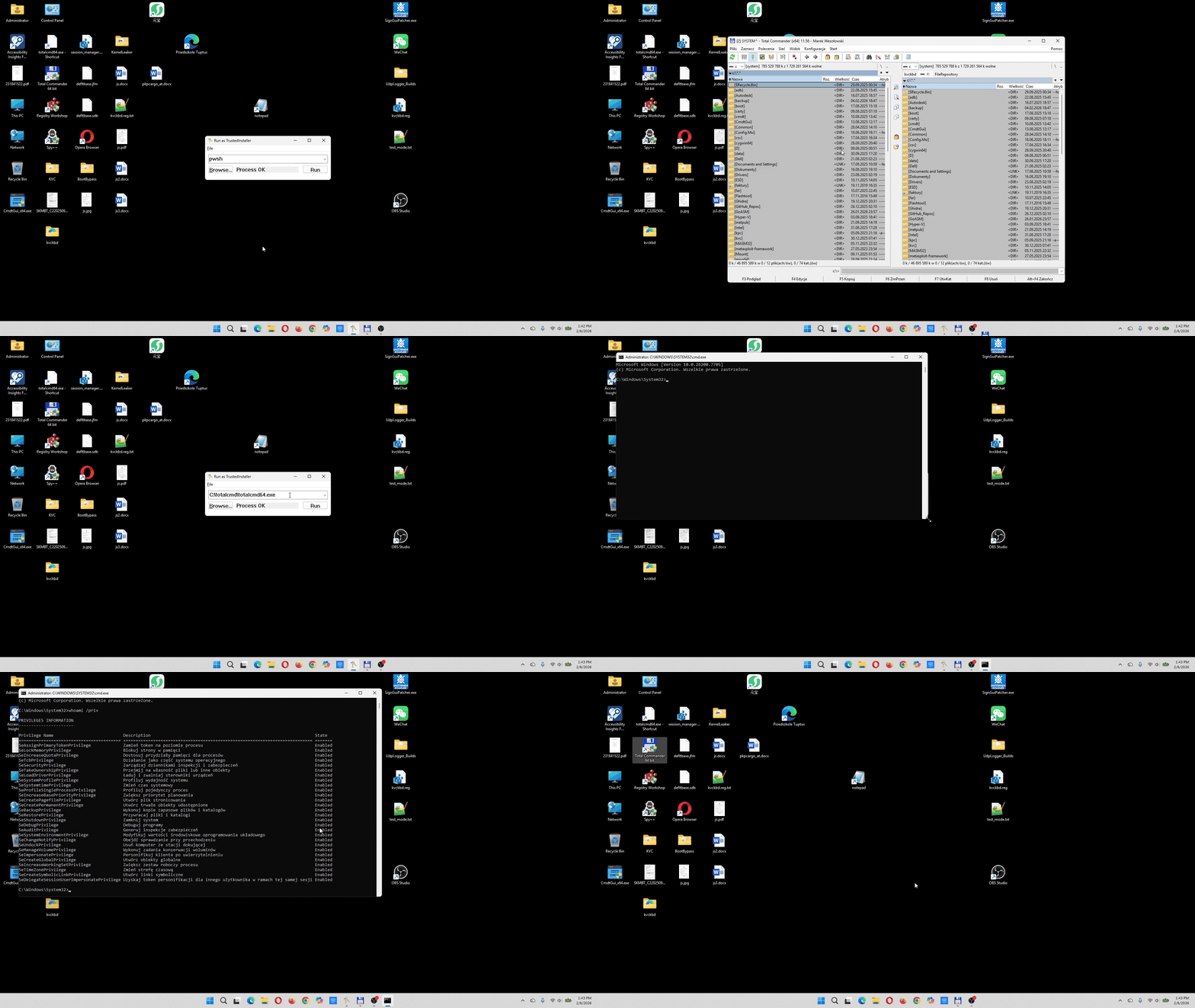
The entire tool compiles to under 40 KB (x64/ARM64) and under 30 KB (x86). No C runtime. No frameworks. No external dependencies beyond the Windows kernel and a handful of system DLLs that ship with every Windows installation since Vista.
Why CMDT?
Windows protects critical system files, registry keys, and services with TrustedInstaller ownership. Even a process running as NT AUTHORITY\SYSTEM cannot modify these resources without taking ownership first — a destructive, auditable, and often irreversible operation.
CMDT solves this by spawning processes that natively run as TrustedInstaller, with the full set of 34 security privileges already enabled. No ownership changes needed. No ACL modifications. The process simply is the owner.
Typical use cases
- Replacing or patching protected system binaries (WinSxS, System32)
- Modifying TrustedInstaller-owned registry keys without taking ownership
- Deleting stubborn files locked behind TrustedInstaller ACLs
- Scripted system maintenance where
SYSTEMcontext is insufficient - Debugging and forensics on protected OS components
- Repairing corrupted Windows installations at the deepest level
Architecture
CMDT is a dual-mode binary — a single executable that operates as both a graphical desktop application and a headless command-line tool, selected at runtime based on arguments. This is not two programs stitched together; the same PE binary, the same entry point, and the same token acquisition pipeline serve both modes. All three binaries link as /subsystem:console — cmd.exe waits synchronously on a console-subsystem process and prints its next prompt only after the child exits, so -cli output ordering is always correct. A no-argument GUI launch hides the process-private console immediately via GetConsoleProcessList + ShowWindow(SW_HIDE), with no second CreateProcessW.
All three architectures — x86 (IA-32), x64 (AMD64), and ARM64 (AArch64) — are built from separate, hand-written assembly source trees. No cross-compilation, no #ifdef macros, no shared C code. Each target is native assembly tuned to its calling convention and register set.
| Binary | Current size | Enforced limit | Architecture |
|---|---|---|---|
cmdt_x64.exe |
38.00 KiB (38,912 bytes) | <40 KiB | x64 / AMD64 |
cmdt_x86.exe |
29.50 KiB (30,208 bytes) | <30 KiB | x86 / IA-32 |
cmdt_arm64.exe |
35.50 KiB (36,352 bytes) | <40 KiB | ARM64 / AArch64 |
For comparison, equivalent tools written in C++ or C# typically weigh in at 50–500 KB, pulling in the CRT, .NET runtime, or static libraries. CMDT achieves full feature parity — GUI with MRU history, shortcut resolution, drag-and-drop, DPI awareness, CLI with I/O redirection, Explorer context menu integration, Sticky Keys IFEO hook, Defender exclusion management, UAC self-elevation — in well under 40 KB on x64/ARM64 and under 30 KB on x86. This is possible only because every byte is hand-placed assembly, every API call is direct, and there is zero abstraction overhead.
Features
- Dual-mode operation — GUI and CLI from a single binary, selected at runtime
- Shift+Minimize to tray — hold Shift while clicking Minimize to hide CMDT in the notification area; double-click the tray icon or right-click for Restore/Exit; UIPI bypass ensures the tray icon survives Explorer restarts while elevated
- UAC self-elevation — automatically prompts for admin rights via
ShellExecuteEx("runas")if not already elevated, forwarding all original command-line arguments to the elevated instance - Explorer context menu integration —
cmdt -installregisters right-click entries for directories, executables, and shortcuts;cmdt -uninstallremoves them - Sticky Keys IFEO hook —
cmdt -shiftinstalls an Image File Execution Options debugger redirect forsethc.exe, so pressing Shift 5 times at the login screen opens a TrustedInstaller command prompt instead of Sticky Keys;cmdt -unshiftreverts to default behavior - Windows Defender exclusions —
-shiftand-unshiftautomatically add or remove process exclusions for the CMDT binary andcmd.exevia WMI (MSFT_MpPreferenceCOM interface on x64/ARM64, PowerShell on x86), preventing false-positive interference - CLI help that works everywhere —
-h,-help,--help,-?,/?,/h,/helpall print the usage banner; the check runs before UAC self-elevation so output always reaches the original shell — both interactive (cmdt -help) and redirected (cmdt -help > out.txt) work correctly in elevated and non-elevated sessions - CLI output relay — running
cmdt -cli <command>correctly delivers stdout/stderr to the caller's redirect target (>> out.txt,| pipe, etc.) whether the caller is already elevated or not; a temp-file relay bridges the gap transparently in both cases - All 34 security privileges enabled in the spawned token
- Token caching — 30-second TTL avoids redundant privilege escalation on repeated runs
- Opt-in MRU history, off by default — no registry key exists until explicitly enabled via File → Enable History in the GUI; last 5 commands available in a dropdown once turned on;
cmdt -history-clearwipes it from the CLI - Windows shortcut (.lnk) resolution — via COM (
IShellLinkW+IPersistFile), both path and arguments - Drag-and-drop with UIPI bypass — accepts drops from non-elevated Explorer windows
- DPI-aware — PerMonitorV2 via application manifest, sharp rendering on mixed-DPI setups
- System-aware dark mode — reads
AppsUseLightThemefrom the registry; appliesDWMWA_USE_IMMERSIVE_DARK_MODEto the title bar,SetWindowTheme+WM_CTLCOLOR*handlers to ComboBox/buttons/status label/client background, and UxTheme ordinal 135 (value1— AllowDark) so native popup menus follow the system theme; updates live onWM_SETTINGCHANGE/WM_THEMECHANGED - Mica backdrop —
DWMWA_SYSTEMBACKDROP_TYPE = DWMSBT_MAINWINDOWon Windows 11, combined with explicit light/dark client painting so minimize/restore never exposes an uninitialized DWM surface - Modern visual styles — Common Controls v6 through SxS manifest dependency
- Resilient service startup — retry loop with up to 2-second backoff when TrustedInstaller service is cold
- I/O handle inheritance — CLI mode preserves stdin/stdout/stderr for piping and redirection
- Zero CRT dependency — all string operations (copy, concatenate, compare, length) are hand-written wide-character routines in
strutil.asm - Proper environment block —
CreateEnvironmentBlockgenerates the correct TrustedInstaller environment for the child process
Installation
No installation required. Copy the binary for your architecture anywhere on your system — cmdt_x64.exe on x86-64 Windows, cmdt_arm64.exe on ARM64 Windows, or cmdt_x86.exe on 32-bit systems. A natural location is C:\Windows\System32 — this is where Microsoft places its own system utilities, and it makes CMDT available from any command prompt without modifying PATH.
CMDT requires Administrator privileges. If launched without elevation, it automatically re-launches itself with a UAC prompt via ShellExecuteEx("runas"), forwarding all original arguments to the elevated instance. No manual "Run as Administrator" is needed.
To register Explorer context menu entries, run:
cmdt -installThis creates right-click menu items for directories, .exe files, and .lnk shortcuts.
Requirements
- Windows 10 / Windows 11 (or Windows Vista+ with reduced feature set)
- Administrator privileges (Run as Administrator)
- TrustedInstaller service present (ships with all desktop and server editions of Windows)
Usage
GUI Mode
Launch cmdt_x64.exe without arguments to open the graphical interface.
cmdt_x64.exeThe window provides:
- ComboBox with dropdown — type a command or, once history is enabled, select from the MRU list (last 5 commands); edit field starts empty on launch so you type fresh
- File menu — Open with TrustedInstaller (browse), Enable History (checkbox — off by default, see below), About, Exit
- Browse... button — opens a file picker filtered to executables (
.exe,.lnk) - Run button — launches the command as TrustedInstaller
- Status bar — displays "Ready", "Launching...", "Process OK", or "Failed"
- Drag-and-drop — drop any
.exeor.lnkfile onto the window; it resolves the target and runs it immediately - Keyboard —
Enterruns the current command,Escapecloses the window
The GUI dynamically relays out on resize. Controls stretch and reposition to fill the available client area.
CLI Mode
Prefix any command with -cli (or --cli or cli) to run headless, inheriting the parent console's standard handles.
cmdt_x64.exe -cli <command>
cmdt_x64.exe -cli -new <command>
cmdt_x64.exe -install
cmdt_x64.exe -uninstall
cmdt_x64.exe -shift
cmdt_x64.exe -unshift
cmdt_x64.exe -history-clear| Switch | Description |
|---|---|
-cli <command> |
Run command as TrustedInstaller, inheriting the current console |
-cli -new <command> |
Run command in a new, separate console window |
-install |
Register Explorer context menu entries under HKCR |
-uninstall |
Remove all CMDT context menu entries |
-shift |
Install Sticky Keys IFEO hook + Defender exclusions |
-unshift |
Remove Sticky Keys IFEO hook + Defender exclusions |
-history-clear |
Wipe the MRU command-history registry key, if present |
-h, -help, --help, -?, /?, /h, /help |
Display available options |
(no arguments) |
Launch GUI mode |
Basic examples
# Launch an interactive TrustedInstaller command prompt
cmdt_x64.exe -cli cmd

# Open Registry Editor as TrustedInstaller
cmdt_x64.exe -cli regedit.exe

# Run PowerShell as TrustedInstaller
cmdt_x64.exe -cli powershell

# Launch a specific executable with full path
cmdt_x64.exe -cli notepad
I/O redirection — why it matters for scripting
In CLI mode without the -new flag, CMDT inherits the parent process's stdin, stdout, and stderr handles. This means the spawned TrustedInstaller process writes to the same console and the same pipe as the caller. Standard shell redirection works exactly as expected:
cmdt_x64.exe -cli cmd /c whoami > output.txt
cmdt_x64.exe -cli net session >> out.txt
Every -cli invocation goes through the same temp-file relay, whether the caller is already elevated or not. Earlier builds only relayed the non-admin path and let an already-elevated shell call CreateProcessWithTokenW directly with STARTF_USESTDHANDLES — but CreateProcessWithTokenW does not reliably hand the spawned child usable inherited std handles, so an admin cmd.exe running cmdt -cli net session > out.txt silently produced an empty file (issue #1). The relay now runs unconditionally for -cli:
- The parent (admin or not) creates two unique temp files via
GetTempFileNameW— one for stdout, one for stderr — so redirecting only one stream (2>err.txtwithout touching stdout, or vice versa) behaves correctly instead of interleaving both. - It inserts internal
-outfile <path>and-errfile <path>tokens into the argument string and launches an elevated copy of itself viaShellExecuteExW("runas")— a no-op prompt if already elevated, a real UAC prompt otherwise. - The elevated child opens both temp files with inheritable
GENERIC_WRITEhandles and uses them ashStdOutput/hStdError;hStdInputis a handle to theNULdevice rather thanNULL, since some console-aware targets refuse to start with a null stdin handle. It waits on the child viaWaitForSingleObjectand captures its real exit code withGetExitCodeProcess. - After the elevated process exits, the parent streams stdout to its own
STD_OUTPUT_HANDLEand stderr toSTD_ERROR_HANDLEindependently (so>,>>,2>, and|all work transparently), deletes both temp files, and exits with the same exit code the spawned command produced —%ERRORLEVEL%/$LASTEXITCODEchecks in the caller's script see the real failure, not always zero.
The relay declines — falling back to direct dispatch — for -new (a detached console has no output to capture), for interactive shells (cmd, powershell, pwsh invoked with no further arguments, which need a real attachable console), for the internal -outfile relay child itself (guarding against relaying itself again on re-entry), and if temp-file creation fails.
One known limitation survives this fix: if the -cli command is itself cmd.exe with embedded I/O redirection (cmd /c foo > file, or a .lnk shortcut targeting that), cmd.exe refuses to run under the relay's CREATE_NO_WINDOW context with "Input redirection is not supported, exiting the process immediately." Plain commands and .lnk targets without their own embedded redirection are unaffected.
This makes CMDT suitable for unattended automation scripts, batch files, and CI/CD pipelines where capturing TrustedInstaller-level output is necessary:
@echo off
cmdt_x64.exe -cli cmd /c icacls "C:\Windows\servicing" > acl_report.txt
cmdt_x64.exe -cli cmd /c reg query "HKLM\SYSTEM\CurrentControlSet" /s > reg_dump.txt
cmdt_x64.exe -cli cmd /c dir "C:\Windows\WinSxS\*.manifest" /s > manifests.txt
cmdt_x64.exe -cli net session >> audit.txt
Without the relay, these commands would silently lose their output — orphaned console windows for a non-admin caller, or an empty file for an already-elevated one. With the relay applied unconditionally to -cli, both cases land the full output at the redirect target.
The -new flag — detached console
Add -new between the CLI switch and the command to spawn the process with CREATE_NEW_CONSOLE. The child gets its own independent console window:
# Open a new, standalone TrustedInstaller command prompt window
cmdt_x64.exe -cli -new cmd

# Open PowerShell in its own window as TrustedInstaller
cmdt_x64.exe -cli -new powershell
The difference is architectural:
| Aspect | -cli (default) |
-cli -new |
|---|---|---|
| Console | Inherits parent | Creates new window |
| stdout/stderr | Shared with caller | Independent |
| I/O redirection | Works (> file.txt) |
Not applicable |
| Use case | Scripting, automation | Interactive sessions |
| Creation flags | CREATE_UNICODE_ENVIRONMENT |
CREATE_NEW_CONSOLE \| CREATE_UNICODE_ENVIRONMENT |
| STARTUPINFO | STARTF_USESTDHANDLES |
STARTF_USESHOWWINDOW |
Help display
All of the following are recognized help switches and print the usage banner:
cmdt_x64.exe -help
cmdt_x64.exe -h
cmdt_x64.exe --help
cmdt_x64.exe -?
cmdt_x64.exe /?
cmdt_x64.exe /h
cmdt_x64.exe /help
The help check runs before UAC self-elevation. This matters because the elevated process is detached from the original shell's console and redirect targets. By printing usage from the non-elevated process, CMDT stays attached to the launching console — so both interactive display and cmdt -help > out.txt work correctly regardless of elevation state.
Output is routed via GetFileType on the stdout handle: WriteConsoleW for a real console (native UTF-16), WriteFile for a file or pipe (raw UTF-16 LE bytes). This ensures redirected output is never silently dropped. After writing to a real console, a fake VK_RETURN is posted to stdin via WriteConsoleInputW so cmd.exe redraws its prompt immediately.
Shortcut (.lnk) resolution
CMDT transparently resolves Windows shortcuts. If the target path ends with .lnk, the tool initializes COM, instantiates CLSID_ShellLink, loads the shortcut via IPersistFile::Load, and extracts both the target path (IShellLinkW::GetPath) and embedded arguments (IShellLinkW::GetArguments). The resolved target and its arguments are concatenated and passed to CreateProcessWithTokenW.
This works in both GUI and CLI modes, and correctly handles quoted paths with spaces:
# Resolve shortcut and run the target as TrustedInstaller
cmdt_x64.exe -cli "C:\Users\Public\Desktop\Some App.lnk"

# Also works with drag-and-drop in GUI mode
The .lnk extension check is case-insensitive, implemented via a hand-written wide-character comparator that folds ASCII uppercase to lowercase inline.
Context Menu Integration
Running cmdt -install registers four context menu entries under HKEY_CLASSES_ROOT:
| Registry Path | Menu Text | Behavior |
|---|---|---|
Directory\Background\shell\CMDT |
Open CMD as TrustedInstaller | Right-click on desktop or inside any folder |
Directory\shell\CMDT |
Open CMD as TrustedInstaller | Right-click on a folder icon |
exefile\shell\CMDT |
Run as TrustedInstaller | Right-click on any .exe file |
lnkfile\shell\CMDT |
Run as TrustedInstaller | Right-click on any .lnk shortcut |
How it works
- Directory entries execute:
"<exepath>" -cli -new cmd.exe /k cd /d "%V"— this opens a TrustedInstaller command prompt in the selected directory. - File entries execute:
"<exepath>" "%1"— CMDT receives the file path as an argument. For.exefiles, it runs the executable directly. For.lnkshortcuts, it resolves the target via the COMIShellLinkinterface before execution.
Each entry displays a UAC shield icon borrowed from shell32.dll (icon index 104 — the "keys" icon). The binary itself contains no embedded icon resource (no .ico file). This is the same approach Microsoft uses for its own system utilities that reside in System32. Since CMDT is designed to live in System32 by default, it does not need a standalone icon — Explorer resolves the shell32.dll,104 reference at display time.
Removal
cmdt -uninstallThis deletes all eight registry keys (four parent keys + four command subkeys) in leaf-first order, as the Windows registry does not allow deletion of keys that still contain subkeys.
Sticky Keys IFEO Hook
Running cmdt -shift installs a login-screen backdoor that replaces the Sticky Keys accessibility helper (sethc.exe) with a TrustedInstaller command prompt. Running cmdt -unshift reverses the process completely.
How it works
Windows supports Image File Execution Options (IFEO) — a documented registry mechanism under HKLM\SOFTWARE\Microsoft\Windows NT\CurrentVersion\Image File Execution Options\ that allows attaching a debugger to any executable. When an IFEO Debugger value exists for a given binary, Windows launches the debugger instead of the original program, passing the original path as an argument.
cmdt -shift creates the following registry entry:
| Key | Value | Data |
|---|---|---|
HKLM\...\Image File Execution Options\sethc.exe |
Debugger |
<exepath> -cli -new cmd.exe |
When the user presses Shift five times at the Windows login screen, the OS launches sethc.exe — but the IFEO redirect intercepts this and runs CMDT instead. CMDT then performs its full token acquisition pipeline (SYSTEM impersonation → TrustedInstaller service start → token duplication → privilege enablement) and opens an interactive cmd.exe window running as NT SERVICE\TrustedInstaller.
This provides a pre-login recovery console with the highest privilege level available in Windows — useful for:
- Emergency system repair when the machine cannot be logged into
- Resetting locked-out local accounts via
net user - Fixing corrupted registry hives or group policies that prevent login
- Recovering from ransomware or malware that blocks the desktop
Windows Defender exclusions
Both -shift and -unshift manage Windows Defender process exclusions automatically. This prevents Defender from flagging CMDT or the spawned cmd.exe as suspicious during the IFEO-redirected launch at the login screen, where no user session exists to dismiss alerts.
| Switch | Action |
|---|---|
-shift |
Adds <filename> and cmd.exe as process exclusions |
-unshift |
Removes <filename> and cmd.exe process exclusions |
On x64 and ARM64, exclusions are managed by calling the MSFT_MpPreference WMI class methods (Add / Remove) directly through the COM interface — no PowerShell or child process is spawned. CMDT connects to the ROOT\Microsoft\Windows\Defender WMI namespace, instantiates IWbemServices, and invokes ExecMethod with a SAFEARRAY of BSTR values for the ExclusionProcess property. This approach is faster, produces no visible console window, and has no dependency on the PowerShell execution policy. On x86, the lighter PowerShell-driven Add-MpPreference path is used instead — the WMI hop is a 30+ KB COM marshalling cost that the x86 build trades away for a tighter binary.
Removal
cmdt -unshiftThis deletes the Debugger value from the IFEO registry key (leaving the key itself intact, as it may contain other unrelated values) and removes both Defender process exclusions. Normal Sticky Keys behavior is fully restored.
How It Works — Token Inheritance Chain
CMDT performs a multi-stage privilege escalation to obtain a fully privileged TrustedInstaller token. Each stage builds on the previous one, forming an inheritance chain:
Stage 0: UAC Self-Elevation
Before any token work begins, CMDT checks IsUserAnAdmin(). If the process is not running elevated, it re-launches itself via ShellExecuteExW with the "runas" verb, forwarding the original command-line arguments to the new instance. The non-elevated process then exits immediately. This makes CMDT self-elevating — the user never needs to manually "Run as Administrator".
Stage 1: Self-Elevation
The process enables two critical privileges in its own token using AdjustTokenPrivileges:
- SeDebugPrivilege — required to open process handles across security boundaries
- SeImpersonatePrivilege — required to impersonate another user's token
These are available because the process runs as Administrator (elevated).
Stage 2: SYSTEM Impersonation
CMDT locates winlogon.exe by enumerating the process list via CreateToolhelp32Snapshot + Process32FirstW/NextW, using a case-insensitive wide-character comparison (wcscmp_ci) against each entry's szExeFile field. The winlogon.exe process runs as NT AUTHORITY\SYSTEM.
The tool opens winlogon.exe with PROCESS_QUERY_INFORMATION | PROCESS_DUP_HANDLE, extracts its process token with OpenProcessToken, and duplicates it with DuplicateTokenEx at MAXIMUM_ALLOWED access and SecurityImpersonation level. It then calls ImpersonateLoggedOnUser to assume SYSTEM identity on the current thread.
After this stage, the calling thread runs as SYSTEM — necessary to interact with the Service Control Manager and the TrustedInstaller service process.
Stage 3: TrustedInstaller Service Activation
CMDT opens the Service Control Manager and queries the TrustedInstaller service (OpenServiceW with SERVICE_QUERY_STATUS | SERVICE_START).
If the service is stopped, it calls StartServiceW and enters a retry loop: up to 10 iterations with 200 ms sleep intervals (~2 seconds total). Each iteration re-queries the service status via QueryServiceStatusEx. This resilient approach handles slow or heavily loaded machines where a single 200 ms wait would be insufficient.
Once SERVICE_RUNNING is confirmed, the service's Process ID is extracted from the SERVICE_STATUS_PROCESS structure (offset dwProcessId).
Stage 4: Token Duplication
CMDT opens the TrustedInstaller process with PROCESS_QUERY_INFORMATION, extracts its token, and duplicates it via DuplicateTokenEx with MAXIMUM_ALLOWED access. This duplicated token becomes the foundation for the child process.
Stage 5: Full Privilege Enablement
The duplicated token has all 34 Windows security privileges enabled via a loop that calls LookupPrivilegeValueW + AdjustTokenPrivileges for each privilege in the table.
Stage 6: Process Creation
The fully privileged token is passed to CreateProcessWithTokenW. CMDT generates a proper environment block via CreateEnvironmentBlock (keyed to the TrustedInstaller token) and sets the working directory to GetSystemDirectoryW. The spawned process runs natively as TrustedInstaller with all 34 privileges enabled.
Token Caching
The duplicated, fully privileged token is cached in memory with a 30-second TTL (tracked via GetTickCount). Subsequent invocations within the TTL window skip stages 2–5 entirely and reuse the cached token. This dramatically reduces overhead when running multiple commands in sequence — the expensive service startup, process enumeration, and privilege loop execute only once.
Privilege Composition
CMDT enables all 34 Windows security privileges in the spawned token. This is the complete set that exists in the TrustedInstaller token:
| # | Privilege | Description |
|---|---|---|
| 0 | SeAssignPrimaryTokenPrivilege | Replace process-level token |
| 1 | SeBackupPrivilege | Bypass ACLs for read access (backup) |
| 2 | SeRestorePrivilege | Bypass ACLs for write access (restore) |
| 3 | SeDebugPrivilege | Debug any process |
| 4 | SeImpersonatePrivilege | Impersonate a client after authentication |
| 5 | SeTakeOwnershipPrivilege | Take ownership of any securable object |
| 6 | SeLoadDriverPrivilege | Load and unload device drivers |
| 7 | SeSystemEnvironmentPrivilege | Modify firmware environment variables |
| 8 | SeManageVolumePrivilege | Perform volume maintenance tasks |
| 9 | SeSecurityPrivilege | Manage auditing and security log |
| 10 | SeShutdownPrivilege | Shut down the system |
| 11 | SeSystemtimePrivilege | Change the system time |
| 12 | SeTcbPrivilege | Act as part of the operating system |
| 13 | SeIncreaseQuotaPrivilege | Adjust memory quotas for a process |
| 14 | SeAuditPrivilege | Generate security audits |
| 15 | SeChangeNotifyPrivilege | Bypass traverse checking |
| 16 | SeUndockPrivilege | Remove computer from docking station |
| 17 | SeCreateTokenPrivilege | Create a token object |
| 18 | SeLockMemoryPrivilege | Lock pages in memory |
| 19 | SeCreatePagefilePrivilege | Create a pagefile |
| 20 | SeCreatePermanentPrivilege | Create permanent shared objects |
| 21 | SeSystemProfilePrivilege | Profile system performance |
| 22 | SeProfileSingleProcessPrivilege | Profile a single process |
| 23 | SeCreateGlobalPrivilege | Create global objects |
| 24 | SeTimeZonePrivilege | Change the time zone |
| 25 | SeCreateSymbolicLinkPrivilege | Create symbolic links |
| 26 | SeIncreaseBasePriorityPrivilege | Increase scheduling priority |
| 27 | SeRemoteShutdownPrivilege | Force shutdown from a remote system |
| 28 | SeIncreaseWorkingSetPrivilege | Increase a process working set |
| 29 | SeRelabelPrivilege | Modify an object label |
| 30 | SeDelegateSessionUserImpersonatePrivilege | Obtain impersonation token for another user in same session |
| 31 | SeTrustedCredManAccessPrivilege | Access Credential Manager as a trusted caller |
| 32 | SeEnableDelegationPrivilege | Enable computer and user accounts to be trusted for delegation |
| 33 | SeSyncAgentPrivilege | Synchronize directory service data |
Binary-level string decomposition
The privilege names are not stored as complete strings in the binary. Instead, CMDT uses a prefix-suffix decomposition technique that splits every privilege name into three parts:
| Part | Value | Storage |
|---|---|---|
| Prefix | Se |
Single shared constant |
| Middle | e.g. Debug, Backup, TakeOwnership |
Per-privilege unique string |
| Suffix | Privilege |
Single shared constant |
At runtime, the BuildPrivilegeName procedure concatenates these three parts into a temporary buffer before passing the result to LookupPrivilegeValueW. The full name SeDebugPrivilege is assembled in memory but never appears as a contiguous string in the binary image.
This decomposition has two engineering consequences:
-
Size reduction — The prefix (
Se, 4 bytes UTF-16) and suffix (Privilege, 18 bytes UTF-16) are stored once instead of 34 times, saving approximately 750 bytes. In a sub-30 KB binary, that is roughly 2.5% of the total size. -
Static analysis opacity — Automated scanners and signature-based tools that grep for known privilege strings like
SeDebugPrivilegeorSeTcbPrivilegewill find no matches in the binary. The stringsSeandPrivilegeappear separately, and the middle parts (Debug,Tcb,Backup, etc.) are generic English words that carry no security significance on their own. This is not obfuscation — it is a natural consequence of factoring out common substrings in a size-constrained binary. But the side effect is significant: the binary's static footprint does not betray the scope of privileges it enables.
Manifest and DPI Awareness
CMDT embeds a Win32 application manifest that declares three important capabilities:
PerMonitorV2 DPI Awareness
The manifest declares both the legacy dpiAware=true attribute (for Vista–8.1 compatibility) and the modern dpiAwareness=PerMonitorV2 attribute (Windows 10 1703+). On modern systems, this means:
- The window renders at native resolution on every monitor — no bitmap scaling or blurriness
- When dragged between monitors with different DPI settings, the window rescales correctly
- Text, buttons, and controls render sharp on 4K, ultrawide, and mixed-DPI configurations
This is the same DPI awareness model used by modern Windows applications like Explorer, Edge, and Terminal.
Common Controls v6 (Visual Styles)
The manifest declares a Side-by-Side (SxS) dependency on Microsoft.Windows.Common-Controls version 6.0. This activates the modern visual theme for all standard controls — the ComboBox dropdown, buttons, and static labels render with the current Windows theme (Fluent, Aero, or Classic) rather than the legacy Win95 appearance.
Dark Mode and Mica Backdrop
CMDT reads the system app theme preference from the registry at startup and whenever the user changes the Windows color scheme:
HKCU\Software\Microsoft\Windows\CurrentVersion\Themes\Personalize
  AppsUseLightTheme (DWORD) — 0 = dark, 1 = light
Depending on the value, it calls DwmSetWindowAttribute with two attributes:
| Attribute | Value | Effect |
|---|---|---|
DWMWA_USE_IMMERSIVE_DARK_MODE (20) |
0 or 1 | Dark or light title bar and window frame |
DWMWA_USE_IMMERSIVE_DARK_MODE_OLD (19) |
same | Fallback for Windows 10 builds before 20H1 |
DWMWA_SYSTEMBACKDROP_TYPE (38) |
DWMSBT_MAINWINDOW (2) |
Mica material backdrop |
The Mica backdrop (DWMSBT_MAINWINDOW) applies on Windows 11 regardless of light/dark mode — the material automatically adapts its tint to the system accent color and theme. The window class is registered with no background brush (hbrBackground = NULL), leaving the client area transparent to the Mica layer.
CMDT also listens for WM_SETTINGCHANGE and WM_THEMECHANGED and re-applies both attributes on every theme change. Switching between light and dark mode in Windows Settings updates the CMDT title bar immediately without restarting the application.
The manifest specifies requestedExecutionLevel=asInvoker. CMDT does not rely on the manifest for elevation — instead, it programmatically checks IsUserAnAdmin() at startup and re-launches itself via ShellExecuteExW("runas") if not elevated. This approach allows the same binary to be invoked silently from already-elevated contexts (scripts, scheduled tasks, elevated terminals) without triggering a redundant UAC prompt, while still self-elevating when launched from a standard user session.
MRU (Most Recently Used) History
History is opt-in and off by default (issue #2) — some users don't want any trace of run commands left on disk, and CMDT now respects that out of the box. There is no separate "enabled" flag stored anywhere: the existence of HKEY_CURRENT_USER\Software\cmdt is the on/off state.
- File → Enable History (GUI menu checkbox) reflects whether the key exists at startup.
- Checking it flips the in-memory flag only — the key is created lazily by the next executed command, same mechanism as before.
- Unchecking it flips the flag and calls
RegDeleteTreeWimmediately, wiping the key and every stored value on the spot. cmdt -history-cleardoes the same wipe from the CLI, for anyone who never opens the GUI.- While disabled,
LoadMRUis never called andSaveMRUexits immediately — zero registry reads or writes, not even a failedRegOpenKeyExWprobe.
When enabled, values are stored as named entries 0 through 4 under HKEY_CURRENT_USER\Software\cmdt, where 0 is the most recent command. On startup, LoadMRU reads these values and populates the ComboBox dropdown. After each successful execution, SaveMRU shifts existing entries down (0→1, 1→2, ..., 3→4), deletes the oldest entry, and writes the new command at position 0. Duplicate detection is implicit — the shift operation naturally pushes older duplicates off the end of the list.
Both LoadMRU and SaveMRU deselect the dropdown with CB_SETCURSEL, -1 and clear the edit field with SetWindowTextW(g_hwndEdit, ""), so the GUI never pre-fills the last command — the user has to either pick from the dropdown explicitly or type fresh. This avoids the trap of accidentally re-running a destructive previous command.
The MRU list, when enabled, persists across sessions, reboots, and updates. It remains the only state CMDT writes to disk (via the registry), and now only when the user has explicitly asked for it.
Drag-and-Drop with UIPI Bypass
CMDT accepts drag-and-drop of .exe and .lnk files. Dropping a file onto the window sets the command text and immediately executes it.
Because CMDT runs elevated (as Administrator), the default Windows behavior is to block drag-and-drop messages from non-elevated processes like Explorer. This is enforced by User Interface Privilege Isolation (UIPI) — a security boundary that prevents lower-integrity processes from sending messages to higher-integrity windows.
CMDT explicitly bypasses this restriction by calling ChangeWindowMessageFilterEx for both WM_DROPFILES and WM_COPYGLOBALDATA on the main window handle. This whitelists these specific messages, allowing drops from standard Explorer windows while maintaining the UIPI boundary for all other message types.
Building from Source
Prerequisites
- Microsoft Macro Assembler —
ml.exe(x86) andml64.exe(x64) from Visual Studio Build Tools;armasm64.exe(ARM64) from the ARM64 C++ build tools component - Windows SDK — for
rc.exe(resource compiler), import libraries, and headers - PowerShell — for the build script
Build
.\build.ps1The build script auto-detects the newest installed Visual Studio C++ toolchain and Windows SDK, assembles all source modules for all three architectures as /subsystem:console, compiles the resource file (cmdt.rc) with the manifest, and links against system import libraries only:
kernel32.lib, user32.lib, advapi32.lib, shell32.lib, comdlg32.lib, ole32.lib, gdi32.lib, shlwapi.lib, userenv.lib, dwmapi.lib, uxtheme.lib, OleAut32.lib
No CRT library is linked. The entry point is mainCRTStartup (x64 / ARM64) / start (x86) — these are raw assembly procedures, not CRT initialization stubs.
Output binaries are placed in the bin\ directory.
Project Structure
cmdt/
├── x64/                          # AMD64 assembly sources
│   ├── main.asm                  # Entry point, CLI/GUI dispatch, privilege table, console-hide-on-GUI-launch
│   ├── cli.asm                   # CLI mode and file-run dispatch, -outfile/-errfile relay protocol
│   ├── help.asm                  # Usage banner and help-switch recognition
│   ├── relay.asm                 # Non-admin AND admin output relay (temp-file bridge, exit-code passthrough)
│   ├── token.asm                 # Token acquisition, SYSTEM impersonation, service control
│   ├── process.asm               # CreateProcessWithTokenW wrapper
│   ├── install.asm               # Context menu registration and Sticky Keys IFEO hook
│   ├── window.asm                # GUI entry: WNDCLASSW registration, includes the six window_*.inc below
│   ├── tray.asm                  # Shift+Minimize tray icon, restore/exit menu, Explorer-restart recovery
│   ├── window_lifecycle.inc      # InitDpiApis, window/control creation, DPI scaling math
│   ├── window_theme.inc          # Dark mode: DWM chrome, controls, native UxTheme menu preference
│   ├── window_commands.inc       # RunCommand — reads the ComboBox, dispatches to RunAsTrustedInstaller
│   ├── window_dispatch.inc       # WndProc message dispatch table + WM_CREATE/WM_COMMAND handlers
│   ├── window_events.inc         # WndProc continued: WM_SIZE, input, teardown
│   ├── window_mru.inc            # LoadMRU/SaveMRU — registry-backed Most Recently Used list
│   ├── strutil.asm               # Wide-character string helpers (wcscpy_p, wcscat_p, …)
│   ├── consts.inc                # Windows API constants, control IDs, message codes
│   └── globals.inc               # External symbol declarations shared across modules
├── x86/                          # IA-32 assembly sources (parallel structure)
│   └── …
├── arm64/                        # AArch64 assembly sources (parallel structure)
│   └── …
├── bin/                          # Compiled binaries (gitignored, rebuilt by build.ps1)
├── data/                         # Tracked release copies used for packaging
│   ├── cmdt_x64.exe              # 64-bit binary (38.00 KiB, limit <40 KiB)
│   ├── cmdt_x86.exe              # 32-bit binary (29.50 KiB, limit <30 KiB)
│   └── cmdt_arm64.exe            # ARM64 binary (35.50 KiB, limit <40 KiB)
├── cmdt.rc                       # Version info resource
├── cmdt.manifest                 # Application manifest (DPI, visual styles, execution level)
├── build.ps1                     # Build script (auto-detects VS/SDK, assembles + links all three architectures)
└── README.md                     # Documentation
Every source file in x64/ has a corresponding counterpart in x86/ and arm64/. The x86 versions use .586 + flat/stdcall MASM syntax with invoke macros; the x64 versions use raw proc frame with explicit SEH prologue/epilogue annotations; the ARM64 versions use A64 instruction syntax with PROC/ENDP and AArch64 calling-convention register assignments, assembled by armasm64.exe. All three targets share the same .rc and .manifest files.
The x64 and x86 source trees were originally monolithic — a single ~90 KB main.asm on each side. They were split into focused modules of roughly 200–700 lines each, while keeping the compiled binary size unchanged. The ARM64 tree was written modularly from the start. The module layout is identical across all three architectures, so any reader who learns one tree can navigate the others without re-orientation.
String Operations — No CRT
CMDT implements all necessary string operations as hand-written wide-character (UTF-16LE) assembly routines in strutil.asm. There is no dependency on msvcrt.dll, ucrtbase.dll, or any C runtime:
| Function | Purpose |
|---|---|
wcscpy_p |
Wide string copy |
wcscat_p |
Wide string concatenation |
wcscmp_ci |
Case-insensitive wide string comparison |
wcscmp_token |
Token-prefix comparison (match up to first space) |
wcslen_p |
Wide string length |
skip_spaces |
Skip leading whitespace in command parsing |
DecryptWideStr |
In-place string decryption for obfuscated constants (x64 only) |
All routines are declared PUBLIC in strutil.asm and referenced via EXTRN (x64) or PROTO (x86) in the modules that use them. Each is a tight loop operating on 16-bit words, with inline ASCII case folding for the comparison functions (uppercase A–Z folded to lowercase by adding 32 to the code point).
Verification
After launching a command prompt as TrustedInstaller:
cmdt_x64.exe -cli cmdVerify the security context:
C:\Windows\System32> whoami
nt authority\system

C:\Windows\System32> whoami /groups | findstr /i trustedinstaller
C:\Windows\System32> whoami /priv
The groups output should contain the TrustedInstaller service SID. whoami /priv shows the privileges actually present and enabled on that machine — not every entry from CMDT's request table is guaranteed present in every Windows version.
Security Considerations
TrustedInstaller is the highest privilege level in Windows — higher than Administrator, higher than SYSTEM. A process running as TrustedInstaller can:
- Modify or delete any file on the system, including protected OS components
- Write to any registry key, including those owned by TrustedInstaller
- Load and unload kernel drivers
- Access and modify the firmware environment (UEFI variables)
- Debug any process, including critical system processes
- Create token objects and impersonate any security principal
Use CMDT with the same caution you would apply to a kernel debugger. Mistakes at this privilege level can render the operating system unbootable.
CMDT requires Administrator privileges to run. It does not bypass UAC — the user must explicitly elevate the process before CMDT can acquire the TrustedInstaller token.
License
MIT License
Copyright (c) 2026 Marek Wesolowski
Author
Marek Wesolowski
- Web: https://kvc.pl
- E-mail: marek@kvc.pl
Size Trivia
During early development, the minimal proof-of-concept builds were significantly smaller:
| Variant | Size | Notes |
|---|---|---|
| CLI-only (no GUI, no registry, no manifest) | 4 KB | Bare token acquisition + CreateProcessWithTokenW |
| Hybrid GUI/CLI (no registry, no manifest) | 6 KB | Added window creation, MRU, drag-and-drop |
| Current full build (x86) | <30 KB | Hybrid mode, context menu, UAC self-elevation, manifest, COM .lnk resolution, system-aware dark mode |
| Current full build (x64) | <40 KB | Same feature set, 64-bit calling convention overhead, DPI-aware layout |
| Current full build (ARM64) | <40 KB | Same feature set, A64 instruction encoding, AArch64 calling convention |
The growth from 4–6 KB to the current size (under 30 KB on x86, under 40 KB on x64 and ARM64) is almost entirely due to the application manifest (DPI awareness, Common Controls v6, execution level declaration), the context menu registry logic, the Sticky Keys IFEO hook with Defender exclusion management, UAC self-elevation, the wide-character string constants for registry paths and UI text, and the dark-mode implementation (cached brushes, control theming, dynamically resolved uxtheme.dll ordinals). The core token acquisition pipeline — the actual "engine" of CMDT — remains remarkably compact.
Written in 100% bare-metal x86/x64/ARM64 assembly. No frameworks. No runtimes. No compromises.
Add a comment