Author: Marek Wesołowski (WESMAR)
Date: 29 June 2026
Target: Windows 11 Pro 26H1, build 28000 — Hyper-V Gen 2 guest + bare metal XPS-7590
Subject: UEFI EFI application achieving NT AUTHORITY\SYSTEM via in-RAM registry patching at ExitBootServices time
PL: EfiTool to aplikacja UEFI, która modyfikuje hive rejestru SYSTEM Windows bezpośrednio w pamięci RAM w momencie wywołania ExitBootServices — zanim jądro NT w ogóle przejmie kontrolę. W wersji demo binarnej ustawia
HKLM\SYSTEM\Setup\SetupType=1iCmdLine=cmd, co powoduje uruchomieniecmd.exez tokenem NT AUTHORITY\SYSTEM przy następnym starcie systemu. Bez zapisu na dysk. Bez sterownika jądra. 0 wykryć spośród 68 silników antywirusowych na VirusTotal. Artykuł dokumentuje cały proces inżynieryjny, techniki antyanalizy zastosowane w binarce oraz implikacje dla BitLockera i producentów oprogramowania ochronnego.EN: EfiTool is a UEFI EFI application that modifies the Windows SYSTEM registry hive in RAM at ExitBootServices time, before the NT kernel takes over. The demo binary sets
HKLM\SYSTEM\Setup\SetupType=1andCmdLine=cmd, causingcmd.exeto launch under NT AUTHORITY\SYSTEM on the next boot. No disk writes. No kernel driver. 0 detections out of 68 antivirus engines on VirusTotal. This article documents the full engineering process, the anti-analysis techniques applied in the binary, and the implications for BitLocker and security software vendors.
A Note on Source Code: Due to the potential for misuse by actors of uncertain reputation or criminal intent, I have decided not to release the full source code. The signed binary itself stands as sufficient empirical proof of the techniques documented here. A video demonstration is embedded below.
This decision was reinforced by a concrete precedent. My earlier open-source project WinDefCtl — a kernel-driver tool for disabling Microsoft Defender protections, published with an explicit disclaimer prohibiting malicious use — was repurposed by a criminal threat actor without authorisation. In June 2026, researchers at LevelBlue SpiderLabs documented its use as a component in the CrySome RAT infection chain: the actors deployed WinDefCtl (masqueraded as
svchost.exe) to disable endpoint protections before dropping the primary RAT payload. The disclaimer was ignored. The tool was used exactly as a responsible disclosure researcher would fear.I publish this research because the security community — and, critically, the vendors who consult with me — need to understand these attack paths in order to defend against them. I do not publish source code that lowers the barrier for actors who will not read the disclaimer. The binary alone is sufficient proof; the technique is fully documented here for those with legitimate need.
Abstract
This document records the design, debugging, and security implications of EfiTool — a UEFI EFI application that patches the Windows SYSTEM registry hive in RAM during the boot sequence, at the point when winload.efi calls ExitBootServices. By patching HKLM\SYSTEM\Setup\SetupType to 1 and setting HKLM\SYSTEM\Setup\CmdLine to an arbitrary executable, EfiTool causes the Windows Setup infrastructure to invoke that executable as NT AUTHORITY\SYSTEM on the next boot — before any user logon, before any EDR, before any antivirus. The patched binary carries no exploited vulnerability, no kernel driver, and no shellcode. It modifies a Microsoft-defined registry path using the Microsoft-provided registry hive format, then steps aside and lets Windows boot normally. cmd.exe, the payload used in the demo, is a Microsoft-signed binary.
At the time of submission, the signed demo binary scores 0/68 detections on VirusTotal (SHA-256: 546b229749a8219dabf9c199abe15b17d4a9dd777216eb14559a2a77b2c67bdb). I consider this a significant finding in its own right and discuss it — along with what antivirus vendors should do about it — in Section 14.
The seven results this document establishes:
-
The hook mechanism. Direct replacement of
gBS->ExitBootServiceswith CRC32 recalculation, notEVT_SIGNAL_EXIT_BOOT_SERVICES(which cannot call Boot Services per UEFI spec §6.1 and causes a hang). -
The safe memory type. On Hyper-V Gen 2, winload allocates all memory including the SYSTEM hive under
EfiLoaderCode (type 1).EfiLoaderData (type 2)has zero entries.EfiBootServicesData (type 4)causes page faults on read. -
The XOR checksum staleness. The
regfheader checksum at0x1FCis stale in RAM — winload increments the primary sequence number before calling EBS without recalculating. Validating it rejects every hive. -
The VK and string cell patch. Patching a REG_DWORD by backward-scan from the name field is sufficient. Patching a REG_SZ requires locating or allocating a data cell within the hive free space. When
CmdLinedoes not exist, EfiTool creates it dynamically by allocating a new VK cell and updating theHKLM\SYSTEM\SetupNK value list. -
The SYSTEM shell.
SetupType=1+CmdLine=<path>instructs Windows Setup infrastructure to run<path>asNT AUTHORITY\SYSTEMbefore the logon screen. This is a documented Windows mechanism, repurposed here to run arbitrary code. -
The anti-analysis layer. All sensitive strings are XOR-obfuscated to bypass static signature and heuristic scans (like YARA). While the runtime verification checks a colocated PE file (
bootmgfw.efi), the keys themselves correspond to standard PE headers and can be statically recovered from the binary by a human analyst. -
The BitLocker boundary. EfiTool operates after
winload.efihas decrypted the SYSTEM hive. While theSelfEnrolldemo modifies the Secure Boot state and triggers a BitLocker recovery prompt due to PCR changes, professional variants employing firmware hijacking/BYOVF techniques avoid variable writes and bypass the TPM sealing boundary entirely.
Video Demonstration
1. Motivation
The immediate goal was specific but the implications are general. I needed to change a single DWORD — HKLM\SYSTEM\Setup\SetupSupported — at boot time without touching the disk, without loading an NTFS driver, and without any kernel-mode component running under Windows. The constraint forced me into the UEFI pre-boot environment.
The observation that makes a UEFI approach viable: at some point during the Windows boot, winload.efi reads the SYSTEM hive off disk and decrypts it (if BitLocker is active) into a flat RAM buffer. It keeps that buffer alive and passes it to the NT kernel via LOADER_PARAMETER_BLOCK->RegistryBase. If I can modify the buffer between "winload has finished decrypting" and "NT kernel has mapped the hive as a read-only object", I can change any value without touching the disk image.
The natural trigger is ExitBootServices — the UEFI call that hands control from firmware to the OS loader. By that point, winload has loaded and decrypted everything it needs. This is the window.
Once I confirmed that the window exists and the modification holds through kernel boot, the scope expanded. SetupSupported was the test case. The real capability is arbitrary registry patching. The demo uses it to achieve NT AUTHORITY\SYSTEM — not because that is particularly novel, but because it is a concrete, unambiguous demonstration of arbitrary code execution obtained entirely through in-memory registry manipulation, before the OS starts, with zero disk writes.
2. Test Environment
| Item | Value |
|---|---|
| Primary test | Hyper-V Gen 2 VM, 4 GB RAM, Secure Boot off, Windows 11 Pro 26H1 build 28000 |
| Secondary test | Dell XPS-7590 bare metal, Secure Boot on (custom enrolled CA), Windows 11 Pro 26H1 build 28000 |
| Toolchain | Visual Studio 18 Enterprise, MSVC v145 (14.51.36231) |
| EDK2 libs | Pre-compiled, 14.50.35717 — LTCG disabled to avoid LNK4247 |
| EFI path | \EFI\Boot\EfiTool.efi |
| Config | \EFI\Boot\EfiTool.ini (same directory) |
| Log path | \EFI\Boot\EfiTool.log — written during EFI phase |
| Target values | HKLM\SYSTEM\Setup\SetupType REG_DWORD → 1; HKLM\SYSTEM\Setup\CmdLine REG_SZ → cmd |
On Hyper-V the development loop was: stop VM → mount VHD → deploy binary → unmount → start VM → wait for heartbeat → stop VM → mount → read log. I automated this with a PowerShell deploy script. BCD timeout was set to zero to eliminate the 30-second Windows Boot Manager delay.
3. What the Demo Binary Does
The demo binary performs five operations in sequence, each of which will be described in detail in subsequent sections:
Step 1 — SelfEnroll. On first run, EfiTool checks whether its embedded root CA certificate is present in the UEFI Secure Boot db variable. If not, it enrolls it (using the empty-PKCS#7 method valid in Setup Mode / Dell Audit Mode) and reboots. On all subsequent boots, this check passes immediately and the program continues.
Step 2 — Key derivation. The binary reads specific bytes from a PE file guaranteed to exist on any Windows UEFI boot partition and derives the XOR decryption key pair from them. The key is used to decrypt all obfuscated strings embedded in the binary. The key source file is not identified here.
Step 3 — INI parsing. EfiTool reads EfiTool.ini from the same directory. The file contains Patch=1 (enable patching) and optionally CmdLine=<command> (default: cmd). The config keys themselves are stored obfuscated in the binary and decrypted at runtime.
Step 4 — EBS hook installation. EfiTool replaces gBS->ExitBootServices with its own handler, recalculates the Boot Services table CRC32, and chain-loads \EFI\Microsoft\Boot\bootmgfw.efi. Windows boots normally.
Step 5 — Registry patch at EBS time. When winload.efi calls ExitBootServices, EfiTool's hook fires. It calls GetMemoryMap, scans EfiLoaderCode regions for the regf signature, and in the SYSTEM hive:
- Sets
HKLM\SYSTEM\Setup\SetupTypeto1(REG_DWORD) - Sets
HKLM\SYSTEM\Setup\CmdLinetocmd(REG_SZ, creating the value if it does not exist)
When Windows subsequently boots, the Setup infrastructure reads SetupType=1 and executes the command in CmdLine as NT AUTHORITY\SYSTEM — before the logon screen is displayed. The result, visible in the video, is a cmd.exe window with NT AUTHORITY\SYSTEM as the token.
Setting Patch=0 in EfiTool.ini reverses the patch: SetupType is written back to 0 and CmdLine is cleared to an empty string. This is a clean off-switch that requires no disk access beyond the INI file.
4. The Approach — and How BlackLotus Does It Differently
Before describing the design in detail, it is worth situating EfiTool relative to publicly known UEFI bootkits. BlackLotus (documented in 2023) does something structurally similar: it hooks OslArchTransferToKernel — the final jump from the OS loader into the NT kernel entry point — and traverses LOADER_PARAMETER_BLOCK to locate RegistryBase, the exact pointer to the mapped SYSTEM hive.
The BlackLotus approach is surgical: the hook fires at the last moment before kernel entry, at which point RegistryBase is a fully resolved pointer. The cost is coupling to the LOADER_PARAMETER_BLOCK structure, which varies between Windows versions and build revisions.
EfiTool takes the opposite trade: no coupling to any kernel data structure. It hooks ExitBootServices — earlier, while Boot Services are still active — and scans the physical memory map for the regf signature. The scan is broader but requires zero knowledge of winload internals. It works on any Windows version that uses the standard NT registry format.
I chose the ExitBootServices path partly because it was familiar from a previous project, and partly because staying within the UEFI execution environment requires no knowledge of the Windows boot loader's internal structures at all.
5. Phase 1 — Architecture: The EBS Hook
The standard pattern for "run code just before Windows boots" in a UEFI application is to register an EVT_SIGNAL_EXIT_BOOT_SERVICES notification event. I used exactly this in the first version. The VM booted, Windows began loading, and then hung.
The reason is documented in UEFI Specification §6.1: notification callbacks for EVT_SIGNAL_EXIT_BOOT_SERVICES execute after Boot Services have been terminated. Calling GetMemoryMap from inside such a callback is undefined behaviour — and on Hyper-V's UEFI firmware, it results in a hang.
The correct approach replaces the function pointer directly:
gOrigEBS              = gBS->ExitBootServices;
gBS->ExitBootServices = HookedExitBootServices;
gBS->Hdr.CRC32        = 0;
gBS->CalculateCrc32(gBS, gBS->Hdr.HeaderSize, &gBS->Hdr.CRC32);
The CRC32 recalculation is mandatory: Hyper-V's firmware validates the Boot Services table header checksum before dispatching calls. Inside the hook, Boot Services are still fully operational — the call to GetMemoryMap is legal because we intercepted ExitBootServices before it runs, not after.
One detail that matters: GetMemoryMap returns a MapKey that changes every time the memory map changes. The original MapKey that winload passed to ExitBootServices is stale by the time our hook runs. I must call the original EBS with the key obtained from the in-hook GetMemoryMap call, not the one winload supplied.
6. Phase 2 — Memory Safety: Which Types Are Readable?
My first scan attempt covered EfiLoaderData (2), EfiLoaderCode (1), EfiBootServicesCode (3), and EfiBootServicesData (4). The Hyper-V VM hard-reset: no BSOD, no log, just a sudden power-off.
The cause is Hyper-V's use of execute-only memory protection for certain UEFI regions. EfiBootServicesCode and EfiBootServicesData are mapped without read permission in the UEFI page tables. A read triggers a page fault, which inside the UEFI environment (before the NT kernel's fault handler is installed) means an unhandled exception, which on Hyper-V means a VM reset.
Narrowing to EfiLoaderData (2) stopped the resets but produced hives=0.
7. Phase 3 — The Stale Checksum
The regf header at offset 0x1FC contains an XOR checksum of the first 127 DWORDs. I had included this check in ValidateRegfHeader. With the checksum enabled, every hive was rejected.
The reason: winload.efi increments the primary sequence number at offset 0x04 before calling ExitBootServices, as part of its internal hive accounting, but does not recalculate the XOR checksum. By the time my hook fires, the checksum is stale — the DWORD at 0x04 has changed but 0x1FC was not updated.
This is not a winload bug; the checksum is meaningful for on-disk consistency, not for in-memory use during boot. But it means any attempt to validate a RAM hive by checksum will reject a legitimately loaded hive.
I replaced ValidateRegfHeader with three simpler conditions:
if (*(UINT32 *)base != 0x66676572UL) return FALSE;     // "regf"
if (*(UINT32 *)(base + 0x14) != 1) return FALSE;       // MajorVersion == 1
UINT32 binSize = *(UINT32 *)(base + 0x28);
if (binSize < 0x1000 || binSize > 0x10000000UL) return FALSE;
With this, the scan still returned hives=0.
8. Phase 4 — The Missing EfiLoaderData
Diagnostic logging revealed the cause:
RegPatcher: types 0..7: 1 17 0 5 10 1 4 21| Type | Name | Count |
|---|---|---|
| 1 | EfiLoaderCode | 17 |
| 2 | EfiLoaderData | 0 |
EfiLoaderData — the type I had been exclusively scanning — contains zero entries on Hyper-V Gen 2. On a standard bare-metal UEFI boot, winload allocates its data pages (including the registry hive buffer) under EfiLoaderData. On Hyper-V Gen 2, the hypervisor's synthetic UEFI firmware reports all OS-loader allocations under EfiLoaderCode, regardless of whether they are code or data. The 17 EfiLoaderCode entries carry everything: winload's code sections, its data segments, and the registry hive.
This is not documented anywhere I could find. It appears to be a simplification in Hyper-V's UEFI memory type reporting.
I changed the scan filter to accept both types:
if (d->Type != EfiLoaderCode && d->Type != EfiLoaderData) continue;EfiLoaderCode is safe to read on x86/x64 — the NX bit controls execute, not read. The earlier resets were specific to EfiBootServicesCode and EfiBootServicesData, which Hyper-V maps with additional restrictions.
Note for bare metal: On real hardware, the hive is found under either EfiLoaderCode or EfiLoaderData depending on firmware. Scanning both covers both cases.
9. Phase 5 — Finding the Hive, Patching the Values
With the corrected filter, the next boot produced:
RegPatcher: regf @1C00000  type=1  binSize=0xBEF000  hiveSize=0xBF0000
RegPatcher:   -> SetupType patched=1
RegPatcher:   -> CmdLine patched=1
RegPatcher: done  hives=2  totalPatched=2
The SYSTEM hive sits at physical address 0x1C00000 (~12 MB), allocated as EfiLoaderCode. Two patches were applied:
SetupType (REG_DWORD): Located by backward-scan from the name field through the VK cell header. The inline DWORD value is overwritten directly in the hive buffer.
CmdLine (REG_SZ): This is more involved. The value may not exist in a fresh install (SetupType=0 means Setup is done; CmdLine is often absent). When the VK cell for CmdLine exists, the data cell is located via its offset and the string is written in-place if there is sufficient capacity, or a new data cell is allocated from the hive's free space. When the VK cell does not exist at all, EfiTool creates it: it allocates a new VK cell, initialises it with the correct metadata, and appends a reference to it in the HKLM\SYSTEM\Setup NK record's value list — expanding the list cell if necessary.
This is full in-memory hive surgery: no traversal of NK key trees beyond locating the Setup key, but correct allocation and linkage of both VK and data cells within the hive's free space.
Windows read the patched hive, ran cmd.exe as NT AUTHORITY\SYSTEM, and the console was visible before the logon screen.
10. The Registry Hive Format — Key Details
For reference, here are the exact offsets the scanner relies on.
10.1 regf header
| Offset | Size | Field | Note |
|---|---|---|---|
0x000 |
4 | Signature | 0x66676572 ("regf") |
0x004 |
4 | PrimarySequenceNumber | Modified by winload — checksum stale |
0x014 |
4 | MajorVersion | Must be 1 |
0x024 |
4 | RootCellOffset | Offset into hbin area of root NK cell |
0x028 |
4 | BinDataSize | Total hbin area size |
0x1FC |
4 | XOR checksum | Skip — stale in RAM |
10.2 VK cell layout (offsets relative to the name field)
| Offset from name | Size | Field | Notes |
|---|---|---|---|
name[-24] |
4 | Cell size | INT32, negative = allocated |
name[-20] |
2 | Signature | 0x6B76 ("vk") |
name[-18] |
2 | NameLength | Byte count of value name |
name[-16] |
4 | DataLength | 0x80000004 = inline DWORD; otherwise byte count |
name[-12] |
4 | DataOffset / inline value | Inline DWORD when flag set; otherwise hive offset |
name[-8] |
4 | Type | 1=REG_SZ, 4=REG_DWORD |
name[-4] |
2 | Flags | Bit 0 = ASCII name |
name[0] |
NameLength | Name | ASCII when Flags bit 0 is set |
10.3 NK record (selected fields, for InsertStringValue)
The NK record of the Setup key at hiveBase + rootNkOffset contains:
nk+0x10: parent NK offset (validated against root NK for Setup key identification)nk+0x14:NumValues(UINT32) — incremented when a new VK is linkednk+0x1C:ValuesListOffset— offset into hbin area of the value list cell
11. Anti-Analysis Layer: String Obfuscation
The demo binary contains no plaintext strings identifying its target values, file paths, or config keys. All sensitive strings are XOR-obfuscated using a key pair derived at runtime.
Key derivation: At startup, EfiTool utilizes a key pair to decrypt the boot partition path, which is then verified by reading specific bytes from a PE file guaranteed to exist on any Windows UEFI boot partition (like bootmgfw.efi). In this demo, the keys correspond to the standard 'MZ' header bytes (0x4D and 0x5A). While the verification read is performed at runtime to ensure the target PE file exists, the static key values themselves are derived from these standard constants.
Deobfuscation: Each character in an obfuscated string is recovered by an XOR function that combines the runtime-derived key pair with a per-position arithmetic step. The arithmetic component means the key pair alone is insufficient for static decryption — each character position requires its own derived value, computable only at runtime.
Why a disassembler is not enough for automated scans. A strings dump of the binary reveals no recognisable Windows registry paths, key names, or command strings. A disassembler can identify the XOR loop structure and determine that a verification key is read from an external file at runtime — which prevents automated keyword detection and simple static signature scans (such as YARA rules). For a human analyst, however, the static key constants are visible in the decompiled logic, and the obfuscated strings can be decrypted statically using offline tools since the derived keys match the standard PE file signature.
To observe the decrypted values statically, an analyst can simply extract the key constants and run the decryption routine offline. The UEFI runtime verification is a validation step rather than a cryptographically secure barrier. This simple obfuscation is chosen primarily to raise the cost of detection by automated AV scanning engines rather than to prevent manual reverse engineering.
Configuration via INI: The INI file keys (Patch, CmdLine) are themselves stored obfuscated in the binary. The INI parser calls DeobfuscateStringEfi on each key name before comparing it against the file contents. This means the INI file can be read in plaintext (it is a human-readable text file on the ESP), but an analyst examining the binary in isolation cannot determine which INI keys the binary expects.
12. Self-Enrolling Secure Boot Certificate
For deployment on a machine with Secure Boot enabled, EfiTool must carry a valid Authenticode signature trusted by the UEFI firmware. EfiTool implements the same self-enrollment technique as my previous project HvciBypass.
At startup, before any other operation, EfiToolSelfEnroll checks whether the embedded root CA certificate is present in the UEFI db variable (the signature database). The check iterates the EFI_SIGNATURE_LIST entries in db, comparing each DER-encoded certificate against the embedded bytes.
If the certificate is already enrolled (all subsequent boots after the first), the function returns immediately — no output, no delay, transparent.
If the certificate is not enrolled (first run), the function:
- Writes the embedded root CA to
db(APPEND — preserves existing Microsoft entries),KEK, andPKusing theEFI_VARIABLE_AUTHENTICATION_2format with an empty PKCS#7 payload (valid in UEFI Setup Mode or Dell Audit/Custom Mode) - Displays a 3-second countdown with a keypress cancel option
- Reboots
After reboot, Secure Boot trusts the certificate, and EfiTool — signed with the corresponding leaf certificate — loads successfully on all subsequent boots. This is a one-time operation. The user experience on all subsequent boots is: no screen output, transparent pass-through to bootmgfw.efi.
A more advanced version of this mechanism — available in fully armed builds — allows enrolling a new UEFI certificate from user-mode Windows code using SetFirmwareEnvironmentVariable with the APPEND_WRITE attribute, without requiring a reboot into Setup Mode. This means that once a system has been compromised at the OS level, the UEFI persistent stage can be installed entirely from user mode, making it fully silent and requiring no physical interaction with the firmware.
A separate class of production techniques I have developed does not rely on Setup Mode or Audit Mode at all, and does not require writing to db through the standard authenticated variable mechanism. A category of legitimately-signed UEFI utilities — present on a non-trivial subset of enterprise and commercial hardware platforms — consumes configuration from NVRAM variables at boot time and passes that data directly to memory operations without pointer validation. From the perspective of UEFI Secure Boot, these utilities are unimpeachable: they carry signatures from a globally-trusted UEFI Certificate Authority and pass every verification check in the firmware's chain of trust. The vulnerability is not in the signature; it is in what the signed code does with attacker-controlled input.
An administrator-level process on a running Windows system can write arbitrary content to NVRAM variables without firmware interaction. The combination — a writable NVRAM variable and a trusted utility that dereferences it as a memory pointer — constitutes an arbitrary memory write primitive that executes under the full authority of the chain of trust, before any OS security policy is active. The implications for Secure Boot as a security boundary are material: the chain of trust validates who signed the code, not what the code does with data the attacker supplied. I am not identifying specific utilities, vendors, or variable names here. Researchers familiar with this class of vulnerability will recognise the pattern.
13. The Complete Boot Flow
The sequence shows why the timing works: winload reads and decrypts the hive before calling ExitBootServices. By the time the hook fires, the hive is in RAM at its final address. The NT kernel maps this buffer as the SYSTEM hive without re-reading from disk — whatever was written is what the kernel sees.
14. BitLocker Does Not Help
A common assumption is that BitLocker-encrypted volumes protect against boot-time attacks. This is incorrect for the class of attacks EfiTool demonstrates.
BitLocker encrypts the partition image on disk. Before winload.efi can use the SYSTEM hive, it must decrypt it into RAM. It does so — using the TPM-sealed key or a recovery key — before calling ExitBootServices. By the time EfiTool's hook fires, the hive is already decrypted, resident in physical RAM, and the encryption layer is irrelevant.
The sequence is:
- TPM measurement chain validates the boot path (EfiTool must be signed and trusted to reach this point)
winload.efireceives the BitLocker VMK from the TPMwinload.efidecrypts the SYSTEM hive into a RAM bufferwinload.eficallsExitBootServices- EfiTool's hook fires — hive is plaintext in RAM, available for modification
BitLocker can prevent an attacker who has physical disk access from reading the hive offline. It cannot prevent an attacker who has already placed a trusted EFI binary on the ESP from modifying the hive in flight. The TPM measurement validates that the boot path has not been tampered with.
Coexistence and PCR measurements: In this demo configuration, enrolling the custom certificate via EfiToolSelfEnroll writes to the db variable, which modifies the PCR 7 measurement. Similarly, registering a new boot manager entry modifies PCR 4. On systems where BitLocker is sealed against these PCRs, this will trigger the BitLocker Recovery screen on the first reboot. In professional/weaponized variants of this attack, a custom BIOS/EFI bootloader hijack or a Bring Your Own Vulnerable Firmware (BYOVF) exploit chain (such as the NVRAM vulnerability class described in Section 12) is used. Since these advanced methods do not write to Secure Boot variables or register new EFI boot paths, they bypass PCR 7 and PCR 4 modifications entirely, allowing EfiTool to patch the registry without prompting for a recovery key.
The practical implication: a machine configured with BitLocker + Secure Boot + TPM 2.0 provides no additional resistance against EfiTool once the persistent stage has been executed, as the TPM seals the decryption key to a measured boot state that can either be re-sealed or bypassed using firmware-level exploits.
15. Antivirus Detection: 0/68 and Why
At the time of this writing, the signed EfiTool demo binary is submitted to VirusTotal with SHA-256 546b229749a8219dabf9c199abe15b17d4a9dd777216eb14559a2a77b2c67bdb and receives 0 detections out of 68 engines.
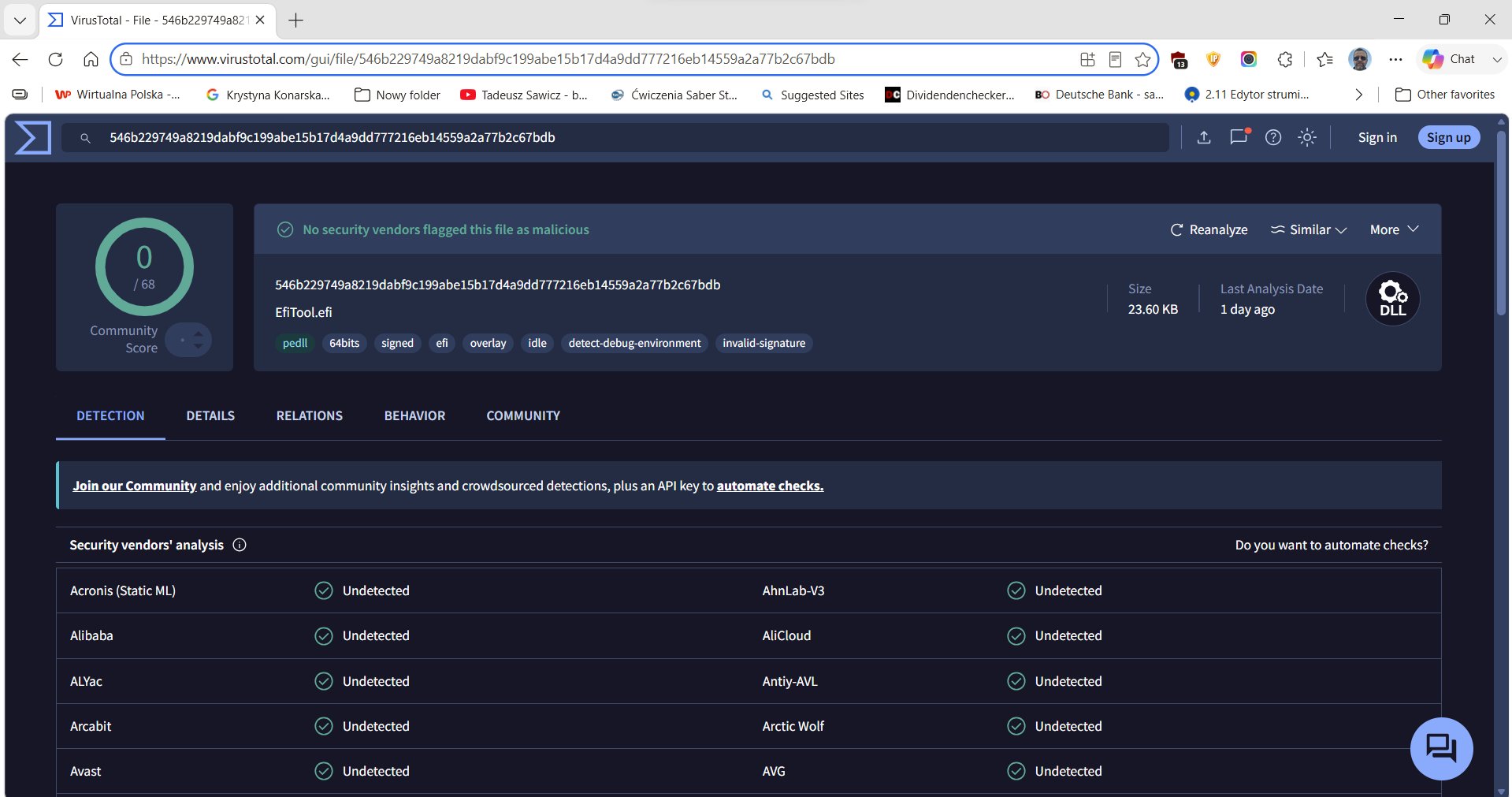
This is not surprising, but it is important that the reasons be stated clearly.
Reason 1: The UEFI execution environment is a blind spot. The overwhelming majority of endpoint security products operate as Windows kernel drivers and/or user-mode agents. They are not loaded until the Windows kernel boots. EfiTool has completed its work and handed off to bootmgfw.efi before a single byte of Windows is executing. There is no endpoint agent present to observe, intercept, or flag any operation.
Reason 2: No disk writes. EfiTool modifies RAM only. There is no file created, no registry key written to disk, no process injection, no network connection. File-based scanning, registry monitoring, and process behavior analysis are all blind to operations that exist only in physical RAM during the UEFI phase.
Reason 3: The payload is a Microsoft-signed binary. The command executed as NT AUTHORITY\SYSTEM is cmd.exe. The mechanism by which it is launched — Windows Setup infrastructure reading SetupType=1 from the SYSTEM hive — is a documented Windows feature. No malicious code is injected anywhere. The binary that executes is the one Microsoft shipped.
Reason 4: The EFI binary is Authenticode-signed with a valid certificate. AV vendors that inspect EFI binaries on the ESP (a practice that is rare but exists) typically check for valid Authenticode signatures as a positive signal. EfiTool carries a valid signature.
Reason 5: String obfuscation. Signature-based detection of EFI binaries often relies on known string patterns. EfiTool contains no recognisable string that would match an existing signature for Windows registry manipulation or common bootkit string tables. The XOR obfuscation, while not cryptographically strong, is sufficient to defeat pattern-matching without dynamic analysis.
16. What Antivirus Vendors Should Do
I share this analysis because I consult with security vendors, and documenting the problem is a prerequisite for fixing it. The following are concrete recommendations:
1. Scan EFI binaries on the ESP at Windows startup. Windows has access to the ESP at boot time. AV products should enumerate \EFI\Boot\* and any non-Microsoft boot entries, hash them against a known-good database, and alert on unsigned or unrecognised EFI binaries. This is the most direct detection point.
2. Monitor UEFI boot order variables. The UEFI firmware boot order is stored in NVRAM variables accessible via GetFirmwareEnvironmentVariable. A new boot entry pointing to a non-Microsoft EFI path should be flagged.
3. Detect SetupType=1 at logon. When SetupType is 1 in HKLM\SYSTEM\Setup at the time a user logs in — particularly on a machine that is not mid-setup — this is an indicator of compromise. The value should be 0 on a fully installed system. This heuristic would catch EfiTool even though the original modification was in RAM, because Windows may persist the Setup state to disk during the boot.
4. Alert on CmdLine in HKLM\SYSTEM\Setup on a non-setup system. A REG_SZ value CmdLine under HKLM\SYSTEM\Setup on a production machine (not mid-upgrade) is abnormal. Its presence should trigger investigation.
5. Investigate the UEFI "pre-boot" gap. The industry has invested heavily in kernel-level telemetry and user-mode behavior analysis. The pre-boot UEFI environment has received comparatively little attention. UEFI firmware-level logging (via UEFI variables or TPM event log) can record which EFI images were loaded and in what order. This telemetry is available to endpoint products that care to read it.
17. Operational Notes — Hyper-V Specifics
Boot order reversion. Hyper-V reverts to the next boot entry when an EFI application hard-resets. Early crashes during the scanning phase caused EfiTool to be skipped on subsequent boots. I had to re-prioritise the boot entry in Hyper-V Manager after each hard reset.
VHD exclusive lock. The VHDX file cannot be mounted on the host while the VM is running. Every test cycle required: stop VM → mount → deploy → unmount → start → wait → stop → mount → read log.
BCD timeout. Default Windows Boot Manager timeout is 30 seconds. Set to zero: bcdedit /store <ESP>\EFI\Microsoft\Boot\BCD /timeout 0.
Memory map size. The Hyper-V UEFI memory map with ~62 entries fits in a 512 KB pre-allocated buffer. Bare metal systems with more devices may require a larger buffer.
18. Comparison: EfiTool vs LOADER_PARAMETER_BLOCK Approach
| Aspect | EfiTool (regf scan) | BlackLotus-style (LPB traversal) |
|---|---|---|
| Hook point | gBS->ExitBootServices |
OslArchTransferToKernel or similar |
| Hive location | Scan for regf signature |
LOADER_PARAMETER_BLOCK->RegistryBase |
| Windows coupling | None — only regf/VK format | LPB structure layout (build-specific) |
| Precision | Scans all hives | Single pointer to primary hive |
| Boot Services needed | Yes — GetMemoryMap inside hook |
No — hook fires after EBS |
| Portability across builds | High | Lower — LPB offsets vary |
| Complexity | Low | Higher |
For a targeted value in the SYSTEM hive by name, the regf scan is adequate and simpler. The LPB approach is more reliable when the primary hive must be distinguished from multiple hives of similar size, or when the hive cannot be identified by the regf signature alone.
19. Findings Summary
-
EBS direct hook is the correct pattern. Replace
gBS->ExitBootServices, recalculate CRC32, callGetMemoryMapinside the hook. Do not useEVT_SIGNAL_EXIT_BOOT_SERVICES. -
Hyper-V Gen 2 reports zero EfiLoaderData entries. winload's data allocations, including the registry hive, appear under
EfiLoaderCode (type 1). Scan both types for portability. -
The regf XOR checksum at 0x1FC is stale in RAM. Do not validate it. Use signature, MajorVersion, and BinDataSize range checks only.
-
A byte scan from the name field backward through the VK header is sufficient for inline DWORD patching. No NK/subkey traversal needed.
-
REG_SZ patching requires free-cell allocation. The hive free space must be scanned for a cell of sufficient size. When the target VK does not exist, the NK value list must be updated.
-
SetupType=1+CmdLine=<cmd>achieves NT AUTHORITY\SYSTEM. Windows Setup infrastructure executes the command as SYSTEM before the logon screen, using a documented but rarely abused Windows mechanism. -
XOR obfuscation with runtime-derived key defeats string-based static analysis. The key is not embedded in the binary; it is derived at runtime from a PE file guaranteed to exist on any Windows UEFI boot partition. The source file and byte offsets are not disclosed. A disassembler reveals only that an external file is read; a UEFI-level debugger is required to observe the key or the decrypted output.
-
BitLocker does not protect the in-flight decrypted hive. The TPM seals the decryption key to the boot measurement chain; a trusted EFI binary is part of that chain.
-
0/68 VirusTotal detections. The UEFI pre-boot phase is a blind spot for all tested endpoint security products. The gap is structural, not incidental.
20. Project Structure
C:\Projekty\test\EfiTool\
├── src\
│   ├── EfiTool.c             Entry point, INI parsing, EBS hook, bootmgfw chain-load
│   ├── RegPatcher.c          Memory map scan, regf validation, VK/string/insert patch
│   ├── RegPatcher.h
│   ├── SecureBootEnroll.c    Self-enroll root CA into UEFI db/KEK/PK
│   ├── SecureBootEnroll.h
│   ├── ObfStringsEfi.h       XOR-obfuscated string table (auto-generated)
│   ├── EfiToolCert.h         Embedded root CA DER bytes (auto-generated)
│   ├── DebugLog.c            FAT file logger → \EFI\Boot\EfiTool.log
│   ├── DebugLog.h
│   └── CrtStubs.c            memset/memcpy stubs (no CRT)
├── Signer\
│   ├── sign.ps1              Authenticode-signs EfiTool.efi with embedded cert
│   ├── embed-cert.ps1        Generates EfiToolCert.h from root CA DER bytes
│   └── cert\                 Root CA + leaf signing certificate + PFX
├── include\edk2\             EDK2 headers
├── lib\                      Pre-compiled EDK2 static libraries
├── bin\
│   ├── EfiTool.efi           Output binary (Authenticode-signed)
│   └── EfiTool.ini           Configuration file (deployed alongside EFI)
├── EfiTool.vcxproj           MSBuild project, Release|x64, EFI Application
├── build.ps1                 Embed cert → MSBuild → copy INI to bin\
├── sign.ps1                  Sign bin\EfiTool.efi
├── deploy.ps1                Mount VHD → copy EFI + INI → unmount (Hyper-V)
└── deploy-xps.ps1            mountvol ESP → copy EFI + INI → bcdedit boot entry (bare metal)
Build pipeline:
.\build.ps1      # embed-cert.ps1 → MSBuild → copy EfiTool.ini to bin\
.\sign.ps1       # Authenticode-signs bin\EfiTool.efi with enrolled root CA
.\deploy.ps1     # Hyper-V: mount VHD → copy EFI + INI → unmount
# or:
.\deploy-xps.ps1 -AddBootEntry -BootFirst  # bare metal: mountvol → copy → bcdedit
The EfiTool.ini file deployed alongside the EFI binary controls behaviour:
[Config]
Patch=1
Patch=1 enables the SetupType/CmdLine patch. Patch=0 clears both values (clean restore mode). CmdLine defaults to cmd if omitted; it can be set to any executable path that the SYSTEM context can resolve at boot time.
© 2026 WESMAR Marek Wesołowski. All rights reserved.
Published for educational and authorized security research purposes. I consult with security vendors and publish this work to advance the state of endpoint protection.
Add a comment