2026-08-07 — v1.0.0.3 — complete-list rule synchronization, GUI checkbox fixes, trusted-name normalization, and expanded collision tests
VaultGuard (
vg.exe) is a complete rewrite of a 12-year-old Qt/C++ folder-protection suite in pure x64 MASM — zero CRT, native WinAPI only, Windows 11 Dark Mode + Mica + system tray. The same binary acts as a full Win32 GUI, a scriptable CLI, or a Windows service depending on its arguments. It communicates withvg.sys, a kernel-mode FSFilter Content Screener minifilter signed by PROMOSOFT CORPORATION (2014), which loads on Windows 11 26H1 via Microsoft's backward-compatibility mechanism for cross-signed drivers predating 29 July 2015.
VaultGuard — Kernel-Backed Folder Protection for Windows
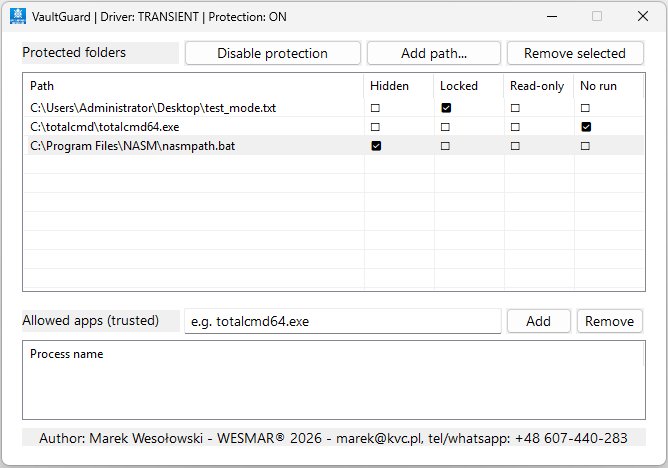
Table of Contents
- Overview
- Architecture
- GUI Reference
- CLI Reference
- Service & Autostart
- Use Cases
- Module Analysis
- main.asm — Entry Point & Globals
- window.asm — Window Skeleton
- layout.asm — Control Creation
- tray.asm — System Tray
- theme.asm — Dark Mode & Colors
- handlers.asm — Commands & Status
- procpicker.asm — Running Process Picker
- impexp.asm — GUI Config Import/Export
- drop.asm — Drag & Drop
- service.asm — Windows Service Runtime
- driver_scm.asm — clrcd SCM lifecycle
- device.asm — Device handle + EnsureDriverReady
- ioctl.asm — DeviceIoControl wrappers
- config.asm — Registry Persistence
- cli.asm — Command-Line Interface
- export.asm — CSV Export
- res.asm — Driver Extraction (FDI)
- strutil.asm — String Utilities
- listview.asm — ListView Wrappers
- Driver Communication Protocol
- Protection Flags
- Registry Layout
- Build System
- Project Structure
- Regression Tests
- Known Limitations
Overview
VaultGuard is an access-control tool for Windows directories and files, backed by a kernel-mode driver of type Minifilter (FSFilter Content Screener). The project is a ground-up rewrite of the original 12-year-old VaultGuard (Qt/C++, split GUI + CLI) into pure x64 MASM assembly. The primary design goals are:
| Goal | Implementation |
|---|---|
| Zero CRT | No msvcrt, ucrtbase, or vcruntime. All memory, string, and file operations go through native Win32 API directly |
| Minimal footprint | Compiled vg.exe is under 100 KB — the original Qt/C++ suite was ~8 MB |
| Modern UX (Windows 11) | Dark Mode, Mica material (DWM API), PerMonitorV2 DPI scaling, system tray, flicker-free rendering |
| Dual-head binary | Same binary: no arguments → rich GUI; recognized argument → scriptable CLI or service mode |
| Persistent startup | Task Scheduler logon task (/rl highest) or Windows service (DEMAND_START), both elevated, no UAC prompt |
| Driver backward compatibility | Original vg.sys signed by PROMOSOFT CORPORATION (2014 certificate) loads correctly on Windows 11 26H1 via Microsoft's cross-signed driver legacy mechanism |
Architecture
GUI Reference
Launching vg.exe without arguments (or with an unrecognized argument) starts the graphical interface. Because the application installs and communicates with a kernel driver, it requires Administrator privileges (enforced via requireAdministrator in the manifest).
Main Window
The main window (class VGMainWnd) has a fixed size of 700 × 550 pixels and uses a native Win32 window with a Mica backdrop and a dark title bar when the system is in Dark Mode.
Driver and protection state is embedded dynamically in the window title:
VaultGuard | Driver: STOPPED   | Protection: OFF
VaultGuard | Driver: TRANSIENT | Protection: ON
This state refreshes every 2 seconds via WM_TIMER and after every user action.
System Tray
| Action | Behavior |
|---|---|
Shift+Minimize |
Hides window to system tray |
/tray switch |
Starts directly as tray-only (hidden window) |
| Double-click tray icon | Restores main window |
| Right-click tray icon | Context menu: Restore / Exit |
TaskbarCreated broadcast |
If Explorer restarts (crash or logon race), VaultGuard re-registers its tray icon automatically |
UIPI note: When launched elevated via Task Scheduler (
/rl highest),ChangeWindowMessageFilterExis called duringWM_CREATEto allow theTaskbarCreatedregistered message (ID ≥0xC000) to cross the integrity boundary from Medium-IL Explorer into the High-IL process. Without this the tray icon would not appear after logon.
Protected Folders Panel
The upper section contains a ListView of protected paths.
| Control | Behavior |
|---|---|
| [Add path...] button | Opens SHBrowseForFolderW native folder browser |
| [Remove selected] button | Removes all selected entries (multi-select supported) |
| Row checkbox | Enables or disables that stored path rule without removing it; the other paths remain synchronized and active |
| Flag columns (H / L / R / X) | Clicking any flag cell immediately toggles the checkbox and sends an IOCTL update to the driver |
| Drag & Drop | Accepts folders and files from Explorer; .lnk shortcuts resolved via COM IShellLink; .exe files dropped here are added as protected items |
Columns:
| Column | Flag | Hex |
|---|---|---|
| Path | — | — |
| Hidden (H) | VG_FLAG_HIDDEN |
0x01 |
| Locked (L) | VG_FLAG_LOCKED |
0x02 |
| Read-only (R) | VG_FLAG_READONLY |
0x04 |
| No run (X) | VG_FLAG_NOEXEC |
0x08 |
Trusted Processes Panel
The lower section defines processes that bypass all driver protections. Trust is global: the driver identifies a trusted process by executable basename and does not expose an application-to-folder mapping. Every copy with the same filename is therefore trusted for every protected path.
| Control | Behavior |
|---|---|
| Edit box | Enter the process executable name (e.g. totalcmd64.exe) |
| [Add] button | Strips path prefix (e.g. C:\dir\app.exe → app.exe), appends .exe if extension missing, lowercases, saves it, then rebuilds the complete trusted list |
| Row checkbox | Enables or disables that stored trusted name without removing it; the other trusted entries remain synchronized |
| [Add running] button | Opens "Select running process" dialog (procpicker.asm) — Ctrl/Shift multi-select — adds all selected processes at once |
| [Remove] button | Multi-select: ConfigRemoveTrusted per selected item → IoctlRemoveTrusted(empty) → ConfigLoad (reloads remaining) → RefreshLists |
| [Export] button | GuiExportConfig — opens Save dialog → writes .vgc file (UTF-16LE, [Paths]/[Trusted] sections) |
| [Import] button | GuiImportConfig — opens Open dialog → parses .vgc → ConfigLoad + RefreshLists |
| Drag & Drop | Drop an .exe file or .lnk shortcut onto this panel — executable name extracted and added as trusted process directly |
Note: Removing sends an empty
IoctlRemoveTrustedthat wipes the entire active trusted list in the driver.ConfigLoadimmediately reloads all remaining registry entries. The driver provides no per-item removal IOCTL.
CLI Reference
CLI mode is activated when vg.exe is launched with at least one recognized argument.
vg.exe /?
vg.exe /enumitems    <outfile.csv>
vg.exe /enumtrusted  <outfile.csv>
vg.exe /protection   on | off
vg.exe /setitem      <path>  Hidden|Locked|Read-only|No-execution|Disabled
vg.exe /settrusted   <name>  Enabled|Disabled
vg.exe /tray
vg.exe /autostart    on | off
vg.exe /service      install | uninstall
vg.exe /driver       install [manual | auto]
vg.exe /driver       uninstall
vg.exe /driver       start | stop
vg.exe /driver       startup manual | auto
vg.exe /uninstall
/p <password>  — parsed and silently ignored (driver has no password layer)
Command Summary
| Command | Description | Example |
|---|---|---|
/?, -h, --help |
Print help to stdout | vg.exe /? |
/protection on\|off |
Enable or disable global protection | vg.exe /protection on |
/setitem <path> <mode> |
Set protection flags for a path | vg.exe /setitem "C:\Data" Locked |
/settrusted <name> <state> |
Add or remove a trusted process; full paths are reduced to a lowercase basename and .exe is appended when missing |
vg.exe /settrusted C:\Tools\CMD Enabled |
/enumitems <file.csv> |
Export protected paths as UTF-16LE CSV | vg.exe /enumitems out.csv |
/enumtrusted <file.csv> |
Export trusted processes as UTF-16LE CSV | vg.exe /enumtrusted trust.csv |
/tray |
Start minimized to system tray | vg.exe /tray |
/autostart on\|off |
Register/remove Task Scheduler logon entry | vg.exe /autostart on |
/service install\|uninstall |
Register/remove VaultGuard Windows service | vg.exe /service install |
/driver install [manual\|auto] |
Install clrcd driver service; default start type is manual |
vg.exe /driver install auto |
/driver uninstall |
Stop and remove clrcd; delete extracted vg.sys best-effort |
vg.exe /driver uninstall |
/driver start\|stop |
Runtime start or stop of clrcd (current session) |
vg.exe /driver start |
/driver startup manual\|auto |
Change clrcd start type via ChangeServiceConfigW (next boot) — running driver is not stopped |
vg.exe /driver startup auto |
/uninstall |
Full cleanup: disable protection, remove app service, remove driver service/file, delete HKCU config | vg.exe /uninstall |
Protection Modes for /setitem
| Mode | Effect |
|---|---|
Hidden |
Directory becomes invisible in Explorer and dir listings |
Locked |
All access attempts return ACCESS_DENIED |
Read-only |
FILE_WRITE_DATA and DELETE bits stripped from DesiredAccess |
No-execution |
Execute bits stripped from DesiredAccess |
Disabled |
Path remains in registry with flags=0; inactive in driver |
CSV Output Formats
/enumitems output:
<BOM>Path,Hidden,Locked,ReadOnly,NoExec\r\n
C:\temp\aaa,1,0,0,0\r\n
/enumtrusted output:
<BOM>Application\r\n
totalcmd64.exe\r\n
Both files are written in UTF-16LE with BOM. /enumitems reads from registry (HKCU\Software\VG\Paths), not from the IOCTL buffer.
Exit Codes
| Code | Meaning |
|---|---|
0 |
Success |
1 |
Unknown switch, bad argument, or driver error |
Every CLI exit path goes through _CliFinish(code), which injects a VK_RETURN keystroke via WriteConsoleInputW so the CMD prompt reappears without waiting for Enter.
Service & Autostart
Windows Service (/service install)
vg.exe /service install
vg.exe /service uninstall
Registers vg.exe as a Windows service named VaultGuard:
- Start type:
SERVICE_DEMAND_START— manual start (immediately started after creation viaStartServiceW) - Binary path:
"<full path to vg.exe>" /svcstart - On install: service is created and immediately started via
StartServiceW - On uninstall: service is stopped and deleted
The internal /svcstart switch is dispatched by CliDispatch → _SvcStart → StartServiceCtrlDispatcherW. Service lifecycle:
_SvcMain → RegisterServiceCtrlHandlerExW → SetServiceStatus(RUNNING)
         → WaitForSingleObject(stop_event, INFINITE)
         → on STOP/SHUTDOWN/PRESHUTDOWN: SetEvent → SetServiceStatus(STOPPED)
Accepted controls: SERVICE_CONTROL_STOP, SERVICE_CONTROL_SHUTDOWN, SERVICE_CONTROL_PRESHUTDOWN.
Logon Autostart (/autostart on)
vg.exe /autostart on
vg.exe /autostart off
Registers a Task Scheduler logon task:
schtasks.exe /create /f /sc onlogon /rl highest /tn VaultGuard
             /tr "\"<exe>\" /tray"
Key properties:
/rl highest— runs elevated (High Integrity Level) without UAC prompt at logon/sc onlogon— fires once per user logon session- Battery restrictions cleared after creation:
DisallowStartIfOnBatteries:$false,StopIfGoingOnBatteries:$false
This is the only officially supported Microsoft method for silent elevated autostart on Windows 10/11.
HKCU\Runentries are silently skipped for processes withrequireAdministratormanifest.
Driver Service (/driver ...)
vg.exe /driver install
vg.exe /driver install auto
vg.exe /driver uninstall
vg.exe /driver start
vg.exe /driver stop
vg.exe /driver startup manual
vg.exe /driver startup auto
Manages the real protection service, clrcd, through WinAPI/SCM calls only:
installextractsvg.sys, creates the kernel driver service and leaves itSERVICE_DEMAND_STARTby defaultinstall autocreates the service and changes start type toSERVICE_AUTO_STARTstart/stopcallStartServiceW/ControlService(current session)startup manual/startup autocallChangeServiceConfigWfor the existingclrcdservice — SCM rewritesHKLM\SYSTEM\CurrentControlSet\Services\clrcd\Starton the fly; a running driver is not stoppeduninstallstops and deletesclrcd, then deletes%SystemRoot%\System32\drivers\vg.sysbest-effort
Full Cleanup (/uninstall)
vg.exe /uninstallSingle-shot teardown of every persistent VaultGuard footprint:
- Disable protection (
IoctlSetActive(0)) if driver reachable - Stop + delete app service
VaultGuardvia SCM - Stop + delete driver service
clrcdvia SCM - Delete
%SystemRoot%\System32\drivers\vg.sysbest-effort - Remove
HKCU\Software\VGregistry tree (Paths,Trusted)
All steps are best-effort — stale partial installs can be flushed in one pass even if individual steps fail.
Use Cases
Scenario 1: Lock a Folder and Allow a Specific Application
vg.exe /protection on
vg.exe /setitem "C:\Private" Locked
vg.exe /settrusted totalcmd64.exe Enabled

vg.exe /enumitems   items.csv
vg.exe /enumtrusted trust.csv

# Revoke when done
vg.exe /settrusted totalcmd64.exe Disabled
Scenario 2: Hide a Folder from Explorer
vg.exe /setitem "C:\Secret" HiddenThe folder disappears from Explorer, dir, and all directory enumeration APIs.
Scenario 3: Read-Only Archive
vg.exe /setitem "C:\Backups" Read-onlyThe driver strips FILE_WRITE_DATA and DELETE bits at the kernel level. Trusted processes can still write.
Scenario 4: Persistent Elevated Tray App at Logon
vg.exe /autostart on
# Task Scheduler entry created. VaultGuard starts at logon to tray, elevated, no UAC prompt.
vg.exe /autostart off   # remove
Scenario 5: Boot-Time Windows Service
vg.exe /service install
# Service VaultGuard created (DEMAND_START) and immediately started.
vg.exe /service uninstall
Scenario 6: Scripted Status Check
vg.exe /enumitems C:\temp\items.csv
$rows   = Import-Csv C:\temp\items.csv -Encoding Unicode
$locked = $rows | Where-Object { $_.Locked -eq '1' }
Write-Host "Locked paths: $($locked.Count)"
Module Analysis
The source tree is organized into 19 MASM source files plus includes. Each file has a single clearly defined responsibility.
main.asm — Entry Point & Globals
Entry point: mainCRTStartup
Startup sequence:
GetStdHandle(STD_OUTPUT_HANDLE)+GetFileType→AttachConsole(-1)if no TTYGetCommandLineW→CommandLineToArgvWargc >= 2→CliDispatch(argv[1], argv, argc); returns 0 (unknown) orargc < 2→ GUI
Public globals:
| Symbol | Type | Description |
|---|---|---|
g_hInstance |
dq |
Process HINSTANCE |
g_hwndMain |
dq |
Main window handle |
g_hwndLvPaths |
dq |
ListView "Protected Paths" |
g_hwndLvTrusted |
dq |
ListView "Trusted Processes" |
g_hwndBtnToggle |
dq |
Toggle button |
g_hDevice |
dq |
Handle to \\.\BE79F7D853E643089D51EDCDA79805C4 |
g_hFontMain, g_hFontSmall |
dq |
GDI font handles |
g_hBrushBg |
dq |
Background brush (0x202020 in dark mode) |
g_isDarkMode |
dd |
1 = dark mode active |
g_startMinimized |
dd |
1 = start hidden to tray (/tray switch) |
g_driverInstalled, g_driverRunning, g_protActive |
dd |
Driver state flags |
g_ioBuf |
65536 B |
IOCTL enumeration buffer (64 KB) |
g_pathBuf, g_tempBuf, g_statusBuf |
520 W |
Wide-character scratch buffers |
window.asm — Window Skeleton
Contains exclusively MainWndProc and CreateMainWindow. Fixed 700 × 550 px, class VGMainWnd.
On creation, calls RegisterWindowMessageW("TaskbarCreated") and stores the dynamic ID in g_wmTaskbarCreated (PUBLIC) — used in MainWndProc and to unlock the UIPI filter in _OnCreate.
Handled WM messages:
| Message | Action |
|---|---|
WM_CREATE |
_OnCreate (layout.asm) |
WM_DESTROY |
KillTimer, DeleteObject (fonts + brush), PostQuitMessage(0) |
WM_CLOSE |
DestroyWindow |
WM_SIZE (minimized + Shift held) |
_TrayAdd — hide to system tray |
WM_TRAY |
_OnTrayMsg — tray icon mouse events |
WM_DROPFILES |
_OnDropFiles (drop.asm) |
WM_NOTIFY |
_OnNotify (handlers.asm) — flag checkboxes |
WM_COMMAND |
_OnCommand (handlers.asm) — button clicks |
WM_TIMER |
UpdateStatusBar every 2 seconds |
WM_SETTINGCHANGE |
_ReadDarkMode + ApplyDarkMode + _ApplyThemeColors + InvalidateRect |
WM_ERASEBKGND |
FillRect(g_hBrushBg) |
WM_CTLCOLORSTATIC |
Dark mode: SetBkMode(OPAQUE) + colors + return g_hBrushBg |
TaskbarCreated |
_TrayAdd — re-register tray icon after Explorer restart |
layout.asm — Control Creation
_OnCreate(rcx=hwnd) creates all widgets in a single pass:
[y=  8] Toggle button (x=182)
[y=  8] [Add path...]  (x=364)  +  [Remove selected]  (x=504)
[y= 10] "Protected files/folders" header (x=20)
[y= 40] ListView Paths (w=624, h=220): columns Path/H/L/R/X — multi-select, checkboxes
[y=278] "Allowed apps (trusted)" header (x=20)
[y=276] Trusted edit box (x=182)  +  [Add] (x=364)  +  [Add running] (x=440)  +  [Remove] (x=556)
[y=308] ListView Trusted (w=624, h=140, ~6 rows): 1 column Process name — multi-select
[y=454] [Export] (x=20)  +  [Import] (x=115)
[y=482] Author/copyright label (x=20, w=624, centered)
Key initialization calls:
InitCommonControlsEx(ICC_LISTVIEW_CLASSES)DragAcceptFiles(TRUE)ChangeWindowMessageFilterExforWM_DROPFILES,WM_COPYDATA,WM_COPYGLOBALDATA, andTaskbarCreated— allMSGFLT_ALLOW
UIPI fix: The
TaskbarCreatedfilter is required when running at High Integrity Level (elevated via Task Scheduler). Without it, theTaskbarCreatedbroadcast from Medium-IL Explorer is silently blocked, and the tray icon never reappears after logon.
tray.asm — System Tray
| Procedure | Description |
|---|---|
_TrayAdd(rcx=hwnd) |
Shell_NotifyIconW(NIM_ADD) with icon handle and tooltip "VaultGuard" |
_TrayRemove(rcx=hwnd) |
Shell_NotifyIconW(NIM_DELETE) |
_OnTrayMsg(rcx=hwnd, rdx=lParam) |
WM_LBUTTONDBLCLK → ShowWindow(SW_RESTORE) + SetForegroundWindow; right-click → context menu (Restore / Exit) |
WM_TRAY is WM_APP + 1. _TrayAdd sets uCallbackMessage = WM_TRAY so all tray icon mouse events are routed to MainWndProc.
theme.asm — Dark Mode & Colors
| Procedure | Description |
|---|---|
_ReadDarkMode |
Reads AppsUseLightTheme registry value; sets g_isDarkMode |
ApplyDarkMode(rcx=hwnd) |
DwmSetWindowAttribute(DWMWA_USE_IMMERSIVE_DARK_MODE) + Mica via DWMSBT_MAINWINDOW |
_SetLvColors |
SetWindowTheme("DarkMode_Explorer") + ListView color messages |
_ApplyThemeColors |
Recreates g_hBrushBg; calls _SetLvColors for both ListViews |
handlers.asm — Commands & Status
_OnCommand dispatch by control ID:
| IDC | Action |
|---|---|
IDC_BTN_TOGGLE |
IoctlSetActive(!g_protActive) |
IDC_BTN_ADD_PATH |
SHBrowseForFolderW → stage as g_pendingPath → RefreshLists |
IDC_BTN_REM_PATH |
Multi-select loop → IoctlAddPath(0) + ConfigRemovePath + LVM_DELETEITEM; ConfigLoad rebuilds the remaining complete list |
IDC_BTN_ADD_TRUSTED |
Strip path prefix, append .exe if missing, lowercase → IoctlAddTrusted + ConfigSaveTrusted + ConfigLoad |
IDC_BTN_ADD_RUNNING |
ShowProcPicker(hwnd) → on return > 0: RefreshLists |
IDC_BTN_REM_TRUSTED |
Multi-select loop → ConfigRemoveTrusted per item; IoctlRemoveTrusted(empty) + ConfigLoad + RefreshLists |
IDC_BTN_EXPORT |
GuiExportConfig(hwnd) — writes .vgc file via GetSaveFileNameW |
IDC_BTN_IMPORT |
GuiImportConfig(hwnd) + ConfigLoad + RefreshLists |
_OnNotify — handles flag-cell clicks and LVN_ITEMCHANGED checkbox events. Every path/trusted enable or disable persists the row state, calls ConfigLoad to rebuild both complete driver lists, and preserves all unaffected entries.
UpdateStatusBar — EnsureDriverReady → IoctlGetStatus → updates title bar and toggle button text.
RefreshLists — IoctlEnumPaths + IoctlEnumTrusted → LVM_DELETEALLITEMS → _LvInsertItem for each entry.
procpicker.asm — Running Process Picker
ShowProcPicker(rcx=hwndOwner) → eax = count of processes added
Opens a modal dialog snapped flush against the right edge of the main window.
| Feature | Description |
|---|---|
| Process list | Snapshot via CreateToolhelp32Snapshot + Process32FirstW/NextW; system processes filtered |
| Multi-select | Ctrl+Click / range select; all selected entries submitted at once |
| Submit | [OK] / double-click: normalize and save each selected name, then call ConfigLoad once to restore the complete trusted list → EndDialog(count) |
| Dark mode | Full dark: WM_ERASEBKGND + WM_CTLCOLORSTATIC/BTN handlers + _SetLvColors for ListView |
| Positioning | DwmGetWindowAttribute(DWMWA_EXTENDED_FRAME_BOUNDS=9) on both windows; compensates for invisible DWM shadow border to place dialog flush-right of main window at pixel precision |
impexp.asm — GUI Config Import/Export
| Procedure | Description |
|---|---|
GuiExportConfig(rcx=hwndOwner) |
GetSaveFileNameW (filter *.vgc) → creates file → writes UTF-16LE BOM + [Paths] section (path=decimal flags per line) + [Trusted] section (name=1 per line) → confirmation MessageBoxW |
GuiImportConfig(rcx=hwndOwner) |
GetOpenFileNameW → reads .vgc file → parses [Paths]/[Trusted] sections → RegSetValueExW per entry; caller calls ConfigLoad + RefreshLists afterward |
File format (.vgc, UTF-16LE with BOM):
[Paths]
C:\Private=2
C:\Secret=1
[Trusted]
totalcmd64.exe=1
drop.asm — Drag & Drop
_OnDropFiles(rcx=HDROP, rdx=hMainWnd) — handles WM_DROPFILES:
DragQueryFileW(0)→ first dropped path intog_pathBuf- Detects drop target: if cursor Y-position is over Trusted panel → route to trusted add
- Last 4 chars are
.lnk→ResolveLnkPath→GetLongPathNameW - Trusted panel drop: extracts filename component → lowercase →
IoctlAddTrusted+ConfigSaveTrusted+ConfigLoad - Paths panel drop: auto-commits prior
g_pendingPath, stores resolved path ing_pendingPath→RefreshLists DragFinish
ResolveLnkPath(rcx=.lnk path, rdx=out buf):
CoInitialize → CoCreateInstance(CLSID_ShellLink) → QueryInterface(IID_IPersistFile) → IPersistFile::Load → IShellLinkW::GetPath → full COM release chain → CoUninitialize
service.asm — Windows Service Runtime
| Procedure | Description |
|---|---|
_CliServiceInstall |
Opens SCM → CreateServiceW (DEMAND_START, binary="<exe>" /svcstart) → StartServiceW |
_CliServiceUninstall |
Opens SCM → ControlService(STOP) → DeleteService |
_SvcStart |
Builds SERVICE_TABLE_ENTRYW[2] on stack → StartServiceCtrlDispatcherW → ExitProcess(0) |
_SvcMain |
CreateEventW(manual-reset) → RegisterServiceCtrlHandlerExW → SetServiceStatus(RUNNING, accepts=STOP\|SHUTDOWN\|PRESHUTDOWN) → WaitForSingleObject(INFINITE) → SetServiceStatus(STOPPED) |
_SvcCtrlHandler |
STOP/SHUTDOWN/PRESHUTDOWN → SetServiceStatus(STOP_PENDING) → SetEvent(stop_event) |
SERVICE_ACCEPT_PRESHUTDOWN (0x100) requires RegisterServiceCtrlHandlerExW (extended variant).
driver_scm.asm — clrcd SCM Lifecycle
Service Control Manager glue for the kernel driver service clrcd.
| Property | Value |
|---|---|
| Service name | clrcd |
| Display name | Vault Guard Driver |
| Type | SERVICE_KERNEL_DRIVER |
| Start | SERVICE_DEMAND_START (default) — switchable to SERVICE_AUTO_START |
| Dependency | FltMgr\0\0 |
| Image path | \SystemRoot\system32\drivers\vg.sys |
| Procedure | Description |
|---|---|
InstallDriver |
ExtractDriver() → CreateServiceW (FSFilter Content Screener, Altitude 389991) → writes Instances subkey |
StartDriver |
StartServiceW; treats ERROR_SERVICE_ALREADY_RUNNING and ERROR_ALREADY_EXISTS as success |
StopDriver |
ControlService(SERVICE_CONTROL_STOP) |
UninstallDriver |
StopDriver → DeleteService |
SetDriverStartType(ecx=startType) |
ChangeServiceConfigW — atomically updates HKLM\...\clrcd\Start; running driver not stopped |
DeleteDriverFile |
Best-effort DeleteFileW on %SystemRoot%\system32\drivers\vg.sys |
IsDriverInstalled |
OpenServiceW probe → boolean |
device.asm — Device Handle + EnsureDriverReady
Owns the kernel device handle and the install-on-demand bootstrap.
| Property | Value |
|---|---|
| Device path | \\.\BE79F7D853E643089D51EDCDA79805C4 |
| Procedure | Description |
|---|---|
OpenDevice |
CreateFileW("\\.\BE79...", GENERIC_READ\|GENERIC_WRITE, ...) — returns handle or INVALID_HANDLE_VALUE |
CloseDevice |
CloseHandle + clears cached handle |
EnsureDriverReady |
OpenDevice → on fail → InstallDriver → StartDriver → OpenDevice retry → returns boolean ready flag |
ioctl.asm — DeviceIoControl Wrappers
Thin marshalling layer over DeviceIoControl for every IOCTL the driver exposes.
IOCTL Codes (reverse-engineered from vg.sys)
| Constant | Value | Description |
|---|---|---|
IOCTL_VG_ADD_PATH |
0x9C402400 |
Replaces the complete path list; record size 0x1404; original five-record input is 0x6414 bytes |
IOCTL_VG_ENUM_PATHS |
0x9C402404 |
Retrieve protected paths list |
IOCTL_VG_ADD_TRUSTED |
0x9C402408 |
Replaces the complete trusted list; record size 0xD94, process name at +4 |
IOCTL_VG_REMOVE_TRUSTED |
0x9C402408 |
Empty input (size=0) clears entire list |
IOCTL_VG_ENUM_TRUSTED |
0x9C40240C |
Retrieve trusted processes list |
IOCTL_VG_SET_ACTIVE |
0x9C40241C |
Enable/disable protection (DWORD, 4 bytes) |
IOCTL_VG_GET_STATUS |
0x9C402420 |
Retrieve VG_STATUS (16 bytes) |
IOCTL_VG_CLEAR_ALL |
0x9C402424 |
Undocumented reset operation; not used for normal list synchronization |
The two SET-style IOCTLs replace their entire in-memory list rather than appending one record. VaultGuard therefore rebuilds and submits the complete active path or trusted-process list after every change.
config.asm — Registry Persistence
| Procedure | Description |
|---|---|
ConfigLoad |
Enumerates both registry keys, skips disabled rows, packs all active records, and submits one complete buffer per list |
ConfigSavePath(rcx=path, rdx=flags) |
RegCreateKeyExW → RegSetValueExW |
ConfigRemovePath(rcx=path) |
RegOpenKeyExW → RegDeleteValueW |
ConfigSaveTrusted(rcx=name_lowercase) |
RegCreateKeyExW → RegSetValueExW(name, 1) |
ConfigRemoveTrusted(rcx=name) |
RegOpenKeyExW → RegDeleteValueW |
cli.asm — Command-Line Interface
Switch comparison uses wcscmp_ci — ASCII case-insensitive wide compare, no CharLowerW. All switches work regardless of capitalization.
Every exit path goes through _CliFinish(code) → ConsoleSendEnter() (injects VK_RETURN via WriteConsoleInputW) so the CMD prompt reappears immediately.
Switch dispatch order: /? → /service → /driver → /uninstall → /enumitems → /enumtrusted → /protection → /setitem → /settrusted → /svcstart → /tray → /autostart → unknown (return 0 → GUI)
RunCmdAndWait(rcx=lpCommandLine) — helper used by /autostart: launches process hidden (CREATE_NO_WINDOW), waits for exit, returns exit code.
export.asm — CSV Export
Owns all enumeration and file-writing logic for /enumitems and /enumtrusted.
| Procedure | Description |
|---|---|
_CliEnumItems(rcx=outfile) |
Opens file → writes UTF-16LE BOM + CSV header → enumerates HKCU\Software\VG\Paths → writes path + 4 flag columns → ExitProcess(0) |
_CliEnumTrusted(rcx=outfile) |
Verifies driver ready → opens file → writes BOM + header → enumerates HKCU\Software\VG\Trusted → one name per row → ExitProcess(0) |
_WriteBytes (private) |
WriteFile wrapper |
_WriteWStr (private) |
Wide string → wcslen_p → _WriteBytes |
CSV is written from registry (authoritative persisted state), not from the driver IOCTL buffer which can lag after flag-change operations.
res.asm — Driver Extraction (FDI)
The driver vg.sys is embedded inside vg.exe as a resource: LZX CAB appended to the ICO file header.
FindResourceW(NULL, IDR_DRIVER=102, RT_RCDATA=10)→ resource pointerLockResource→ raw bytes; CAB starts at offset 1078 bytes- All FDI callbacks operate in memory — no temp files on disk
FDICopy→ heap buffer →WriteFileto%SystemRoot%\system32\drivers\vg.sys
CAB is packed at ~42% of original size via LZX compression.
strutil.asm — String Utilities
| Procedure | Signature | Description |
|---|---|---|
wcslen_p |
rcx=s → rax=count |
Wide strlen |
wcscpy_p |
rcx=dst, rdx=src → rax=dst |
Wide strcpy |
wcscat_p |
rcx=dst, rdx=src → rax=dst |
Wide strcat |
wcscmp_ci |
rcx=a, rdx=b → rax=0/nonzero |
Case-insensitive wide compare (ASCII A-Z only) |
wcs_ascii_lower_inplace |
rcx=s |
Lowercases A-Z in place |
IntToDecW |
rcx=val, rdx=buf → rax=ptr |
DWORD → wide decimal string |
IntToHexW |
rcx=val, rdx=buf → rax=ptr |
DWORD → 8-char wide hex string |
WideWriteConsole |
rcx=handle, rdx=str |
WriteConsoleW; falls back to ANSI WriteFile if not a console |
WideWriteLn |
rcx=str |
WideWriteConsole(stdout, str) + CRLF |
ConsoleSendEnter |
— | Injects VK_RETURN via WriteConsoleInputW |
listview.asm — ListView Wrappers
| Procedure | Signature | Description |
|---|---|---|
_LvAddColumn |
rcx=hwnd, rdx=idx, r8=width, r9=text |
LVM_INSERTCOLUMNW |
_LvInsertItem |
rcx=hwnd, rdx=row, r8=col, r9=text |
LVM_INSERTITEMW / LVM_SETITEMW |
_LvGetItemText |
rcx=hwnd, rdx=row, r8=col, r9=buf |
LVM_GETITEMTEXTW |
Driver Communication Protocol
IOCTL Buffer Formats
Path-list synchronization:
- Each
0x1404-byte record contains[0..3]= DWORD flags and[4..]= the NT path as WCHARs. QueryDosDeviceW("C:")resolves the DOS drive to an NT prefix such as\Device\HarddiskVolume3.IOCTL_VG_ADD_PATHreceives the packed complete list. The original five-record input size is0x6414bytes.- When no active paths remain, VaultGuard sends a syntactically valid system-drive record with
flags=0; a completely zero-filled input is accepted but does not reliably remove the driver's final in-memory path.
Trusted-list synchronization:
- Each fixed
0xD94-byte record contains[0..3]= 0 and[4..]= the lowercase executable basename as WCHARs. IOCTL_VG_ADD_TRUSTEDreceives the packed complete list.
IoctlRemoveTrusted:
nInBufSize = 0→ driver clears entire active trusted list- Caller must call
ConfigLoadafterward to reload remaining entries
IoctlGetStatus → output buffer VG_STATUS (16 bytes):
| Offset | Type | Description |
|---|---|---|
| 0 | BYTE | IsActive (protection enabled) |
| 4 | DWORD | PathCount |
| 8 | DWORD | TrustedCount |
| 12 | DWORD | Version |
Protection Flags
| Flag | Hex | Driver behavior |
|---|---|---|
VG_FLAG_HIDDEN |
0x01 |
PreCreate → STATUS_OBJECT_NAME_NOT_FOUND; directory listing entry removed |
VG_FLAG_LOCKED |
0x02 |
PreCreate → STATUS_ACCESS_DENIED |
VG_FLAG_READONLY |
0x04 |
Strips FILE_WRITE_DATA and DELETE from DesiredAccess |
VG_FLAG_NOEXEC |
0x08 |
Strips execute bits from DesiredAccess |
Flags combine as bitmask: Hidden + Locked = 0x03, Hidden + Locked + Read-only = 0x07. Disabled = 0x00 means path stored in registry, inactive in driver.
Registry Layout
HKEY_CURRENT_USER\
└── Software\
    └── VG\
        ├── Paths\
        │     "C:\Private\Data"   REG_DWORD  0x00000003   (Hidden + Locked)
        │     "C:\Projects\Work"  REG_DWORD  0x00000004   (Read-only)
        │     "C:\Temp\Archive"   REG_DWORD  0x00000000   (Disabled)
        └── Trusted\
              "totalcmd64.exe"    REG_DWORD  0x00000001
              "explorer.exe"      REG_DWORD  0x00000001
ConfigLoad enumerates both subkeys, packs all active records, and submits each complete list in one IOCTL. The driver holds no persistent state across reboots.
Build System
| Property | Value |
|---|---|
| Assembler | ml64.exe — MASM x64 (auto-detected via vswhere.exe) |
| Standard | x64 MASM, zero CRT |
| Output | bin\vg.exe (under 100 KB) |
| Subsystem | Windows GUI — CLI attaches/allocates console at runtime |
| Build script | build.ps1 — 4 steps, verifies imports via dumpbin |
Build Steps
.\build.ps1[0] makecab IcoBuilder\vg.sys → LZX CAB → prepend 1078 B ICO header → ICON\vg.ico
[1] rc.exe /c65001 vg.rc → vg.res
[2] ml64.exe /c /Cp /Cx /Zi
strutil res driver_scm device ioctl config cli export service theme listview handlers drop tray layout procpicker impexp window main
[3] link.exe /SUBSYSTEM:WINDOWS /NODEFAULTLIB /MANIFEST:EMBED /MANIFESTUAC:requireAdministrator
Libs: kernel32 user32 advapi32 shell32 ole32 dwmapi gdi32 comctl32 uxtheme cabinet
[4] dumpbin — verify: no CRT imports, allowed DLL set only-SkipRC skips steps 0 and 1 (requires pre-existing vg.res). Intermediates removed on completion.
Project Structure
VaultGuard\
├── x64/
│   ├── consts.inc       EQU constants: IOCTL codes, flags, struct offsets, control IDs
│   ├── globals.inc      EXTRN declarations for globals from main.asm
│   ├── main.asm         Entry point, global data, message loop
│   ├── window.asm       MainWndProc + CreateMainWindow
│   ├── layout.asm       _OnCreate: all controls + UIPI message filters
│   ├── tray.asm         System tray: _TrayAdd, _TrayRemove, _OnTrayMsg
│   ├── theme.asm        Dark mode, Mica, ListView colors
│   ├── handlers.asm     _OnCommand, _OnNotify, UpdateStatusBar, RefreshLists
│   ├── procpicker.asm   ShowProcPicker — running process picker dialog
│   ├── impexp.asm       GuiExportConfig, GuiImportConfig — .vgc file import/export
│   ├── drop.asm         WM_DROPFILES + ResolveLnkPath (IShellLink COM) + trusted panel routing
│   ├── service.asm      Windows service runtime: _SvcStart, _SvcMain, _SvcCtrlHandler
│   ├── listview.asm     _LvAddColumn, _LvInsertItem, _LvGetItemText
│   ├── driver_scm.asm   clrcd SCM lifecycle (Install/Start/Stop/Uninstall/SetStartType)
│   ├── device.asm       Device open/close + EnsureDriverReady
│   ├── ioctl.asm        DeviceIoControl wrappers + path/trusted marshalling
│   ├── config.asm       ConfigLoad/Save/Remove for Paths and Trusted (registry)
│   ├── cli.asm          CliDispatch + RunCmdAndWait + _CliAutostart
│   ├── export.asm       _CliEnumItems, _CliEnumTrusted — CSV export
│   ├── strutil.asm      String utilities + WideWriteLn/WideWriteConsole
│   └── res.asm          ExtractDriver — FDI decompression of CAB from icon
├── tests/
│   ├── cli_test.ps1              84 CLI, lifecycle, registry, CSV, and enforcement checks
│   ├── rule_collision_test.ps1   55 rule-order and collision enforcement checks
│   ├── gui_sync_test.ps1         Native GUI complete-list synchronization regression
│   └── driver_protocol_probe.ps1 Destructive low-level driver protocol probe
├── IcoBuilder/
│   ├── vg.sys           Original driver (source for packaging)
│   └── vg.ico           Base icon (ICO header used as CAB wrapper)
├── images/
│   └── VaultGuard.jpg   Main window screenshot
├── build.ps1            Build script — auto-detects VS + SDK via vswhere.exe
└── LICENSE.md
Regression Tests
tests/cli_test.ps1 contains 84 regression checks. It requires bin\vg.exe, an Administrator context, and an isolated NTFS test volume. The script installs, starts, and removes clrcd as needed and performs a full uninstall check.
powershell -ExecutionPolicy Bypass -File tests\cli_test.ps1 -TestDrive X:
# -KeepOutput   preserves CSV output files in tests\out\
Safety: Never point
-TestDriveat a system or data volume. The suite deliberately applies protection to the selected volume root. A temporary NTFS VHD mounted asX:is the recommended target.
| Group | Tests | What is verified |
|---|---|---|
| Help | 6 | /? output and command list |
| Driver lifecycle | 14 | Install/start/stop/uninstall and Manual/Auto start modes |
| setitem flags | 4 | Each flag individually → registry value |
| setitem Disabled/overwrite | 4 | Inactive value 0 and last-mode-wins persistence |
| enumitems CSV | 7 | File content, rows, flag bits, disabled entries |
| settrusted + enumtrusted | 12 | Registry/CSV and remove-one-keeps-other behavior |
| protection/error cases | 6 | On/off and invalid argument exit codes |
| Test-volume round trip | 13 | Root/subfolder flags and CSV on the selected volume |
| Driver enforcement | 14 | Read-only/Locked behavior and lifting protection |
| Full uninstall | 4 | Services, driver, and registry are removed |
tests/rule_collision_test.ps1 -TestDrive X: adds 55 enforcement checks covering the last-rule transition, seven simultaneous paths, six trusted names, reversed update order, same-basename executables, a protected-and-trusted executable, parent/child collisions, No-execution, global on/off, and driver restart persistence.
tests/gui_sync_test.ps1 drives the native window controls and verifies that disabling one path or trusted process keeps the other entries active, and that adding another process preserves the existing trusted list.
tests/driver_protocol_probe.ps1 is the destructive driver-level protocol probe used to confirm SET/replace semantics, the valid zero-flags empty-list transition, overlapping-path behavior, trusted-record layout, and global trust. It refuses to run while clrcd is already active.
Known Limitations
| Item | Status |
|---|---|
wcscmp_ci |
ASCII only (A-Z). Non-ASCII paths use case-sensitive comparison |
| COM apartment | CoInitialize/CoUninitialize at every .lnk resolution; safe for GUI use |
| Password mode | /p parsed and silently ignored; driver has no password layer |
| Light mode | GUI works; ListView colors fall back to system defaults |
| Trusted list removal | No per-item IOCTL — driver only supports clearing entire list + full reload |
| Scoped trust | Trusted executable basenames are global; every copy with the same filename is trusted for every protected path, and the driver cannot bind an application to selected folders |
| Protected trusted executable | A trusted executable stored inside a Locked/No-execution path cannot bootstrap itself because the untrusted launcher must open the image first; after its own path is accessible, its process-name trust applies normally |
| Nested exceptions | Path rules are cumulative; a disabled child does not override protection inherited from a matching parent |
| Multi-file drop | Only first dropped file processed per WM_DROPFILES; others discarded |
| Service + GUI | Service mode runs full GUI; no headless-only service build |
License
MIT License — full text in LICENSE.md.
WARNING: This tool installs a kernel-mode driver (
vg.sys) and requires Administrator privileges. The originalvg.sysis the property of PROMOSOFT CORPORATION. Use on systems you own or have permission to modify.
Last updated: 2026-08-07 — v1.0.0.3
Add a comment