Notepad is a bare-metal implementation of a text editor for the Microsoft Windows operating system, written entirely in Macro Assembler (MASM).
github.com
Notepad: Win32 API Implementation (x86/x64/ARM64)
[30.08.2026] New: native ARM64 build, and Shift+Minimise hides the window to the notification area
**There is now a third binary, `Notepad_arm64.exe`, built for AArch64 with `armasm64`.** It is native code, not emulation — Windows on ARM runs the x64 build through its translation layer, and this one skips that entirely. Same editor, same features, third calling convention. Hold **Shift** and press **Minimise**, and the window leaves the task bar for the notification area instead of shrinking into it. Double-click the icon to bring the window back; right-click it for *Restore* and *Exit*. Plain Minimise is untouched. The shortcut is an addition, never a replacement, so a window cannot be lost by reflex - press the button as usual and it behaves as usual. Three details are worth stating, because each of them is a way to get this wrong: - The low four bits of `wParam` in `WM_SYSCOMMAND` are reserved by the system for its own use. The command has to be masked with `0xFFF0` before it is compared - a raw comparison against `SC_MINIMIZE` misses the message whenever Windows happens to set any of them. - `SetForegroundWindow` is required before `TrackPopupMenu`, and a `WM_NULL` posted afterwards clears the foreground state it had to establish. Without the pair, the tray menu stays on screen when the user clicks somewhere else. - `WM_DESTROY` removes the icon explicitly. One left behind outlives the process and sits in the notification area until something makes Windows notice its owner is gone. The icon is `IDI_APPLICATION`, taken from the system. The resource script carries a version block and a manifest but no icon of its own, and inventing one would cost bytes for nothing. Implemented in `x86/tray.asm`, `x64/tray.asm` and `arm64/tray.asm` - same behaviour in all three, differing only in the calling convention and in the size of `NOTIFYICONDATAW` (152 bytes in 32-bit, 168 in 64-bit).
Abstract
Notepad is a bare-metal implementation of a text editor for the Microsoft Windows operating system, written entirely in Macro Assembler (MASM). Unlike standard software development involving high-level abstractions (C#, C++, Python), this project interacts directly with the Win32 API and the CPU registers, bypassing the C Runtime (CRT) entirely.
This repository serves as a reference implementation for systems programmers, malware analysts, and computer science students studying the PE (Portable Executable) format, Windows message loops, and low-level memory management. It demonstrates the dichotomy between legacy x86 (Flat Memory Model) and modern x64 (Microsoft x64 ABI) calling conventions within a single codebase.
Download
Pre-built binaries: notepad.zip
Contains the x86, x64 and native ARM64 executables, ready to run on Windows.
The source archive above carries the full tree for all three targets.
Technical Specifications
Build Environment
| Component | Specification | Notes |
|---|---|---|
| Assembler | ml.exe (x86) / ml64.exe (x64) / armasm64.exe (ARM64) | Microsoft Macro Assembler, and the ARM64 assembler for the third target |
| Linker | link.exe | Microsoft Incremental Linker |
| Subsystem | WINDOWS | Graphical User Interface (GUI) |
| Entry Point | start | Custom entry, no main() wrapper |
| Resource Compiler | rc.exe | Compiles menus, icons, and manifests |
Core Dependencies (Kernel-Level)
The application relies strictly on standard dynamic link libraries found in all Windows versions since XP:
- kernel32.dll: Memory allocation (HeapAlloc/HeapFree), File I/O (CreateFile, ReadFile, WriteFile), Process control
- user32.dll: Window creation (CreateWindowEx), Message loop (GetMessage), Clipboard interaction
- gdi32.dll: Font rendering and graphics device interface contexts
- comdlg32.dll: Common Dialogs (Open File, Save File, Print, Find/Replace)
- shell32.dll: Shell functions and file path operations
- shlwapi.dll: Shell Lightweight API (PathFindFileName for title display)
- advapi32.dll: Registry read, and only read - the Windows theme setting
- comctl32.dll: Common controls (Status Bar)
- riched20.dll: RichEdit 2.0 control for advanced text editing
dwmapi.dll is deliberately absent from that list. The title bar colour and the
Mica backdrop are set through it, but it is resolved with LoadLibrary at run
time and released again, so it never enters the import table. On a system that
has no Desktop Window Manager every one of those calls degrades to nothing and
the editor still runs.
Architecture & Internals
The application implements a standard Windows Event-Driven Architecture. It does not poll for input; rather, it yields CPU time until the Operating System pushes a message to the thread's message queue.
1. The Message Loop (The Heartbeat)
The entry point initializes the WNDCLASSEX structure and spawns the main window. It then enters an infinite loop, consuming approximately 0% CPU when idle.
; Pseudo-assembly representation of the core loop (x64)
MessageLoop:
    mov     rcx, OFFSET msg
    xor     rdx, rdx
    xor     r8, r8
    xor     r9, r9
    call    GetMessage          ; Blocking call, waits for OS event
    test    eax, eax
    jz      ExitProgram         ; WM_QUIT received

    ; Modeless Dialog Handling (Find/Replace)
    mov     rcx, hFindReplaceDlg
    mov     rdx, OFFSET msg
    call    IsDialogMessage     ; Checks if msg belongs to Find/Replace dialog
    test    eax, eax
    jnz     MessageLoop         ; If handled, skip Dispatch

    call    TranslateMessage    ; Virtual-Key -> character
    call    DispatchMessage     ; Route to WndProc
jmp MessageLoopblocks until the OS has something"] QUIT{"return value"} DLG{"Find/Replace dialog open
and this message is its own?"} ACC{"WM_KEYDOWN with
Ctrl or F3 held?"} CMD["Run the accelerator directly
New, Open, Save, Find, Replace, Select All"] TR["TranslateMessage
virtual key to character"] DISP["DispatchMessage
routed to WndProc"] WP["WndProc
WM_CREATE, WM_SIZE, WM_COMMAND,
WM_DPICHANGED, WM_DRAWITEM,
WM_SYSCOMMAND, WM_TRAY"] END(["PostQuitMessage, exit code from wParam"]) START --> GET GET --> QUIT QUIT -->|"0 = WM_QUIT, or -1 = error"| END QUIT -->|"message"| DLG DLG -->|"IsDialogMessage handled it"| GET DLG -->|"no"| ACC ACC -->|"yes"| CMD --> GET ACC -->|"no"| TR --> DISP --> WP --> GET
The dialog filter comes first on purpose. A modeless Find/Replace window
receives its keystrokes through the same queue as the main window, and without
IsDialogMessage the Tab key would not move between its fields.
2. Tri-Architecture Logic (x86, x64, ARM64)
The codebase highlights critical differences in assembly programming between the
three targets. The first two share an assembler and differ in calling
convention; the third differs in both.
x86 (32-bit Protected Mode)
- Calling Convention: STDCALL. Arguments are pushed onto the stack in reverse order. The callee cleans the stack (
ret n). - Registers: EAX, EBX, ECX, EDX, ESI, EDI, EBP, ESP.
- Memory Addressing: 32-bit absolute or relative.
- MASM Syntax: Uses
invokemacro for simplified API calls.
x64 (Long Mode)
- Calling Convention: Microsoft x64 ABI (FASTCALL variant).
- First 4 integer arguments passed in RCX, RDX, R8, R9.
- Floating point args in XMM0 - XMM3.
- Remaining arguments pushed to stack.
- Shadow Space: The caller must reserve 32 bytes (0x20) on the stack for the callee to spill registers.
- Stack Alignment: The stack pointer (RSP) must be aligned to a 16-byte boundary before calling any Windows API function.
- RIP-Relative Addressing: Data is accessed relative to the current instruction pointer to support position-independent code (PIC).
- Handles: All handles and pointers are 64-bit (QWORD).
ARM64 (AArch64)
- Assembler:
armasm64.exe, and this is the part that surprises people
coming from MASM. It is a different assembler, not the same one with different
mnemonics:AREAinstead of segment directives,DCB/DCD/DCQinstead of
db/dd/dq,EXPORT/IMPORTinstead ofPUBLIC/EXTERN, and noSTRUCT
at all - every structure field is a hand-writtenEQUoffset. It is also not
GNUas:.section,.globaland.quadbelong to a different toolchain
and will not assemble here. - Calling Convention: AAPCS64. First eight integer arguments in X0 - X7,
further arguments on the stack. No shadow space - the 32 bytes an x64
caller must reserve have no counterpart here. - Return Address: in the link register X30, not pushed by the call. A leaf
function need not touch the stack at all; anything that calls onward must save
X30 itself, which is why every non-leaf procedure opens with
STP x29, x30, [sp, #-16]!. - Stack Alignment: SP must be 16-byte aligned at every call, and the
hardware enforces it rather than merely expecting it. - Callee-saved: X19 - X28. Values that must survive a Win32 call live there.
- Addressing:
ADRPplusADDforms a 4 KB-page-relative address and its
low 12 bits. The pair is one address computation - applying the second half
twice is a silent memory-corruption bug rather than an assembly error.
locates the toolset by evidence:
vswhere, then the directory that
actually holds the assembler"] subgraph X86["x86 - IA-32"] A86["ml.exe
stdcall, invoke macro"] L86["link.exe /MACHINE:X86"] end subgraph X64["x64 - AMD64"] A64["ml64.exe
Microsoft x64 ABI"] L64["link.exe /MACHINE:X64"] end subgraph ARM["ARM64 - AArch64"] AA["armasm64.exe
AAPCS64, AREA and EQU,
a different assembler
not a different mnemonic set"] LA["link.exe /MACHINE:ARM64"] end RC["rc.exe
version block and manifest,
shared by all three"] OUT["bin/
Notepad_x86.exe
Notepad_x64.exe
Notepad_arm64.exe"] PS --> A86 --> L86 --> OUT PS --> A64 --> L64 --> OUT PS --> AA --> LA --> OUT RC --> L86 RC --> L64 RC --> LA
One manifest and one version resource serve all three images. The ARM64 build
reuses x64/notepad.rc, because a resource script carries no architecture of
its own.
3. Memory Management Implementation
Since malloc and free (C-Runtime) are unavailable, the application interfaces directly with the Windows Heap Manager via kernel32:
- Allocation:
HeapAlloc(GetProcessHeap(), HEAP_ZERO_MEMORY, size) - Deallocation:
HeapFree(hHeap, 0, pMemory)
This is critically used for:
- File buffers when reading/writing files
- Text buffers for status bar updates and word counting
- Temporary storage during word wrap toggle
4. Unicode Support
The application uses Unicode (UTF-16 LE) throughout:
- All Windows API calls use Wide (W) variants:
CreateWindowExW,SendMessageW, etc. - File Reading: Detects encoding via BOM (Byte Order Mark):
- UTF-16 LE (FF FE): Direct load
- UTF-8 (EF BB BF): Convert via
MultiByteToWideChar - No BOM: Try UTF-8 first, fallback to ANSI (CP_ACP)
- File Writing: Always UTF-16 LE with BOM for maximum compatibility
Feature Implementation Detail
A. The RichEdit Control
Instead of using a basic EDIT control, the application uses RichEdit 2.0 (riched20.dll) which provides:
- Advanced text selection and manipulation
- Built-in Find/Replace support via
EM_FINDTEXTEX - Character formatting capabilities
- Better undo/redo handling
Styles: WS_CHILD | WS_VISIBLE | WS_VSCROLL | ES_MULTILINE | ES_AUTOVSCROLL | ES_NOHIDESEL
For word wrap toggle, horizontal scrolling is added/removed: WS_HSCROLL | ES_AUTOHSCROLL
B. File I/O Pipeline
File operations adhere to strict transactional steps to ensure data integrity:
- CreateFile: Opens handle with
GENERIC_READorGENERIC_WRITE - GetFileSize: Determines allocation requirements
- Heap Allocation: Dynamic memory request via
HeapAlloc - ReadFile / WriteFile: Bulk transfer between disk and memory
- Encoding Conversion: BOM detection and
MultiByteToWideCharif needed - SetWindowText / GetWindowText: Transfer between memory and the GUI RichEdit control
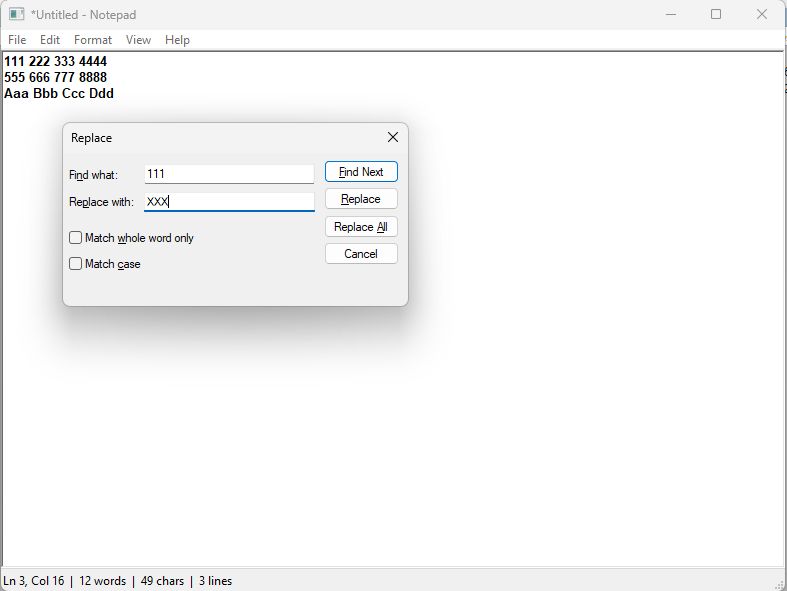
C. Find & Replace
The search feature uses the Common Dialog Box Library (FindText / ReplaceText) for the UI, with search logic implemented via RichEdit messages:
- Search:
EM_FINDTEXTEXwithFINDTEXTEXstructure - Selection:
EM_EXSETSELto highlight matching text - Replace:
EM_REPLACESELfor text substitution - Wrap Around: Automatic search restart from beginning/end when not found
D. Status Bar
Real-time display of:
- Current cursor position:
Ln X, Col Y - Word count (manual counting algorithm)
- Character count (excluding CR)
- Line count
E. Appearance: Theme, DPI and Tray
A Win32 window gets none of the modern Windows appearance for free, and the
surfaces that make it up answer to mechanisms that have nothing to do with each
other. theme.asm keeps them together, because that is the only way they stay
in step.
Dark mode. View -> Theme offers Use System Setting, Light and Dark.
The system option reads AppsUseLightTheme under
HKCU\Software\Microsoft\Windows\CurrentVersion\Themes\Personalize and
follows WM_SETTINGCHANGE, so switching Windows over switches the editor with
it; an explicit Light or Dark choice deliberately ignores that. The registry is
read and never written - the program still creates no files and stores no
settings of its own, so the choice lives for the session only.
Three surfaces have to be told separately. The title bar is the Desktop Window
Manager's, set through DwmSetWindowAttribute with attribute 20, and with 19 as
well because Windows 10 builds before 19041 spelled it that way. The editor is a
RichEdit control: EM_SETBKGNDCOLOR paints its whole client area, including the
margin past the last line, and the text colour travels separately as a
CHARFORMAT2 with CFM_COLOR. That message also raises EN_CHANGE, whose
handler reads the modify flag and rewrites the title, so notifications are
silenced for the duration - otherwise the window opens claiming an untouched
document has been edited.
HKCU Themes Personalize
read only, never written"] DARK["g_isDark = 1"] LIGHT["g_isDark = 0"] subgraph SURF["Three surfaces, three mechanisms"] TITLE["Title bar
DwmSetWindowAttribute 20 and 19
plus the Mica backdrop"] EDIT["Editor
EM_SETBKGNDCOLOR and
CHARFORMAT2 with CFM_COLOR"] SB["Status bar
SBT_OWNERDRAW, painted in WM_DRAWITEM
comctl32 takes its background from a
system colour no message overrides"] end GUARD["EN_CHANGE silenced, modify flag saved
colour and font changes would otherwise
mark an untouched document as edited"] MENU --> MODE MODE -->|"Use System Setting"| REG MODE -->|"Dark"| DARK MODE -->|"Light"| LIGHT REG --> DARK REG --> LIGHT DARK --> GUARD LIGHT --> GUARD GUARD --> TITLE GUARD --> EDIT GUARD --> SB
The status bar is painted by hand. comctl32 fills its own background from a
system colour that no message overrides and SetWindowTheme does not reach, so
in dark mode the part is marked SBT_OWNERDRAW and drawn in WM_DRAWITEM. In
light mode the control is left to draw itself, which it already does correctly.
Owner-draw keeps the pointer rather than the string, so the text is copied into
the module's own buffer first: a caller's stack buffer would be dangling by the
time the control repainted.
PerMonitorV2 DPI is implemented, not merely declared. The manifest asks for
it, which tells Windows to stop scaling the window on the application's behalf
and hand the job over as WM_DPICHANGED. Declaring it without handling the
message is worse than not declaring it at all - the window then keeps its 96 DPI
pixel sizes on a 192 DPI monitor and comes out half size. The handler rebuilds
the editor font through MulDiv and moves the window to the rectangle Windows
suggests, taken verbatim: computing one instead is how windows drift across
monitors on every change. The font is also rechecked once at startup, because a
window can open on a monitor whose DPI differs from the system value the first
font was built for, and on a stationary window no WM_DPICHANGED ever arrives
to correct it.
the low four bits are the system's alt Shift held T->>S: Shell_NotifyIcon NIM_ADD T->>W: ShowWindow SW_HIDE T-->>W: consumed, no ordinary minimise else Shift not held T-->>W: not ours W->>W: DefWindowProc minimises as usual end U->>S: double-click the icon S->>W: WM_TRAY with WM_LBUTTONDBLCLK W->>T: TrayOnMessage T->>S: Shell_NotifyIcon NIM_DELETE T->>W: ShowWindow SW_RESTORE, SetForegroundWindow note over T,S: WM_DESTROY removes the icon explicitly.
One left behind outlives the process.
Shift+Minimise hides to the notification area. Plain Minimise keeps its
ordinary meaning; the shortcut is an addition, never a replacement, so nobody
loses a window by reflex. Double-clicking the icon brings it back, right-clicking
offers Restore and Exit, and Exit restores first so the save prompt appears on a
window that can be seen. The icon is IDI_APPLICATION from the system - the
resource script carries no icon of its own, and inventing one would cost bytes
for nothing.
Keyboard Shortcuts
| Shortcut | Action |
|---|---|
| Ctrl+N | New document |
| Ctrl+O | Open file |
| Ctrl+S | Save file |
| Ctrl+Shift+S | Save As |
| Ctrl+P | |
| Ctrl+Z | Undo |
| Ctrl+X | Cut |
| Ctrl+C | Copy |
| Ctrl+V | Paste |
| Ctrl+A | Select All |
| Ctrl+F | Find |
| Ctrl+H | Replace |
| F3 | Find Next |
| Shift+F3 | Find Previous |
| Del | Delete selection |
| Shift+Minimise | Hide to the notification area |
Performance & Metrics
| Metric | Notepad ASM (x64) | Notepad ASM (x86) | MS Notepad (Win11) | VS Code |
|---|---|---|---|---|
| Disk Usage | ~20 KB | ~18 KB | ~200 KB + Deps | ~300 MB |
| RAM Usage (Idle) | ~1.5 MB | ~1.2 MB | ~12 MB | ~400 MB |
| Startup Time | < 10ms | < 10ms | ~200ms | ~2500ms |
| Dependencies | System DLLs only | System DLLs only | UWP / CRT | Electron / Node.js |
Note: The tiny memory footprint is due to the lack of garbage collection, JIT compilation, or interpreted runtime environments. The application maps directly to OS pages.
Build Instructions
The project includes a PowerShell build script (build.ps1) that automates the assembly and linking process.
Prerequisites
- Visual Studio Build Tools (Workload: C++ Desktop Development)
- Windows SDK (for rc.exe and libraries)
- PATH must include paths to ml.exe, ml64.exe, rc.exe, and link.exe
Compilation Steps
-
Clone the repository:
git clone https://github.com/wesmar/notepad.git cd notepad -
Run the Build Script:
.\build.ps1The script will:
- Compile resources (.rc -> .res)
- Assemble source files (.asm -> .obj)
- Link object files with libraries into executables
- Move binaries to
bin/folder - Clean up intermediate files
-
Manual Compilation (x64 Example):
cd x64
rc /c65001 notepad.rc
ml64 /c /Cp /Cx /Zd /Zf /Zi main.asm
ml64 /c /Cp /Cx /Zd /Zf /Zi file.asm
ml64 /c /Cp /Cx /Zd /Zf /Zi edit.asm
link main.obj file.obj edit.obj notepad.res /subsystem:windows /entry:start /out:Notepad_x64.exe /MANIFEST:EMBED /MANIFESTINPUT:notepad.manifest kernel32.lib user32.lib gdi32.lib comdlg32.lib shell32.lib shlwapi.lib comctl32.lib
Scientific & Academic Use Cases
This project is not merely a tool, but a pedagogical instrument for:
-
Reverse Engineering Training:
- Analyzing the generated binary in IDA Pro or Ghidra provides a clean "control group" for recognizing standard Win32 patterns without compiler optimization noise
- Perfect for learning to identify prologue and epilogue sequences manually
-
Malware Analysis Research:
- Many malware families use raw API calls to avoid detection by heuristics that look for CRT signatures
- Understanding how to invoke APIs like CreateFile and HeapAlloc in pure assembly is crucial for analysts
-
Operating Systems Study:
- Demonstrates the boundary between User Mode (Ring 3) application logic and Kernel Mode (Ring 0) transitions via system calls (mediated by ntdll.dll / kernel32.dll)
Directory Structure
notepad/
├── bin/                      # Compiled executables
│   ├── Notepad_x86.exe       # 32-bit executable (~21 KB)
│   ├── Notepad_x64.exe       # 64-bit executable (~24 KB)
│   └── Notepad_arm64.exe     # native ARM64 executable (~19 KB)
├── x86/                      # 32-bit source files
│   ├── main.asm              # Entry point, WinMain, WndProc
│   ├── file.asm              # File operations (New, Open, Save, Print)
│   ├── edit.asm              # Edit functions (Find, Replace, Status Bar)
│   ├── theme.asm             # Dark mode, Mica, DPI, owner-drawn status bar
│   ├── tray.asm              # Shift+Minimise to the notification area
│   ├── data.inc              # Data structures, constants, variables
│   ├── proto.inc             # Function prototypes, API declarations
│   ├── notepad.rc            # Resource script (manifest reference)
│   └── notepad.manifest      # Application manifest (DPI awareness, etc.)
├── x64/                      # 64-bit source files
│   ├── main.asm              # Entry point, WinMain, WndProc (x64 ABI)
│   ├── file.asm              # File operations (x64 calling convention)
│   ├── edit.asm              # Edit functions (x64 calling convention)
│   ├── theme.asm             # Dark mode, Mica, DPI, owner-drawn status bar
│   ├── tray.asm              # Shift+Minimise to the notification area
│   ├── data.inc              # Data structures (64-bit handles, alignment)
│   ├── proto.inc             # Function prototypes (EXTERN declarations)
│   ├── notepad.rc            # Resource script
│   └── notepad.manifest      # Application manifest
├── arm64/                    # native ARM64 source files (armasm64 syntax)
│   ├── main.asm              # Entry point, WinMain, WndProc (AAPCS64)
│   ├── file.asm              # File operations (AAPCS64)
│   ├── edit.asm              # Edit functions (AAPCS64)
│   ├── theme.asm             # Dark mode, Mica, DPI, owner-drawn status bar
│   ├── tray.asm              # Shift+Minimise to the notification area
│   ├── constants.inc         # EQU constants and hand-written struct offsets
│   └── globals.inc           # IMPORT declarations for the shared globals
├── build.ps1                 # Automated build pipeline
├── LICENSE.md                # MIT License
└── README.md                 # Documentation
Known Limitations
- Large File Handling: The implementation loads the entire file into RAM. Files larger than available heap space will trigger an allocation failure.
- Undo/Redo: Relies on the RichEdit control's built-in undo buffer. Complex multi-level undo history is not manually implemented.
- Print: Basic single-page print implementation. Does not support pagination or print preview.
- Menu bar in dark mode: The menu strip stays light. Its background is drawn by the window manager from a system colour that an application cannot override without owner-drawing the entire menu, which would cost more than it buys.
- Theme is not remembered: The choice under
View -> Themelasts for the session. The program writes nothing to the registry and creates no files of its own, and that is worth more than persistence.
License
MIT License. Free for academic, personal, and commercial use. Attribution to the original author is appreciated but not mandatory.
Author
Marek Wesolowski
- Email: marek@wesolowski.eu.org
- Website: https://kvc.pl
- Tel/WhatsApp: +48 607 440 283
Project Repository: https://github.com/wesmar/notepad
Add a comment