2026-07-21 — Initial public release
RegEdLin Commander is a native GTK4 / libadwaita editor for offline Windows registry hives on Linux. It combines a two-pane Commander interface with an original, high-performance
regfparser and writer. Open two hives side by side, compare their contents, copy complete key trees, edit every common registry value type, import or export.regfiles, search and replace, and undo destructive changes — withoutlibhivex.
RegEdLin Commander — Windows Registry Editor for Linux
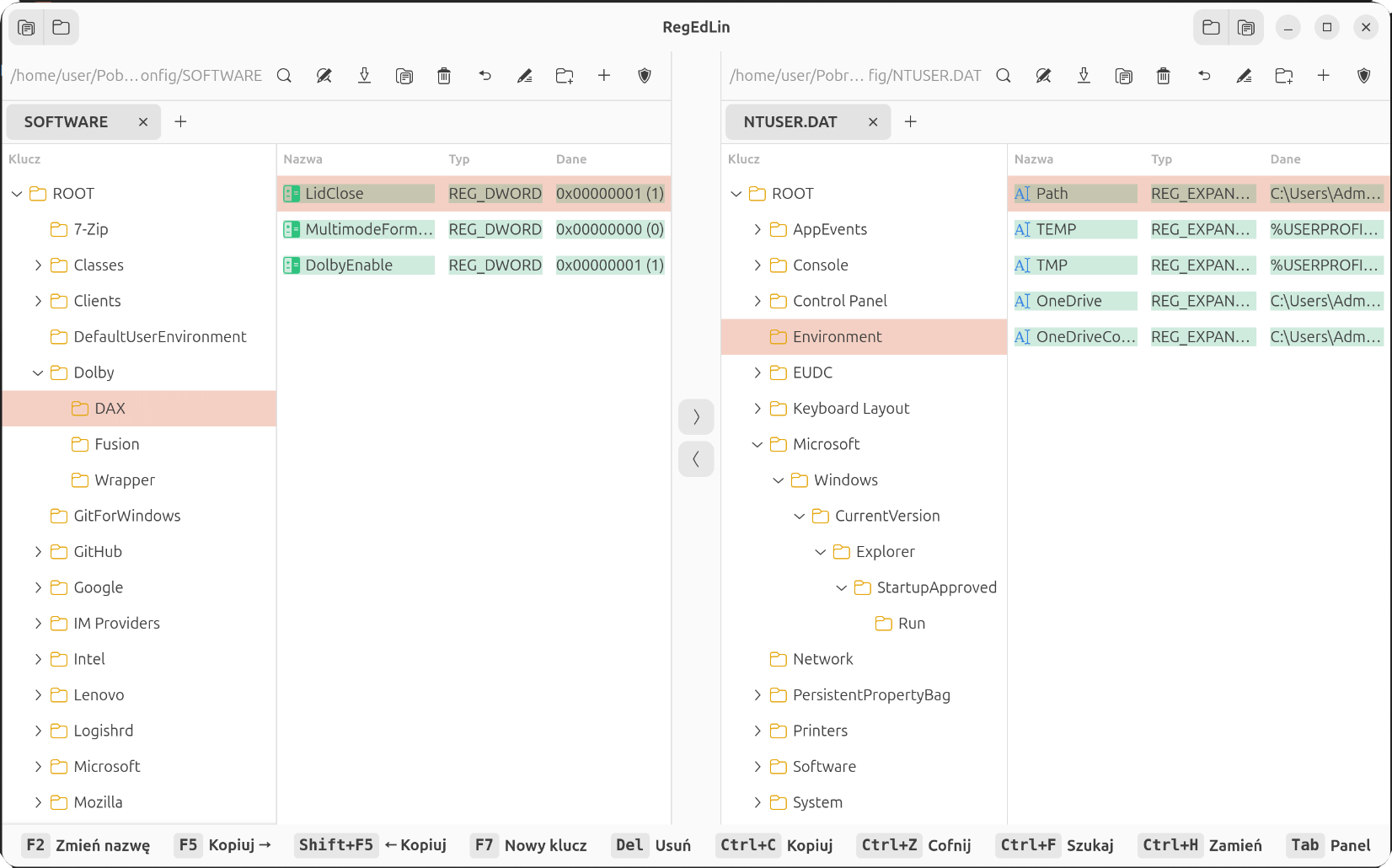
Table of Contents
- Overview
- Highlights
- Commander Workflow
- Supported Hive and Value Formats
- Installation and Requirements
- Building from Source
- Usage
- Keyboard Shortcuts
- Architecture
- Registry Engine
- Safe Write Process
- Import, Export and Search
- Testing and Validation
- Localization
- Scope and Safety Notes
- Downloads and Source Code
- License
Overview
RegEdLin is designed for administrators, recovery technicians, forensic work and developers who need to inspect or modify offline Windows registry hive files from Linux. It works with hives copied from a Windows installation, mounted disk, backup image or recovery environment.
Unlike tools that place a generic tree view over an existing library, RegEdLin contains its own bounds-checked binary registry engine. The engine understands the regf file structure directly and is completely separated from the graphical interface. This makes large-hive operations fast while keeping the application independent of libhivex.
The interface follows the familiar Total Commander / Norton Commander model: each pane has its own hive, path, tree, values and tabs. This is especially useful when repairing one hive from another, comparing snapshots or migrating a complete branch between installations.
| Capability | What RegEdLin provides |
|---|---|
| Offline hive editing | Read and write SYSTEM, SOFTWARE, SAM, SECURITY, DEFAULT and NTUSER.DAT files |
| Two-pane operation | Open two independent hives and work between them without switching windows |
| Live comparison | Values unique to one side are green; changed type, size or data is amber |
| Complete editing | Create, rename and delete keys or values; edit all common Windows value types |
| Data transfer | Copy a key and its full subtree between hives with F5, Shift+F5 or drag-and-drop |
| Recovery tools | Undo destructive operations, atomic file replacement and validation of untrusted input |
| Interchange | Byte-exact .reg import/export with Microsoft registry syntax support |
Highlights
- Original
regfparser and writer — handles registry structures directly:regf,hbin,nk,vk,sk,lf,lh,li,rianddb. - Windows 2000 through Windows 11 hives — supports format v1.3 and v1.5, including segmented big values larger than 16 KB.
- Fast work on large files — zero-copy
mmapreads, cached key names, geometrically growing lists and O(n) subtree enumeration. - Commander-style copying — F5 / Shift+F5 copies a complete branch to the opposite pane and merges it like a
.regimport. - Typed editors — dedicated handling for strings, expandable strings, multi-strings, binary data, DWORD and QWORD values.
- Context menus throughout — New, Modify, Rename, Delete, Export, Copy key name and Permissions are available where expected.
- Search and Replace — searches key names, value names and string data with substring, whole-word or regular-expression matching.
- Security descriptors — reads and edits raw
SECURITY_DESCRIPTOR_RELATIVEdata with SID/ACL validation and copy-on-writeskcells. - Tabs and sessions — up to 16 tabs per pane, restored from
~/.config/regedlin/session.ini. - Defensive persistence — atomic saves, cycle/depth guards, bounds checking and an Undo safety net.
Commander Workflow
Each pane is independent. You can load a clean reference hive on one side and a damaged or older copy on the other, navigate to the same branch, inspect the colour-coded differences and transfer only the data you need.
Copying a key includes all of its subkeys and values. If the destination already contains part of that tree, RegEdLin merges the copied data rather than requiring the whole destination branch to be removed first.
Supported Hive and Value Formats
Hive files
| Hive | Typical contents |
|---|---|
SYSTEM |
Services, drivers, control sets and boot configuration |
SOFTWARE |
Installed applications, Windows configuration and COM registration |
SAM |
Local Security Accounts Manager database |
SECURITY |
Local security policy and cached security data |
DEFAULT |
Default system profile settings |
NTUSER.DAT |
Per-user settings normally exposed as HKEY_CURRENT_USER |
Registry values
| Type | Editor / representation |
|---|---|
REG_SZ |
Unicode text editor |
REG_EXPAND_SZ |
Expandable Unicode text with environment-variable placeholders |
REG_MULTI_SZ |
Multi-line list of strings |
REG_BINARY |
Binary / hexadecimal data |
REG_DWORD |
32-bit numeric value |
REG_QWORD |
64-bit numeric value |
| Other types | Preserved and represented through generic binary or typed .reg syntax |
Large values are supported through segmented db chains. RegEdLin also preserves security descriptor sharing correctly: modifying permissions on one key creates a private descriptor instead of silently changing every key that referenced the original sk cell.
Installation and Requirements
The ready-to-use archive is available from the download button at the top of this page. Extract it and follow the included package instructions for your distribution.
To build RegEdLin, the system needs:
- Linux with GTK 4 ≥ 4.10
- libadwaita ≥ 1.4
- GLib ≥ 2.72
- Meson, Ninja, pkg-config, gettext and a C compiler
On Debian or Ubuntu:
sudo apt install build-essential meson ninja-build pkg-config gettext \
  libglib2.0-dev libgtk-4-dev libadwaita-1-dev
Building from Source
Clone the public repository and build with Meson:
git clone https://github.com/wesmar/RegEdLin.git
cd RegEdLin
meson setup build
ninja -C build
./build/src/regedlin
Install the program, desktop entry, AppStream metadata, icon and locale catalogs under /usr:
meson setup build --prefix=/usr
ninja -C build
sudo meson install -C build
Tests are enabled by default. For a lean production-only build:
meson setup build -Dtests=falseDebian / Ubuntu package
The repository includes a complete debian/ directory:
dpkg-buildpackage -us -uc -bRuntime dependencies for the generated binary package are resolved automatically through shlibs.
Usage
Launch RegEdLin empty, with one hive or with a hive in each pane:
regedlin
regedlin /path/to/SYSTEM
regedlin /path/to/SYSTEM /path/to/SOFTWARE
For safe offline work, first copy a hive from the mounted Windows installation:
mkdir -p ~/registry-work
cp /mnt/windows/Windows/System32/config/SOFTWARE ~/registry-work/SOFTWARE
regedlin ~/registry-work/SOFTWARE
Navigate through the tree, double-click a value to modify it, or press F5 / Shift+F5 to copy the selected key to the other pane. Changes are saved immediately and atomically, so there is no separate Save command. Undo remains available for destructive operations.
Important: always edit a working copy. Keep the original hive untouched until the modified file has been validated and Windows can be recovered if necessary.
Keyboard Shortcuts
| Key | Action | Key | Action |
|---|---|---|---|
F2 |
Rename selected key or value | F5 / Shift+F5 |
Copy selection to the opposite pane |
F7 |
Create a new key | Delete |
Delete selected key or value |
Enter / double-click |
Modify a value | Ctrl+C |
Copy key path or value to clipboard |
Ctrl+Z |
Undo | Ctrl+F |
Search |
Ctrl+H |
Find and Replace | Tab |
Switch the active pane |
← / →, Num + / Num - |
Collapse or expand a node | Num * |
Expand the complete subtree |
Right-click the tree or value list for the full context menu. Typing a letter jumps to the next key beginning with that character.
Architecture
The project is strictly layered. The registry engine has no GTK dependency, while the interface reaches hive data through the logic layer.
panes, tabs, trees, dialogs, diff colours"] LOGIC["Logic layer
format, import, export, search, replace, install scan, hive copy"] HIVE["Custom regf engine
parser, writer, allocator, security descriptors"] FILE["Offline Windows hive
SYSTEM, SOFTWARE, SAM, SECURITY, DEFAULT, NTUSER.DAT"] UI --> LOGIC LOGIC --> HIVE HIVE --> FILE SESSION["session.ini"] -. restores tabs .-> UI REGFILE[".reg files"] --> LOGIC LOGIC --> REGFILE
| Layer | Main files | Responsibility |
|---|---|---|
src/ui/ |
pane, window, key_item, value_item, style |
GTK interface, two panes, trees, lists, dialogs, tabs and session state |
src/logic/ |
format, regfile_export, regfile_import, search, replace, installscan, hivecopy |
Formatting, .reg interchange, search/replace, installation scan and cross-hive copying |
src/hive/ |
regf.c, regf.h |
Bounds-checked regf parser and writer with no user-interface dependency |
Registry Engine
Read path
Hive files are initially mapped read-only with mmap. Registry records are decoded directly from the mapped bytes, avoiding a second full copy of large files. Key-name caching reduces repeated decoding while browsing the tree.
First mutation
The first edit switches the hive to a private, growable in-memory representation. This keeps browsing cheap while providing controlled allocation once a write is actually needed.
Allocation and enumeration
- The cell allocator uses a bump strategy with a one-
hbincache, providing predictable amortized O(1) allocation. - Subkey and value lists grow geometrically instead of being reallocated for every inserted item.
rel_key_subkeys_all()enumerates a subtree in one O(n) pass and avoids the repeated index lookups that turn large trees into O(n²) work.- The implementation supports hashed
lf/lh, directli, indirectriand segmented big-datadbstructures found in real hives.
These choices matter on production-sized files: testing includes a 135 MB SOFTWARE hive and a subtree containing 99,507 keys.
Safe Write Process
Atomic replacement prevents an interruption halfway through a save from leaving a partially written hive at the destination path. Parser bounds checks, recursion-depth guards and cycle detection protect the application when opening malformed or deliberately corrupted input.
Undo complements file-level safety by allowing destructive UI actions to be reversed during the editing session.
Import, Export and Search
.reg interoperability
Import and export are designed to be mutually inverse. Supported syntax includes:
- escaped string values;
dword:and QWORD representations;hex:and typedhex(N):values;- line-wrapped hexadecimal data;
- key deletion with
[-Path]; - value deletion with
"Name"=-.
Search and Replace
RegEdLin can search keys, value names and string data using:
- case-insensitive substring matching;
- whole-word matching;
- regular expressions through GLib
GRegex/ PCRE2; - replacement preview before any write is committed.
Testing and Validation
The engine is exercised independently of GTK by CLI development tools under tests/.
| Test area | Coverage |
|---|---|
| Mutation | Write, delete, rename, import, Undo, replace and security descriptors |
| Read and round-trip | Hive reading, export, search, paths and Windows installation scanning |
| Memory safety | AddressSanitizer and UndefinedBehaviorSanitizer on old and modern real-world hives |
| Malformed input | Byte-flip and truncation fuzzing with timeouts; corrupt files must fail cleanly |
| Independent validation | Written hives are read back with hivexml, hivexget and hivexsh |
| Graphical interface | Headless Xvfb smoke tests with screenshot verification |
Testing covers Windows 2000 v1.3 and modern Windows 10/11 v1.5 hives, including 20 MB SYSTEM and 135 MB SOFTWARE files. Fuzzing and cross-validation have already exposed subtle issues involving padded big-value segments and real-world hashed subkey lists.
For a sanitizer build:
meson setup build-asan -Db_sanitize=address,undefined
ninja -C build-asan
meson test -C build-asan
Localization
The user interface uses GNU gettext, with English as the source and fallback language. Five complete translation catalogs are currently shipped with the project:
| Code | Language |
|---|---|
pl |
Polish |
de |
German |
fr |
French |
es |
Spanish |
it |
Italian |
GTK selects the language automatically from LANG, LANGUAGE and LC_MESSAGES. When no matching catalog is available, the original English interface is used.
LANGUAGE=en ./build/src/regedlin
LANGUAGE=pl ./build/src/regedlin
LANGUAGE=de ./build/src/regedlin
LANGUAGE=fr ./build/src/regedlin
LANGUAGE=es ./build/src/regedlin
LANGUAGE=it ./build/src/regedlin
The currently enabled catalogs are listed in po/LINGUAS, while po/regedlin.pot is generated from the English strings in the source code. To add another translation, append its language code to po/LINGUAS, create po/<code>.po from the POT template, translate the catalog and rebuild. No C source changes are required.
Scope and Safety Notes
- RegEdLin edits offline hive files. It is not a live registry monitor and does not connect to a remote Windows registry.
- Linux has no native equivalent of Windows access tokens and accounts. SIDs, ACLs and security descriptors are therefore preserved and edited in their Windows binary form; they are not mapped to Unix UID/GID values.
NTUSER.DATtabs use the filesystem profile directory for their labels and do not extract a person's real name from registry data.- Changes are written immediately. Work on a copy, retain an untouched backup and avoid modifying the live files of a mounted Windows installation.
- If a hive belongs to an active or hibernated Windows system, shut Windows down fully and copy the hive before editing it.
Downloads and Source Code
The downloadable binary archive is provided without a password. Source code, build files, issue tracking and future updates are hosted in the public wesmar/RegEdLin repository.
License
RegEdLin is released under the MIT License. See LICENSE.md in the source repository.
Author
Marek Wesołowski — WESMAR
https://kvc.pl
Add a comment