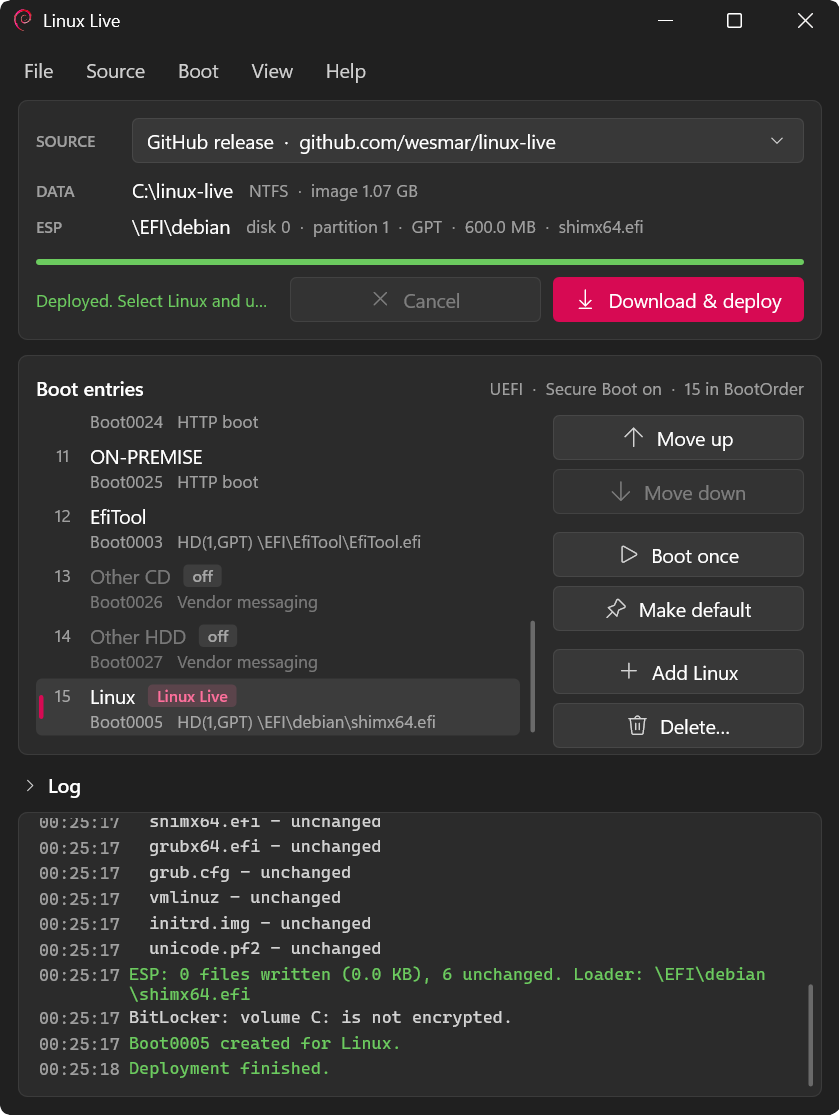
LinuxLive.exe on Windows 11: deployment source, data folder, ESP, the UEFI boot entry list with the Linux Live entry, and the deployment log.
Engineering status
LinuxLive.exedeploys and boots a complete Linux live system that resides as a single file on the Windows NTFS volume. The boot chain is the standard Microsoft-signed shim → distribution-signed GRUB → distribution-signed kernel, so Secure Boot stays fully enforced and no MOK enrolment is needed. BitLocker-encrypted volumes unlock at boot. Verified end to end on a Dell XPS 7590 (Windows 11, Secure Boot ON, BitLocker ON). Debian 13 with the signed 7.2.11 kernel is the reference image; any distribution that ships a signed shim, GRUB and kernel works the same way.Repository policy: the release archive is not password-protected. Git tracks the native Windows C++23 source, project files, language files, test suites and the image build scripts. Binary build artifacts, releases and local packaging tools stay outside the repository.
Linux Live — a Signed Linux System on the Windows Volume
LinuxLive.exedeploys a Linux live environment to a Windows machine without repartitioning or USB media. The root filesystem is onefilesystem.squashfsstored inC:\linux-live. The signed boot loader lives on the EFI System Partition (ESP) and is started through a dedicated UEFI NVRAM boot entry. After the kernel starts, Linux finds its NTFS container, unlocks BitLocker with the recovery password (stored only after an explicit yes), imports Wi-Fi credentials and SSH keys straight from the Windows installation and mounts the Windows partition read-write at/mnt/win. Runtime changes can be committed to a compressed delta layer (persistence.squashfs). Reverting the installation means removing the folder, the ESP directory and the NVRAM entry.Debian is the representative case, not a special one. The program reads what it needs from the package: the ESP folder is the prefix compiled into the signed GRUB, the folder on the Windows volume is
live-media-pathingrub.cfg. A Fedora package (/EFI/fedora,rd.live.image) goes through the same code.
Table of Contents
- Overview
- Quick Start
- Architecture
- The Boot Chain and What Is Signed
- The Package Decides the Layout
- Inside the Image
- Building the Image
- The Build Steps in Detail
- The Windows Program
- Security Boundaries
- Known Issues
- Testing and Validation
- Source Layout
- Supported Features
- Removing Linux Live
- Building from Source
- Downloads
- License
Overview
Ways of running Linux on a Windows computer, and what each one costs:
| Way | What it costs | Secure Boot | Hardware access |
|---|---|---|---|
| WSL 2 | a VM without its own kernel on the hardware | stays on | virtualised GPU, no Wi-Fi card, no firmware |
| Live USB | a stick and the boot menu every time | depends on the distribution | full |
| Dual boot | repartitioning, a second installed system | needs a signed distribution | full |
| Disabling Secure Boot | a weaker platform, BitLocker recovery prompts | off | full |
| Linux Live | 1.1 GB file on C:, 57 MB on the ESP | stays on | full — real kernel, real drivers |
Typical uses: Linux with full hardware access on a BitLocker-protected laptop without touching its partitioning; a rescue and diagnostics system that is always there (efibootmgr, mokutil, nvme-cli, cryptsetup, parted, gdisk, msr-tools, tcpdump); new hardware that needs a current kernel — the reference image runs the signed 7.2.11 kernel from Debian backports.
Design principles:
- Official signatures, byte for byte. shim, GRUB and the kernel come unchanged from the distribution packages, so Secure Boot works without custom key enrolment.
- The package decides the layout. Paths and the ESP folder are read from the package, not hardcoded in the executable.
- Clean build lifecycle. Image builds run in isolated tmpfs trees; the result contains no stale logs, caches, machine identifiers or embedded credentials.
- Explicit user consent. Two operations need a yes: saving the BitLocker recovery password on the ESP (
--bitlocker-key) and shrinking the Windows partition for a dedicated boot partition (--boot-partition). - Strict compiler standards. C++23, built cleanly with
/W4 /WX /sdl /guard:cf /CETCompat /Breproon MSVC.
Quick Start
LinuxLive.exe is one executable with two front ends: an interactive Direct2D application and an automation-friendly command line. Both need an elevated (Administrator) session and a UEFI system.
GUI
- Download
LinuxLive.7zand extract it. - Run
LinuxLive.exeas Administrator. - Click Download & deploy. The program downloads
filesystem.squashfsandesp.tar, verifies SHA-256 digests, fills the ESP, createsC:\linux-live\authorized_keysand adds a UEFI NVRAM entry. - Click Boot once and restart.
Command line
:: 1. Deploy: download release assets, verify SHA-256, configure the ESP, store the BitLocker key
LinuxLive.exe deploy --github --bitlocker-key

:: 2. Boot Linux once, on the next restart only
LinuxLive.exe once

:: 3. Restart now
LinuxLive.exe reboot --yes
Other everyday commands: status (firmware, Secure Boot, BitLocker, layout, ESP, entry), list (UEFI boot entries), default (make Linux the default entry), delete linux --yes (remove the entry and its BCD copies). The complete reference is in Command line.
First minutes in Linux
- Login. Automatic console login as
user(user@debian:~$) with passwordlesssudo. - Network. Ethernet uses DHCP; Wi-Fi profiles and passwords are recovered from the Windows registry at boot. Check with
ping -c 4 linux.org. - Headless SSH. Connect with the emergency π key (
~/.ssh/id_pi), or with any key Windows already trusts — see SSH with the keys of Windows. - Windows drive. The BitLocker volume is unlocked and mounted read-write at
/mnt/win. - Persistence.
save-sessionwrites the session toC:\linux-live\persistence.squashfs;save-session --resetreturns to the pristine image. - Back to Windows.
reboot. Windows Boot Manager starts normally; to enter firmware setup usesystemctl reboot --firmware-setup.
Architecture
Deploy, BootList, Actions"] end SRC["GitHub release
or own URL / file"] NTFS["C:\linux-live
filesystem.squashfs"] ESP["ESP \EFI\debian
shim, GRUB, grub.cfg, kernel, initrd"] BOOT["FAT32 boot partition
kernel, initrd (small ESP only)"] NVRAM["UEFI NVRAM
boot entries, BootOrder, BootNext"] BCD["Windows BCD store
copies of entries"] CLI --> CORE GUI --> CORE CORE -- "HTTPS + SHA-256" --> SRC CORE --> NTFS CORE --> ESP CORE -. "kernel, initrd" .-> BOOT CORE --> NVRAM CORE --> BCD
Two independent halves meet in two places only: the ESP package (esp.tar) and the image (filesystem.squashfs). Everything the Windows program needs to know about the Linux side it reads from the package; everything the Linux side needs to know about the Windows side it reads from the kernel command line and from the Windows volume itself.
The Boot Chain and What Is Signed
| Part | Verified by | Where it lives |
|---|---|---|
shimx64.efi |
firmware, Microsoft UEFI CA in db |
ESP |
grubx64.efi |
shim, distribution key | ESP |
vmlinuz |
shim (shim_lock), distribution key |
ESP or boot partition |
grub.cfg, initrd.img |
not verified — true of every signed distribution | ESP or boot partition |
filesystem.squashfs |
not verified at boot; SHA-256 at download | Windows volume |
This is the normal trust model of signed Linux distributions, not something this project relaxes. See Security Boundaries.
The Package Decides the Layout
A signed GRUB cannot be told where to look: the folder it reads grub.cfg from is compiled into the signed image. Debian's grubx64.efi has a PE section mods; it starts with a grub_module_info64 header (magic mimg, offset, size) followed by typed modules, and the module of type 3 (OBJ_TYPE_PREFIX) holds /EFI/debian. There is no embedded configuration and no cmdpath fallback. Renaming the ESP folder breaks the boot — and on machines that still have \EFI\debian from an earlier installation this goes unnoticed, because GRUB silently reads the old folder.
So the folders are read, not chosen:
| Folder | Source of truth | Read by |
|---|---|---|
ESP folder (EFI\debian) |
the prefix in the signed grubx64.efi |
Install::GrubPrefix() |
Media folder (linux-live) |
live-media-path in grub.cfg, usually through set media= |
Install::MediaFolder() on Windows, /proc/cmdline in Linux |
GrubPrefix() walks the PE section table (bounds-checked reads at every step, 64 MiB limit for the image), strips a device part such as (hd0,gpt1) and accepts only EFI\<name>. MediaFolder() resolves $var and ${var} from set lines, falls back to live (the live-boot default) when nothing is given, and refuses absolute paths, .., reserved characters and undefined variables.
The grub.cfg of the reference package:
set media=linux-live
set live=$prefix
if [ ! -e $live/vmlinuz ]; then
    search --no-floppy --set=root --file /$media/vmlinuz
    set live=/$media
fi
linux  $live/vmlinuz boot=live components live-media-path=$media ignore_uuid noeject noprompt nonetworking ...
initrd $live/initrd.img
The search fallback is what makes the boot partition possible: when the ESP folder holds only the boot loader, GRUB finds the kernel on another FAT partition, and shim still verifies it. The program checks that a package has this fallback before it splits a deployment.
Collisions. The ESP folder is fixed by the signature, so an installed Debian uses the same \EFI\debian. Before deploying, the program reads the grub.cfg already there. If it does not start a live system (boot=live, rd.live.image, root=live:) — or cannot be read — the folder belongs to an installed system and nothing is changed.
Inside the Image
The reference image is Debian 13 (trixie) live, rebuilt in 16 audited steps (Building the Image). The sections below describe what makes it work on somebody else's Windows computer.
Dynamic hardware and runtime discovery
The image is machine-agnostic: no hardcoded partition IDs, UUIDs, interface names, IP addresses or embedded credentials. Every parameter is discovered at start-up:
| What | How it is found at boot |
|---|---|
| media folder | live-media-path= on the kernel command line (from grub.cfg) |
| encrypted volumes | blkid -t TYPE=BitLocker |
| BitLocker recovery password | every FAT partition is mounted read-only and searched for EFI/*/bitlocker.key and <media>/bitlocker.key; the console asks when none works |
| the live medium | live-boot scans block devices, including /dev/mapper/bitlocker*, for <media>/filesystem.squashfs |
| writable Windows view | dmsetup info bitlocker0 decides: second BitLocker mapping, or the plain device |
| Wi-Fi networks and passwords | decrypted from the Windows installation on this disk by regedlin, at every boot |
| wireless interface | the first wl* entry in /sys/class/net |
| addresses, routes | DHCP through systemd-networkd, MAC as client identifier |
| DNS servers | collected from all current DHCP leases whenever a lease changes |
| "network is up" | a default route exists (polled, 8 s at most) |
| SSH keys and host key | C:\ProgramData\ssh and <media>\authorized_keys of this Windows |
| live user | getent passwd 1000 |
| time zone | live-config.timezone= on the kernel command line |
| console font | framebuffer width in /sys/class/graphics/fb0/virtual_size |
| persistence file | <media>/persistence.squashfs on the Windows volume |
The discovery is plain shell in /usr/local/bin and the initrd (console-font.sh, network-ready.sh, update-dns.sh, wifi-connect.sh, ssh-import.sh, mount-win.sh, wll-commit, unlock-bitlocker) plus the compact regedlin binary (60 KB). All logic is open and can be read on the running system.
The initrd
Three concatenated parts, each kept the way the kernel expects it:
early microcode
uncompressed newc cpio"] B["part b
kernel modules for storage and file systems
uncompressed newc cpio, padded to 512 bytes"] C["part c
init, live-boot, cryptsetup, scripts, userspace
newc cpio, zstd -19 -T0"] A --> B --> C
The steps split the file by walking the newc headers (110-byte header, name and data aligned to 4 bytes) to each TRAILER!!!, skipping the zero padding between archives. Searching for the zstd magic instead would be wrong: the magic can occur inside a module. A step repacks only the part it changes — archives are written in LC_ALL=C sort order — and compares the other parts byte for byte afterwards.
The initrd is trimmed so that it fits small ESPs, and the trimming is checked, not guessed:
- GPU, network and InfiniBand drivers are removed from part b; they load after the switch to the image, together with their firmware, which lives only in the image.
- Server storage is removed: SCSI HBAs except
sd_mod,sr_mod,sg, virtio, Hyper-V and VMware paravirtual; device-mapper exceptdm-mod,dm-crypt,dm-zero; network and server file systems (NFS, btrfs, xfs, f2fs, …); sound, FireWire, NVDIMM, watchdogs. - Modules whose dependencies are gone are removed in a loop until nothing changes, so
modules.depnever points at a missing file;hv_storvscis restored for Hyper-V guests. - After each trim
depmodrebuilds the index andmodprobe --show-dependsagainst the trimmed tree must resolve every module needed to reach the image:vfat ntfs squashfs overlay loop nvme xhci_pci usb_storage uas sd_mod ahci dm_crypt dm_zero xts af_alg algif_skcipher hv_storvsc hv_vmbus virtio_blk virtio_scsi vmd mmc_block sdhci_pci ufshcd_pci usbhid hid_generic efivarfs nls_cp437 nls_ascii nls_utf8. One missing module stops the step and leaves the previous initrd in place.
How a step changes the initrd
Every initrd change in the build steps follows the same procedure:
- Split.
initrd_split.py <initrd> <dir> savewalks the file: zero padding between archives is skipped, each newc header is read (file size at bytes 54–62, name size at 94–102, both followed by 4-byte alignment) and entries are counted up toTRAILER!!!. The first zstd frame (28 b5 2f fd) ends the walk; everything from there is written aspartc.zst. Insavemode the helper refuses unless exactly two cpio archives precede it — the structure this initrd must have. - Unpack. Part b with
cpio -idm, part c throughzstd -dcq | cpio -idm. - Change modules in part b.
depmod -bexpects<root>/lib/modules; a merged-/usrtree may have nolib, so the step creates a temporarylib -> usr/liblink fordepmodand removes it again — only when it created it itself.modules.orderis filtered to files that exist;modules.builtin*comes from the full module tree of the image. - Keep both halves consistent. The kernel unpacks the concatenated archives one after another into the same root, and a file from a later archive replaces the same file from an earlier one. Part c carries its own copy of the module index; a stale copy there would win over the fresh one in part b. Every step therefore copies the rebuilt
modules.*files into part c as well. - Repack.
find . -mindepth 1 | LC_ALL=C sort | cpio -H newc -ofor a stable order; part b padded with zeros to a 512-byte boundary; part c compressed withzstd -19 -T0; part a padded to 512 bytes; the three concatenated. - Verify. The new file is split again with the same helper (two cpio archives and a zstd frame, or the step fails),
zstd -ttests the frame, andcpio -itmust list the files the step is about (init,9990-main.sh,9990-misc-helpers.sh,00_mount_efivarfs,unlock-bitlocker,cryptsetup,dm-crypt,vfat,ntfs,nvme, …).
Modules are always copied as the .ko.xz files of the Debian package — never rebuilt, never recompressed. Their signatures stay valid, which matters: with Secure Boot on the kernel loads only signed modules.
Kernel and firmware
- The kernel is the signed
linux-image-amd64from trixie-backports, 7.2.11+deb13. Moving to it, step 10 carried the trimmed module set over by name, added the dependencies the new kernel needs and checked the list above again. - Newer Intel Wi-Fi firmware (
firmware-iwlwifi) comes from the Debian archive; its SHA-256 is compared with thePackages.xzindex of the archive before it is installed, not only with what was downloaded. - The NTFS driver is the kernel's new
ntfsdriver (NTFSPlus) instead ofntfs3from Paragon; live-boot is patched to mount the live medium with it (ro,noatime,nocase,windows_names,iocharset=utf8). NTFSPlus was chosen for its write path, which/mnt/winand persistence depend on. It is a young driver and still has a few bugs — see Known Issues.
BitLocker in the initrd
/usr/sbin/unlock-bitlocker runs before live-boot scans the disks (a one-line patch in 9990-main.sh, after udevadm settle):
blkid -t TYPE=BitLockerfinds encrypted volumes; without one nothing happens.- The modules are loaded explicitly (
dm_mod dm_crypt dm_zero xts cbc ecb aesni_intel af_alg algif_skcipher algif_hash vfat nls_*);DM_DISABLE_UDEV=1, because there is no udev to create the nodes. - Candidate recovery passwords are collected from every FAT partition:
EFI/*/bitlocker.key(whereLinuxLive.exewrites it, next to the boot loader) and<media>/bitlocker.key, with the media folder taken fromlive-media-path. No folder name is assumed. The copies stay in/run/bitlocker-keys(RAM, mode 700); the directory is removed before the real system starts. - Each volume is opened with
cryptsetup open --type bitlk --readonly --disable-locks --disable-keyringas/dev/mapper/bitlockerN, trying each candidate; without a working key the password is asked on the console. - live-boot's block-device scan skips device-mapper nodes, so
9990-misc-helpers.shis patched to check/dev/mapper/bitlocker*first; it finds/linux-live/filesystem.squashfsinside.
The unlock is read-only, the key protectors are not changed, and the recovery password is the one Windows already has. cryptsetup was copied into the initrd together with the libraries ldd reports; a library that already exists is compared, and libc or the loader differing between image and initrd stops the step.
What Windows provides, and what stays untouched
BitLocker on a Windows laptop normally has a TPM protector and a numerical recovery password protector. The 48-digit recovery password is what Windows itself asks for when the TPM refuses to release the key, and what Microsoft account, Entra ID or Active Directory backups store. Linux Live uses exactly this protector — the one Windows designed for "the boot path has changed" — and nothing else:
- Read on Windows through the documented interface. An administrator's
Win32_EncryptableVolume.GetKeyProtectorNumericalPasswordcall, after an explicit yes (BitLocker on the Windows side). - No protector is added or removed, BitLocker is not suspended, no registry value of Windows or BitLocker is changed, the TPM is not used from Linux.
- The metadata is never written.
cryptsetup open --type bitlk --readonlyreads the FVE metadata and builds a device-mapper table:cryptsegments for the NTFS data andzerosegments over the BitLocker metadata areas — this is whydm_zerobelongs to the required modules. Neither the read-only view nor the read-write/mnt/winmapping, which reuses the same table, can reach the metadata: reads there return zeros, writes are discarded. - Why not the TPM. The TPM protector is sealed to the measurements of the Windows boot path. Linux starts different code (shim, GRUB, the kernel), so the TPM would not release the key, and trying would add nothing but a failed unseal attempt.
- Windows boots normally afterwards. The next Windows start goes through its own boot path again, the measurements match and the TPM releases the key as before. On the test laptop Windows started without a recovery prompt after every Linux session.
Secure Boot is kept, end to end
- No MOK, no key enrolment in shim, no
mokutil --disable-validation, no change todbordbx. shim verifies GRUB and the kernel with the distribution certificate built into it. - Debian's kernel switches to lockdown (integrity mode) when started with Secure Boot, and that stays on: only signed modules load — the trimmed initrd keeps the original signed modules — and kexec of unsigned kernels,
/dev/memand raw MSR writes are refused. mokutil --sb-statereportsSecureBoot enabledinside the running system;LinuxLive.exe statusreports Secure Boot on before and after.- Windows Boot Manager, its files on the ESP and its NVRAM entry are not modified; only the new entry is added, appended to BootOrder.
Two views of one volume
The running root file system is a squashfs file on the Windows volume, so the live medium has to stay mounted read-only for the whole session. Writing to Windows through that mount would mean remounting the medium under the running system. mount-win.sh gives Linux a second, independent view instead:
BitLocker volume"] B0["/dev/mapper/bitlocker0
cryptsetup bitlk, read-only"] B1["/dev/mapper/bitlocker_rw
same table and key, read-write"] MED["/run/live/medium
ntfs, ro"] L0["loop0
linux-live/filesystem.squashfs"] L1["loop1
linux-live/persistence.squashfs"] TMP["tmpfs
session changes"] ROOT["overlay root /"] WINV["/mnt/win
ntfs, rw, nocase, windows_names"] PART --> B0 PART --> B1 B0 --> MED MED --> L0 MED --> L1 L0 --> ROOT L1 --> ROOT TMP --> ROOT B1 --> WINV
dmsetup table --showkeys bitlocker0 | dmsetup create bitlocker_rw
mount -t ntfs -o rw,noatime,nocase,windows_names,iocharset=utf8 /dev/mapper/bitlocker_rw /mnt/win
The second device-mapper target reuses the decryption table of the first one — no password is asked twice and no key is written anywhere. To the kernel these are two block devices and two file systems: the read-only one keeps serving the root image, the read-write one is free to change files. The images are never modified in place (persistence is written as a new file and renamed), so the running root is not affected by writes through /mnt/win. Without BitLocker the medium device itself is mounted a second time. nocase,windows_names keeps Windows semantics: case-insensitive lookups and no names Windows could not open. No FUSE, no ntfs-3g: the build checks that neither package is installed.
mount-win.service starts after run-live-medium.mount and stops before umount.target; /mnt/win also serves wll-commit.
Network: DHCP, routes, DNS and Wi-Fi from the Windows registry
- Wi-Fi credentials come from Windows, not from the image. The image's
wpa_supplicant.confholds onlyctrl_interface,update_configandcountry. When/run/live/medium/Windowsexists,wifi-connect.shrunsregedlin wifi --sync /run/live/medium, and the networks Windows knows work in Linux without typing a password. When no Windows tree is readable nothing is synced and nothing fails. - One DHCP client.
systemd-networkdowns every interface.networking.service,ifup@.service,ifupdown-pre.serviceandifupdown-wait-online.serviceare masked, so ifupdown cannot start a second client;nonetworkingon the kernel command line keeps live-boot's own initramfs networking out. - The same address as Windows.
ClientIdentifier=macmakes the DHCP server see the same client as under Windows, so Linux usually gets the same lease — and SSH reaches the machine at the same address in both systems. - Route preference. Wired links get route metric 100, wireless 600, so a cable wins automatically;
IgnoreCarrierLoss=3son wireless rides out roaming between access points without dropping addresses. - DNS.
update-dns.pathwatches/run/systemd/netif/leases;update-dns.shcollects the DNS servers of every lease, appends 1.1.1.1, 8.8.8.8 and 1.0.0.1 as fallbacks and writesresolv.confwithout duplicates, in order. - A prompt with a network.
network-ready.service(beforegetty@tty1) polls for a default route every 0.2 s for at most 8 s, so the login prompt appears when the machine is online, without the longsystemd-networkd-wait-onlinetimeout.
regedlin (regedlin-cli 0.2.2, 60 KB, links only GLib and OpenSSL's libcrypto) is the command-line component of RegEdLin, an offline Windows registry editor I developed from scratch for Linux. It does not depend on libhivex or Python wrappers; it has its own binary parser and writer for the regf hive format. Windows stores Wi-Fi keys encrypted with the machine's DPAPI, so reading them offline means repeating what Windows does at boot:
Windows\System32\config\SYSTEM: the boot key, scattered over the class names of fourControl\Lsasubkeys of the current control set;Windows\System32\config\SECURITY:Policy\PolEKListdecrypted with the boot key gives the LSA key, which decrypts the LSA secretPolicy\Secrets\DPAPI_SYSTEM\CurrVal— the DPAPI keys of the machine;Windows\System32\Microsoft\Protect\S-1-5-18\User: the SYSTEM account's DPAPI master keys, unlocked with those keys;ProgramData\Microsoft\Wlansvc\Profiles\Interfaces\{interface}\*.xml: each profile's<keyMaterial>is a DPAPI blob, decrypted with the master key (AES-256, SHA-1 HMAC, OpenSSL EVP);- the result is written as
network={ ssid=... psk=... }blocks to/etc/wpa_supplicant/wpa_supplicant.conf— on the overlay's tmpfs, so in RAM.
Nothing is written to Windows and nothing is cached in the image; the passwords are recovered again at every boot from the installation that is actually on the disk. The same binary offers info, ls, dump and find on any hive file and wifi <SOFTWARE> to list the networks Windows remembers (NetworkList\Profiles) — small, scriptable diagnostics for an offline Windows from the live system.
The same network as Windows, and priorities
Why ClientIdentifier=mac matters. DHCP servers identify a client by option 61 (client identifier) when it is present, not by the MAC address in the packet header. Windows sends hardware type 1 followed by the MAC. systemd-networkd sends a DUID-based identifier by default (RFC 4361) — to the server a different client: a different lease, a different address, and no match for reservations or access rules bound to the Windows client. ClientIdentifier=mac makes networkd send 01:<MAC> exactly like Windows, so the server sees the same machine. Without it Linux would land on a different address, or not get onto networks that admit only reserved clients at all.
Everything is chosen by priority, nothing by fixed name:
- Interfaces are matched by pattern (
en*,eth*,wl*), never by name or MAC; a USB adapter or a docking station works like the built-in port. - Default routes carry metrics — wired 100, wireless 600. The kernel uses the lowest metric, so plugging in a cable moves traffic to it at once and unplugging falls back to Wi-Fi, without reconfiguration.
- DNS servers are taken in this order: those of the current DHCP leases as they are found, then 1.1.1.1, 8.8.8.8, 1.0.0.1; duplicates are dropped keeping the first occurrence. The resolvers of the local network — local names, captive portals, company DNS — come first; public ones are only the fallback. The list is rebuilt whenever a lease changes, not once at boot.
- Wi-Fi networks are whatever Windows remembers on this disk, with the passwords Windows stored for them.
SSH with the keys of Windows
sshd accepts public keys only:
HostKey /etc/ssh/ssh_host_ed25519_key
PubkeyAuthentication yes
AuthenticationMethods publickey
PasswordAuthentication no
KbdInteractiveAuthentication no
PermitRootLogin prohibit-password
At boot ssh-import.sh:
- reads
C:\ProgramData\ssh\administrators_authorized_keys— the keys that already open an administrator session on this Windows — andC:\<media>\authorized_keys; NUL bytes, CR, UTF-8 BOM and UTF-16 byte-order marks are stripped, so files saved by Windows editors work; - installs the keys for root and for the live user (uid 1000, passwordless sudo —
Users\*\.sshkeys are deliberately ignored); - reuses the Windows host key
ssh_host_ed25519_key, so clients that know the machine from Windows see the same host key in Linux; - creates
/run/ssh-keys-imported;ssh.servicehasConditionPathExists=on it and does not start without imported keys.
Automatic emergency key (π) and custom SSH keys
The Windows OpenSSH server is an optional feature, so many machines have no C:\ProgramData\ssh\administrators_authorized_keys. To make headless SSH work out of the box on any system, LinuxLive.exe creates C:\linux-live\authorized_keys during deployment when the file does not exist yet. It holds a deterministic emergency public key derived from the mathematical constant π:
ssh-ed25519 AAAAC3NzaC1lZDI1NTE5AAAAIIdXmgotoDC4ToQLmyyveTQDpuaV/QLio8d/qPXejYUIThe Ed25519 private seed is the 32 ASCII characters 31415926535897932384626433832795 (the first 32 digits of π) behind the standard PKCS#8 header 302e020100300506032b657004220420. To connect from another machine, save the private key as ~/.ssh/id_pi:
printf -- '-----BEGIN PRIVATE KEY-----\n%s\n-----END PRIVATE KEY-----\n' \
  "$(printf '\x30\x2e\x02\x01\x00\x30\x05\x06\x03\x2b\x65\x70\x04\x22\x04\x2031415926535897932384626433832795' | base64)" \
  > ~/.ssh/id_pi && chmod 600 ~/.ssh/id_pi
ssh-keygen -y -f ~/.ssh/id_pi        # prints the public line above
ssh -i ~/.ssh/id_pi root@<IP>        # or user@<IP>
From Windows PowerShell:
ssh -i $HOME\.ssh\id_pi root@<IP>Replace the emergency key. Anyone can compute the private key from the constant π, so it gives no secrecy on an open network:
- Recommended: generate your own pair (
ssh-keygen -t ed25519) and replaceC:\linux-live\authorized_keyswith your public key. - Acceptable only when the machine sits behind a firewall on an isolated private network and you want an emergency key you can reconstruct from a formula without storing a secret file.
- Never copy the π key into
C:\ProgramData\ssh\administrators_authorized_keys. It belongs in the live Linux bootstrap only.
From an elevated PowerShell:
ssh-keygen -t ed25519                                    # creates %USERPROFILE%\.ssh\id_ed25519(.pub)
Get-Content $env:USERPROFILE\.ssh\id_ed25519.pub |
    Set-Content C:\linux-live\authorized_keys            # replaces the emergency key with your own
ssh-import.sh copes with every encoding Windows tools produce: Add-Content, Set-Content, PowerShell 5.1 redirection (UTF-16) and Notepad (UTF-8 with or without BOM, CRLF). NUL bytes, CR and byte-order marks are stripped, and keys present in both files are imported once.
The image contains no host keys; the HostKey lines for RSA and ECDSA are removed so live-config does not generate them. The build steps tested this in a RAM overlay with a temporary sshd on 127.0.0.1:2222 and a fake Windows volume: key login works for root and the user; a wrong key, a password and keyboard-interactive are refused; files with BOM + CRLF and a UTF-16 file are imported.
Persistence as a delta squashfs
save-session (a symlink to wll-commit) packs the upper layer of the overlay — everything changed during the live session — into C:\<media>\persistence.squashfs (zstd level 15, 1 MiB blocks), merged with the persistence layer loaded at boot. On the next boot live-boot mounts the squashfs containers in alphabetical order and stacks filesystem.squashfs, persistence.squashfs and a fresh RAM tmpfs.
save-session             # persist session changes to C:\linux-live\persistence.squashfs
save-session --status    # layer size and modified files still residing in RAM
save-session --auto-on   # save automatically at shutdown (--auto-off to disable)
save-session --reset     # remove the persistence layer, back to the pristine base image
Excluded from a save: tmp, var/tmp, var/log, var/cache/apt/archives/*.deb, run, mnt, media. The new layer is written as persistence.squashfs.new.<pid>, synced and renamed over the old one, so an interrupted save leaves the previous layer intact. The media folder comes from live-media-path, like everywhere else.
Console, clock, locale and boot time
- Console font by resolution.
console-font.shreads the framebuffer width from/sys/class/graphics/fb0/virtual_sizeand switches tty1–6 toLat2-TerminusBold32x16on screens 2560 pixels wide or more. - Local-time RTC. Windows keeps the hardware clock in local time:
/etc/adjtimesaysLOCAL. live-boot is patched to link/etc/localtimefromlive-config.timezone=on the kernel command line before systemd starts — live-config would set it too late and the clock would be off by the zone offset until then. en_US.UTF-8is prebuilt inlocale-archive;etc/.updatedandvar/.updatedcarry the timestamp of/usr, soldconfigand the other "needs update" units do not run at every boot.- journald is volatile (16 MB); sysstat, apt-listchanges, cups, colord, lm-sensors, smartd and e2scrub are masked.
- Measured on the XPS 7590: kernel 4.5 s, userspace 14.4 s; SSH answers 15–20 s after the restart.
Pre-installed diagnostics and image footprint
The image carries the tools for recovery, partition management and hardware diagnosis: efibootmgr, mokutil, cryptsetup, nvme-cli, parted, gdisk, msr-tools, tcpdump, dosfstools, squashfs-tools and regedlin. Packages follow Debian backports.
Build verification keeps the squashfs clean and stateless: zero SSH host keys, an uninitialised machine-id, no shell history, empty /var/log and /tmp, no cached APT archives, no credential backups, and no FUSE or ntfs-3g packages (only the in-kernel NTFS module is used).
Building the Image
tests/linux/build-steps/ is the complete recipe of the reference image, in the order it was applied:
| Step | What it does |
|---|---|
| 01 | purge leftover packages, systemd-networkd profiles, DNS from leases, local-time RTC; trim GPU/network drivers from the initrd |
| 02 | cryptsetup and the BitLocker unlock in the initrd; live-boot patches for /dev/mapper/bitlocker* |
| 03 | key lookup on every FAT partition; console font by resolution |
| 04 | remove Wi-Fi credentials from the image; install regedlin |
| 05 | trim server storage, network file systems and hwdb from the initrd |
| 06 | key-only sshd with Windows keys and host key; functional login tests |
| 07 | second key source in the media folder; tests with BOM, CRLF and UTF-16 files |
| 08 | dependency-consistent module set, timezone before systemd, volatile journal, network-ready |
| 09 | prebuilt locale, faster network wait, console-only service set |
| 10 | signed 7.2 kernel from backports, newer Wi-Fi firmware (index-verified), NTFSPlus in live-boot |
| 11 | root login with the same keys |
| 12 | low-level tools, /mnt/win read-write through the second BitLocker mapping |
| 13 | full upgrade, nothing left upgradable |
| 14 | squashfs-tools and the persistence tools |
| 15 | no folder names in the system: layout from grub.cfg, folder-agnostic BitLocker key lookup |
| 16 | real unmount of /mnt/win at shutdown, persistence auto-save ordered before it (prepared, not yet in the released image) |
filesystem.squashfs"] UNPACK["unsquashfs into
private tmpfs in /dev/shm"] WORK["change the tree
chroot with /dev /proc /sys bound in"] DIFF["metadata + SHA-256 of every file
before / after, print the difference"] PACK["mksquashfs -comp xz -Xbcj x86
-b 1M -noappend"] PART["write .part
unpack again, compare SHA-256"] FIN["rename to the final file
write .sha256"] PREV --> UNPACK --> WORK --> DIFF --> PACK --> PART --> FIN
Every step:
- works only in a private tmpfs under
/dev/shm, removed by anEXIT INT TERM HUPtrap — also on failure; the/dev,/procand/sysbind mounts used for chroot work are unmounted by the same trap; - records metadata (
type mode uid gid size path -> target) and the SHA-256 of every file before and after, and prints the difference; - applies text patches only when the expected text occurs exactly once, and checks shell syntax (
sh -n,bash -n) and units (systemd-analyze verify) afterwards; - installs packages with
policy-rc.dreturning 101, so no daemon starts inside the build, and removes it again; - verifies the packed image by unpacking it, writes the result to
.part, compares SHA-256 and renames.
The image file
- Each step unpacks the previous image with
unsquashfsinto the tmpfs, works on the tree — package changes in a chroot with/dev,/procand/sysbound in — and packs it again withmksquashfs -comp xz -Xbcj x86 -b 1M -noappend. The BCJ filter turns relative x86 call targets into absolute ones before compression, so machine code compresses noticeably better; 1 MiB blocks suit an image that is read sequentially at boot and randomly afterwards. - The kernel lives in the image only as its modules:
vmlinuzand the initrd travel inesp.tar, and/boot,/vmlinuz,/initrd.imgand the old kernel's modules are removed from the image, so nothing is stored twice. - Before every pack the build removes what a package manager leaves behind — apt lists and archives,
pkgcache.bin,*-oldfiles of dpkg and debconf, compressed apt logs,__pycache__,/root/.cache, account backup files — empties every log file and both temporary directories, and refreshes the.updatedstamps so they match/usragain. - The reference result: 1.07 GB, 80 017 inodes, signed files byte-identical to the Debian packages.
At run time the image is never written: live-boot stacks it read-only under the optional persistence layer and a tmpfs (overlayfs), so a session changes only RAM until wll-commit saves it.
Run the steps in WSL 2 as root; initrd_split.py is the helper the initrd steps use.
The Build Steps in Detail
Each step names what it changes and how the change is checked. The scripts are in tests/linux/build-steps/; they record the path the reference image took, starting from a Debian 13 live image.
01 — clean image, network, clock, first initrd trim
- Leftovers purged with
dpkg --purgein a chroot (Python crypto packages left from earlier tooling), followed bydpkg --auditand a listing of every package not in stateii. - Test traces removed:
__pycache__directories,/mnt/c,systemd-units-load,sources.list, apt caches,*-oldfiles of dpkg and debconf,/boot/initrd.img-*,/initrd.img. - Network:
20-wired.network(en*eth*, DHCP, metric 100) and25-wireless.network(wl*, DHCP, metric 600,IgnoreCarrierLoss=3s);update-dns.shwithupdate-dns.path/.service;wifi-connect.sh; ifupdown masked (networking,ifup@,ifupdown-pre,ifupdown-wait-onlinelinked to/dev/null) and removed from the targets that wanted it. - Clock:
/etc/adjtimewithLOCAL. - Checks:
sh -nfor the new scripts,systemd-analyze --root verifyfor the new units; after packing, the image is unpacked again and compared file by file with the original — metadata and content differences are listed, and kernel modules, firmware,regedlin,mcandwpa_supplicantmust be untouched. - initrd: GPU, network and InfiniBand drivers removed from part b and firmware from part c;
modules.orderfiltered;depmod; the presence ofvfat ntfs3 squashfs overlay loop nvme xhci-pci ahciinmodules.depis counted.
02 — BitLocker unlock in the initrd
- cryptsetup is fetched into a RAM overlay of the image (the squashfs as lower layer, a tmpfs as upper): the image itself is not changed by this step.
- Binary and libraries:
cryptsetupis copied into part c together with every librarylddreports. A library already in the initrd is compared: identical — kept; different — replaced;libc.so.6orld-linux-x86-64.so.2different — the step stops, because a mismatched C library would break everything else in the initrd. - Kernel modules:
modprobe -d <image> --show-dependsfordm_mod dm_crypt dm_zero xts cbc ecb aesni_intel aes_generic af_alg algif_skcipher algif_hashlists every module and dependency; the missing ones are copied from the image's module tree into part b, thendepmod. unlock-bitlockerand the two live-boot patches (the call afterudevadm settlein9990-main.sh, the/dev/mapper/bitlocker*scan in9990-misc-helpers.sh), each applied only when its anchor text occurs exactly once, thensh -non all three files.- Proof that it runs: part c is copied, and
chroot <copy> /usr/sbin/cryptsetup --versionand--help | grep bitlkmust succeed — cryptsetup starts with nothing but the initrd's own libraries and supports BITLK.
03 — key lookup on every FAT partition, console font
- initrd: the key is looked for on every
vfatpartition instead of one with a fixed label; part b is compared byte for byte with its previous version and must be unchanged. - Image:
console-font.shandconsole-font.service(afterconsole-setupandsystemd-vconsole-setup); metadata difference printed after packing.
04 — no credentials in the image, regedlin
- The
psk=values of the oldwpa_supplicant.confare collected into the tmpfs only to search the rest of the image for copies; the search prints paths, never values. The list is deleted afterwards. wpa_supplicant.confis reset toctrl_interface,update_config,country, mode 600; the check after packing countspsk=lines — zero.regedlinis installed with mode 755, owner root, and its SHA-256 compared with the source binary after packing.wifi-connect.shis patched by exact lines: regedlin's output goes to/dev/null, and the comment says the image ships no credentials.
05 — second initrd trim
- Microcode is measured, not cut: Intel microcode blobs are grouped by CPU family and model to see how much belongs to laptop CPUs since 2015 — the numbers are printed, part a stays complete.
- Removed from part b: SCSI drivers except
scsi_mod scsi_common sd_mod sr_mod sg virtio_scsi hv_storvsc vmw_pvscsi; device-mapper exceptdm-mod dm-crypt dm-zero; block drivers exceptloop virtio_blk;btrfs xfs nfs nfs_common nfsd lockd netfs f2fs reiserfs jfs jffs2 udf hfs hfsplus; network stack modules, sound, FireWire, NVDIMM, watchdogs, message-based and target drivers. - Removed from part c:
hwdb.binand the thin-provisioning tools (pdata_tools,thin_*,cache_*,era_*) — after checking that no initrd script refers to them. - Gate: the list of modules needed to reach the image is resolved with
modprobe --show-dependsagainst the trimmed tree; one missing module and the step ends without writing anything.
06 — key-only sshd with the keys of Windows
openssh-serverinstalled in a chroot withpolicy-rc.dreturning 101 (no daemon starts in the build); host keys deleted;10-key-only.conf;ssh-import.sh,ssh-import.serviceand thessh.servicedrop-in withConditionPathExists=/run/ssh-keys-imported.ClientIdentifier=macadded to both network profiles.- Cleanup: apt lists and archives, caches, logs,
tmp;machine-idsize and host key count printed. - Functional test in a RAM overlay of the new image, with the real Windows volume bound read-only as the live medium: a user with uid 1000 is created,
ssh-import.shruns, the permissions of.sshandauthorized_keysand the imported host key's fingerprint are compared with the Windows one,sshd -tand the effectivesshd -Tsettings are printed, andsshdon 127.0.0.1:2222 must accept a test key for the user and refuse a wrong key, a password and root.
07 — second key source and Windows file formats
ssh-import.shmergesProgramData\ssh\administrators_authorized_keysand<media>\authorized_keys.- Tested with a fake Windows volume in the overlay: no files at all (no keys, no marker, sshd stays off); only
authorized_keyswith a BOM and CRLF; both sources plus the Windows host key; the Windows file saved as UTF-16. passwd-,shadow-,group-,gshadow-,subuid-,subgid-and.pwd.lockremoved.
08 — boot time and cleanliness
HostKeylines for RSA and ECDSA removed, so live-config does not generate those keys at boot./etc/localtimedefaults to UTC; the zone comes from the kernel command line through a live-boot patch inserted before theNetbasecall in9990-main.sh.- journald
Storage=volatile,RuntimeMaxUse=16M;/var/log/journalremoved; sysstat and apt-listchanges masked. network-ready.servicebeforegetty@tty1; the Wi-Fi interface wait reduced from 15 to 5 seconds.etc/.updatedandvar/.updatedwritten with the timestamp of/usrand given its mtime, so the "update done" units are skipped.- initrd:
hv_storvscand its dependencies restored from the image's full module tree; then every module with a dependency that is no longer present is removed, repeated until nothing changes;modules.orderfiltered;depmod; the required-module gate again; the number of kept modules with an absent dependency is printed — zero.
09 — locale, network wait, services
en_US.UTF-8enabled inlocale.genand built withlocale-genin a chroot;locale -aprinted.network-ready.sh: a default route, polled every 0.2 s, 8 s at most.- cups (service, socket, path), cups-browsed, colord, lm-sensors, smartmontools and e2scrub_reap masked and removed from the targets.
- The step checks that the mtime of
/usrdid not change, so the stamps from step 08 stay valid.
10 — signed 7.2 kernel, Wi-Fi firmware, NTFSPlus
- Kernel: a temporary
trixie-backportssource (signed by the Debian archive keyring),linux-image-amd64installed from it withINITRD=No, the 6.12 kernel purged; the remaininglinux-*packages listed. The source file andpolicy-rc.dare removed again. - Firmware:
firmware-iwlwifiis downloaded from the Debian pool and its SHA-256 compared with the entry in the archive'sPackages.xzindex beforedpkg -i; the presence of the newestiwlwifiblobs is listed. - vmlinuz is taken from the new kernel's module directory for the ESP package;
/bootis emptied in the image. - initrd migration: every module of the trimmed 6.12 set is looked up by name in the 7.2 tree,
ntfs.kois added, and the dependency closure from the fullmodules.depis copied; modules that no longer exist in 7.2 are listed, as are the ones pulled in only as dependencies. Thendepmod, the required-module gate (now withntfsinstead ofntfs3), the absent-dependency count, and a search for the old kernel version inconf,scriptsandetcof the initrd — nothing may refer to it. - live-boot for NTFSPlus: the
ntfs3-specific branches are replaced — mount options withoutforce,modprobe -q ntfs, the file system type left as detected;sh -non both files and a count of remainingntfs3references.
11 — root login with the same keys
PermitRootLogin prohibit-password;ssh-import.shalso installs the keys for root.- Tested with a fake Windows volume: root with the key — accepted; the user with the key — accepted; root with a wrong key or a password — refused.
12 — low-level tools and /mnt/win
efibootmgr mokutil cryptsetup nvme-cli parted gdisk msr-tools tcpdump dosfstoolsinstalled without recommends; the step aborts if anyntfs-3gorfusepackage was pulled in; smartmontools masked.mount-win.sh,mount-win.serviceand themnt-win.mountdrop-in.- Each new tool is started once in the chroot (
--version) to prove it runs. - A temporary
resolv.confis used for apt and replaced afterwards;update-dnsrewrites it at run time anyway.
13 — full upgrade
apt-get dist-upgradewithout recommends,autoremove --purge,clean,autoclean; the fuse / ntfs-3g check again; the step refuses to finish whileapt list --upgradableshows any package.
14 — persistence tools
squashfs-toolsinstalled;wll-commitand thesave-sessionlink;/etc/default/wll-persistencewithAUTO_SAVE_ON_SHUTDOWN=0;wll-persistence.serviceenabled; nothing left upgradable.
15 — no folder names in the system
- The GRUB prefix is read from the PE section
modsof the signedgrubx64.efi(an inline parser), andgrub.cfgis generated withset media=and thesearchfallback. - Only part c of the initrd is rebuilt: the bytes before the zstd frame (microcode and modules) are kept verbatim and compared by hash afterwards.
unlock-bitlockeris replaced by the folder-agnostic version. ssh-import.shandwll-commitreadlive-media-pathfrom/proc/cmdline; unit and configuration descriptions renamed. A search for old folder names in/usr/local,/etc/systemd/systemand/etc/defaultmust find nothing.shimx64.efi,grubx64.efi,vmlinuzandunicode.pf2are hashed before and after — the step fails if any of them differs.esp.taris written as ustar with owner and group 0; both outputs go to.partfiles, are compared with SHA-256, renamed, and get.sha256files.
16 — real unmount of /mnt/win at shutdown (prepared)
mount-win.sh stop:sync, a realumount(retried; processes still using/mnt/winare ended after the third attempt), remount read-only as the fallback,umount -lonly as the last resort; the read-write BitLocker mapping is removed afterwards with retries; without BitLocker/run/live/mediumgoes back to read-only.wll-persistence.servicegetsAfter=mount-win.service, so the auto-save finishes before/mnt/wingoes away;mount-win.servicegets a 30-second stop timeout; theLazyUnmount=truedrop-in ofmnt-win.mountis removed.- Not yet part of the released image. It makes the shutdown order right, but it does not by itself keep C: clean — see Known Issues.
The Windows Program
Structure
One executable is both the graphical interface and the command line. It is a GUI-subsystem program; with arguments it attaches to the parent console and runs the command line instead of opening a window. No installer, no service, no driver; settings live in HKCU\Software\KVC\LinuxLive.
| Layer | Content |
|---|---|
app |
command parser, commands, console output and progress bars |
gui |
window, list, log, menus, dialogs, theme |
core |
Deploy (shared by both front ends through a Hooks struct: log, progress, confirmations), BootList (one snapshot of NVRAM for both front ends), Actions |
install |
tar reader and ESP writer, GRUB prefix and grub.cfg parsing |
efi |
NVRAM variables, load options, device paths, BCD copies |
storage |
volume discovery, BitLocker, the boot partition |
net, support |
WinHTTP downloader, SHA-256 (CNG), WMI client, strings, settings, RAII handles |
Errors travel as std::expected<T, std::wstring> with messages ready for the user; cancellation is a std::stop_token passed down to the download and write loops; handles, COM pointers and BSTRs are owned by small RAII types. The front ends never touch Win32 storage or firmware APIs directly.
Volumes without drive letters
The program works with volume GUID paths (\\?\Volume{...}\) and never assigns or needs a drive letter — the ESP is never mounted to one. FindFirstVolumeW / FindNextVolumeW enumerate the volumes, GetVolumePathNamesForVolumeNameW maps them to mount points for display (C:\linux-live instead of the GUID path). The ESP is located through IOCTL_VOLUME_GET_VOLUME_DISK_EXTENTS (disk number and offset of the volume) and IOCTL_DISK_GET_DRIVE_LAYOUT_EX (partition number, type, GPT partition GUID, start and length) — exactly the data an EFI HD() device path needs. With several ESPs, the one that holds a deployed live package wins, then the one on the Windows system disk.
NVRAM boot entries
Boot#### variables are ordinary, non-authenticated UEFI variables: they can be changed with Secure Boot enabled. The program checks GetFirmwareType, enables SeSystemEnvironmentPrivilege (and SeShutdownPrivilege for restarts) with AdjustTokenPrivileges, and uses GetFirmwareEnvironmentVariableExW / SetFirmwareEnvironmentVariableExW in the EFI global-variable namespace.
A new entry is an EFI_LOAD_OPTION built from scratch: attributes, the length of the device path list, the UTF-16 description, then a media HD() node (partition number, start LBA, size in sectors, GPT partition GUID, signature type), a File() node with the loader path and the end node. tests/verify.cpp rebuilds existing entries from the partition data and compares them byte for byte with what the firmware stored. Reading goes the other way: device path nodes are parsed into a short summary (HD(1,GPT), NVMe, firmware application), and entries are matched to the ESP by GPT partition GUID or MBR signature.
- An existing equal entry (same partition, same loader) is reused and never rewritten; a new entry is appended to BootOrder, not put first.
- BootNext for one-time boots; move to the front, up, down, to a position; take out of BootOrder; enable/disable (
LOAD_OPTION_ACTIVE— the rest of the variable is rewritten byte for byte). - Variables are written and deleted with attributes
NV | BS | RT(0x7). Deleting with attributes 0 fails with error 87 on real firmware. - Deleting the entry the system was started from needs
--force; disabling it asks first.
Windows writes deleted entries back
Found while testing: an entry made with bcdedit /copy {bootmgr} — a common way of adding a boot entry from Windows — lives in the BCD store, and its NVRAM variable carries WINDOWS + BCDOBJECT={guid} as optional data. When only the variable is deleted, Windows writes it back at its next start, at the front of BootOrder. On the test laptop such a stale "Debian" entry went before UnderVolter and started Linux instead of Windows.
delete therefore removes the BCD copies too. The optional data of each entry is parsed for BCDOBJECT=; after the variable is deleted, the BCD store is searched for that object and for firmware-application and boot-manager objects with the same loader path and description. The objects are read from the registry: the system store is mounted as the hive HKLM\BCD00000000, readable by SYSTEM only, and an administrator opens it with SeBackupPrivilege and REG_OPTION_BACKUP_RESTORE, so type, ApplicationPath and Description of every object are read locally by plain WinAPI — no process, no file, no text parsing, so the Windows language does not matter. This replaces reading them over the BCD WMI provider, where every BcdObject call re-opens the system store (about 300 ms each, 10 s for a store with 33 objects). If the hive cannot be opened or read, the same search runs over WMI (root\WMI: BcdStore.EnumerateObjects, BcdObject.GetElement). The objects found are deleted through the BCD WMI provider (BcdStore.OpenStore, BcdStore.DeleteObject) — the documented interface behind bcdedit — with the store opened once, and only when there is something to delete. {bootmgr}, {fwbootmgr} and \EFI\Microsoft\Boot\bootmgfw.efi are never touched, and a copy shared with another remaining entry is kept. A failure to clean the store is reported as a warning; the entry itself is deleted either way.
Deployment
SHA-256 against esp.tar.sha256"] LAY["read the layout:
GRUB prefix + live-media-path"] COL{"ESP folder used by
an installed system?"} STOP["stop, nothing changed"] IMG["image to the media folder on C:
skipped when the verified copy is current"] FIT{"fits on the ESP
with the reserve?"} ESPW["shim, GRUB, grub.cfg, kernel, initrd to the ESP"] SPLIT{"boot partition exists
or consent given?"} BPW["kernel + initrd to the boot partition
boot loader to the ESP"] KEY["BitLocker key, after a yes"] ENT["NVRAM entry: create or reuse, append"] SRC --> PKG --> LAY --> COL COL -- "yes" --> STOP COL -- "no" --> IMG --> FIT FIT -- "yes" --> ESPW --> KEY FIT -- "only the boot loader" --> SPLIT SPLIT -- "no" --> STOP SPLIT -- "yes" --> BPW --> KEY KEY --> ENT
- Package first. The layout decides where the image goes, so the package is downloaded and read before the image.
- Integrity. Each download is compared with
<url>.sha256(plain digest orsha256sumformat), hashed with CNG (BCrypt). A copy that was verified once is remembered by path, size, time stamp and hash and is not downloaded or hashed again while the server reports the same file. A missing.sha256file is logged as a warning; the compile-time switchConfig::kRequireSha256(off by default in the source) turns it into a refusal. - WinHTTP. HTTPS with redirects allowed except HTTPS → HTTP; the download is written to
<name>.partand renamed withMOVEFILE_WRITE_THROUGHafter the hash matched, so an interrupted download never replaces a good file. - Tar reader. ustar, pax (
path,size,mtime) and GNU (long names, base-256 sizes); every header checksum is verified, every path sanitised (no.., no drive or reserved characters), files over the FAT32 limit of 4 GB refused. The whole archive is validated — paths, types, sizes and free space — before the first byte is written. - ESP writer. Each file goes to
<name>.tmp, is flushed withFlushFileBuffersand renamed; an unchanged file (same size, time within FAT's 2-second resolution) is skipped. A temporary file is deleted again on any error. - Progress. Steps are weighted by their real cost (hashing a local copy counts a tenth of downloading it), so the bar moves evenly and never goes back; speed and remaining time are shown per step.
A repeated deploy with nothing new finishes in about two seconds.
The ESP reserve for firmware updates
Firmware (BIOS/UEFI) updates stage their capsules on the ESP; a laptop BIOS image alone is 20–40 MB. A deployment always leaves 20 % of the ESP free, never less than 20 MB — 20 MB on an old 100 MB ESP, 40 MB on the 200 MB ESP of current Windows installations. Linux is not worth losing the ability to update the firmware.
Small ESP: the boot partition
Windows 11 24H2 and later create a 200 MB ESP; older installations often have 100 MB, most of it used by Windows. The kernel and initrd (about 54 MB) do not fit there together with the reserve. The signed boot loader has to stay on the ESP — its prefix is part of the signature — but the kernel and initrd do not.
With consent (deploy --boot-partition, or a question in the interface):
- The Windows volume must be clean. The NTFS dirty bit is read with
FSCTL_IS_VOLUME_DIRTY; Windows neither shrinks nor grows a volume that needs repair. - The Windows volume is shrunk by 200 MB with the Windows Storage Management API over WMI (
root\Microsoft\Windows\Storage):MSFT_Partition.GetSupportedSize, thenResize. This is the interface Disk Management, diskpart andResize-Partitionuse; it moves NTFS data out of the way and works on BitLocker volumes. Sizes are aligned to 1 MiB. MSFT_Disk.CreatePartitioncreates a GPT basic data partition in the freed space directly after it, without a drive letter;MSFT_Volume.Formatformats it FAT32 with the labelLINUXLIVE.IOCTL_DISK_SET_PARTITION_INFO_EXnames the partitionLinux Live bootand setsGPT_BASIC_DATA_ATTRIBUTE_NO_DRIVE_LETTER— the Storage API cannot set a GPT partition name. Explorer never shows the partition, and the program finds it again by its GPT name (IOCTL_DISK_GET_PARTITION_INFO_EX) without the registry.- Kernel, initrd and font are written to
<partition>\<media folder>; then their old copies are deleted from the ESP folder — GRUB prefers its own folder, so stale copies there would win — and only shim, GRUB andgrub.cfgare written to the ESP.
After the shrink every failure is rolled back: the new partition is deleted and the Windows volume grown back to its previous size. boot-partition remove --yes (interface: File → Remove boot partition) checks the volume first, deletes the partition and grows the Windows volume to the maximum GetSupportedSize reports. Storage API errors are reported with their extended status; StorageWMI 42008 ("a volume with errors") is translated into the chkdsk instruction.
Tested on the XPS: C: shrunk by 200 MB, the partition created between C: and the Recovery partition, Linux started with BOOT_IMAGE=/linux-live/vmlinuz from it, Secure Boot on — 15 seconds for the whole deployment. When the Windows Recovery partition follows C: (the usual layout) the boot partition sits between them; Microsoft's manual procedure for enlarging the Recovery partition needs that space, so remove the boot partition first.
BitLocker on the Windows side
Win32_EncryptableVolume (WMI, root\CIMV2\Security\MicrosoftVolumeEncryption): GetConversionStatus decides whether the volume is encrypted — "protection off" alone does not mean decrypted, a suspended volume is still encrypted — GetProtectionStatus reports protection, GetKeyProtectors with type 3 lists numerical passwords and GetKeyProtectorNumericalPassword returns one. The password's BSTR is wiped with SecureZeroMemory after use. bitlocker.key is written atomically (.tmp, then MoveFileExW with MOVEFILE_WRITE_THROUGH), compared first so an unchanged key is neither rewritten nor asked about, and removed when the volume is no longer encrypted.
Command line
LinuxLive.exe status                    firmware, Secure Boot, BitLocker, layout, ESP, boot partition, entry
LinuxLive.exe list [--all]              NVRAM entries: BootOrder first, then the others
LinuxLive.exe deploy [--image <url|file>] [--esp <url|file>] [--github]
                     [--bitlocker-key] [--boot-partition] [--no-entry] [--no-progress]
LinuxLive.exe source | source github | source custom --image <..> --esp <..>
LinuxLive.exe add | once [<entry>] | once --clear | default [<entry>]
LinuxLive.exe up|down <entry> | move <entry> <pos> | unlist|enable|disable <entry>
LinuxLive.exe delete <entry> --yes [--force]
LinuxLive.exe boot-partition | boot-partition remove --yes
LinuxLive.exe reboot --yes [--force]
LinuxLive.exe lng-export <file> | lng-check [<file>]
<entry> is a Boot#### number (0006, Boot0006, 6) or linux.
- Console.
AttachConsole(ATTACH_PARENT_PROCESS); colours and redrawn progress bars use virtual-terminal sequences when the console supports them (ENABLE_VIRTUAL_TERMINAL_PROCESSING) and plain lines otherwise. cmd does not wait for a GUI-subsystem program and has already printed its prompt; a synthetic Enter written withWriteConsoleInputWat exit makes cmd print a fresh prompt below the output. - No questions. Confirmations are options (
--yes,--force,--bitlocker-key,--boot-partition), so ssh sessions and scripts behave like a terminal. Output is English, for scripts and bug reports. - Ctrl+C goes through
SetConsoleCtrlHandlerto the samestop_tokenthe interface uses; the deployment stops cleanly and the program exits with 4. - Exit codes:
| Code | Meaning |
|---|---|
| 0 | success |
| 1 | failed |
| 2 | invalid arguments |
| 3 | not possible here (no administrator rights, no UEFI, no ESP) |
| 4 | canceled |
- cmd, batch files and
ssh host commandwait for the program; interactive PowerShell does not wait for GUI-subsystem programs — useLinuxLive.exe list | Out-Hostthere. - Restart uses
InitiateShutdownWwith a planned reconfiguration reason;--forcealso ends other users' sessions.
A typical remote session:
ssh admin@laptop "C:\Tools\LinuxLive.exe deploy --bitlocker-key"
ssh admin@laptop "C:\Tools\LinuxLive.exe once"
ssh admin@laptop "C:\Tools\LinuxLive.exe reboot --yes"
ssh root@laptop                     # the same address, now Linux, the same keys
Graphical interface
- Per-Monitor V2 DPI awareness; layout, fonts and icons are recomputed on
WM_DPICHANGED. - Mica.
DWMWA_SYSTEMBACKDROP_TYPEandDwmExtendFrameIntoClientArea; the client area is drawn with Direct2D into a DC render target with premultiplied alpha, so text and controls blend with the backdrop per pixel. In high-contrast mode the backdrop is off and system colours are used. - Text with DirectWrite; menus are drawn by the program (
WM_MEASUREITEM/WM_DRAWITEM) so they match the theme, with keyboard navigation kept through aWH_MSGFILTERhook; every action is in the menus and has a context menu or a button where it belongs. - Work off the UI thread. A deployment runs on a
std::jthread; log lines and progress are posted to the window with ownership-transferring messages, and confirmations are sent synchronously, so the worker waits for the answer of the dialog. Closing the window during a deployment asks first and requests a stop. - Taskbar progress (
ITaskbarList3), the NVRAM list with move up/down, one-time boot, default, enable/disable and delete, a collapsible log, and the source dialog for custom URLs or files.
Languages
English is built in. Additional languages are plain UTF-8 files in language\<code>.lng next to the executable (<id>=<text>, #name= and #locale= headers, \n for line breaks). The UI language follows the Windows display language through GetUserPreferredUILanguages or is chosen under View → Language, where each translation shows its native name and coverage. Strings are formatted with C++20 std::vformat; a missing string or a mismatched format argument falls back to English.
Shipped: 21 languages (English built in plus 20 files), 293 strings each, 100 % coverage: English, Polish (pl), German (de), Spanish (es), French (fr), Italian (it), Russian (ru), Japanese (ja), Simplified Chinese (zh-cn), Arabic (ar), Portuguese (pt), Ukrainian (uk), Turkish (tr), Korean (ko), Dutch (nl), Czech (cs), Traditional Chinese (zh-tw), Indonesian (id), Vietnamese (vi), Persian (fa), Hindi (hi).
More languages are welcome: export a template with lng-export, translate it and open a pull request.
LinuxLive.exe lng-export language\custom.lng    :: export a template with all IDs
LinuxLive.exe lng-check                         :: validate coverage, missing IDs and format fields
Security Boundaries
Security model and administrator privileges
Linux Live works inside the native Windows security boundary and uses only data that an elevated Windows administrator already has access to through built-in tools:
| What Linux Live uses | Where it comes from | How the Windows administrator already sees it |
|---|---|---|
| BitLocker recovery password | the volume's numerical password protector, read through WMI | manage-bde -protectors -get C: |
| Wi-Fi networks and passwords | WLAN profiles, decrypted with the machine's DPAPI keys | netsh wlan show profile name=<network> key=clear |
| SSH login keys | C:\ProgramData\ssh\administrators_authorized_keys |
the same keys already open an administrator session on Windows |
| SSH host key | C:\ProgramData\ssh\ssh_host_ed25519_key |
Windows' OpenSSH server uses it for every connection |
| the Windows volume | BitLocker unlocked with the recovery password, NTFS mounted | Explorer, as an administrator |
The one place where Linux Live stores a secret somewhere new is bitlocker.key on the ESP — in plain text, on a partition that is not encrypted. It is the price of starting Linux without typing 48 digits, so it is written only after an explicit yes, and the program says so in the question.
Details
- No key enrolment, no signature changes. Everything Secure Boot verifies is distribution-signed and unchanged.
- The unsigned parts are the usual ones.
grub.cfg, the initrd and the squashfs are unsigned on every signed distribution. They are checked with SHA-256 when downloaded; on disk they are as safe as any file an administrator of this Windows can change — an administrator can also replace Windows' own boot files. - The BitLocker recovery password on the ESP is plain text. The ESP is not encrypted; anyone with physical access can read it and unlock C:. It is stored only after an explicit yes and removed again when the volume is no longer encrypted. Without it, Linux asks for the password on the console.
- SSH trusts what Windows trusts. Only
administrators_authorized_keysand the media folder'sauthorized_keysare imported — keys that already give administrator access to this machine. - Wi-Fi passwords add no exposure. regedlin writes them to the overlay's tmpfs, in RAM. The public image contains none; a session saved with
wll-commitis that user's private layer on their own Windows volume. The passwords are the ones an administrator of that Windows already sees withnetsh wlan show profile name=<network> key=clear. - Downloads. HTTPS; no downgrade on redirects; SHA-256 compared before a file replaces the previous one (a missing checksum file is a warning unless
Config::kRequireSha256is switched on at build time). - The media folder is administrator-only for writing. What lies in
C:\linux-liveruns as root in Linux: the image, the persistence layer,authorized_keys, and the cachedesp.tarthat a later deployment may copy to the ESP. The default permissions ofC:\give every authenticated user Modify on new folders below it, so a standard user could otherwise plant a layer or a key and become root in Linux — and reach C: past its Windows permissions. Every deployment therefore sets the folder's DACL explicitly (SetNamedSecurityInfoW, protected): full control for SYSTEM and Administrators, read and execute for Users, nothing inherited fromC:\; the files inside take the same entries. Linux writes there as root through the NTFS driver, which does not apply NTFS permissions, sowll-commitkeeps working. - The boot partition is FAT. FAT has no file permissions; the partition relies on having no drive letter. On machines where untrusted people log on to Windows, an ESP large enough for the kernel is the better place — the ESP itself is not accessible to standard users.
- Disk layout. The Windows volume is changed only for the boot partition, only after consent, and that change can be undone.
Known Issues
NTFSPlus is young and not free of bugs. The kernel's new NTFS driver replaced the old read-only ntfs driver recently, and as an NTFS implementation it still has a few defects. I write NTFS code myself — NTFS_EFI, a read-write NTFS driver for UEFI — and while building this project I found and reproduced defects in NTFSPlus and contributed to fixing them upstream: some twenty to thirty threads of reports, reproductions and patches on the driver's mailing list (ntfs@lists.linux.dev), reviewed by its maintainers (one of the test runs in the driver's repository). One example of the kind of defect involved: $MFT writeback could look up a VCN past the allocated end of the MFT when a folio straddled it, marking the volume erroneous after creating a single file; I reproduced it on arm64 with 16 KiB pages and sent a patch, and the maintainers' ntfs-next branch had meanwhile replaced that code path (commit e543dc6c5f1e). Fixing continues.
C: is left marked dirty after a session that wrote to it. With the Debian 7.2.11 kernel, unmounting /mnt/win — also cleanly, without -l — logs:
ntfs: (device dm-1): ntfs_put_super(): Volume has errors. Leaving volume marked dirty. Run chkdsk.A mount and unmount without writes stays clean. The only other driver message of such a session is is_boot_sector_ntfs(): Invalid boot sector checksum. — the checksum field of the NTFS boot sector is stale on Windows volumes resized after formatting (Windows does not maintain it); in the driver's source that warning alone does not set the error flag. The cause is not identified yet. Consequences on the Windows side: the volume is flagged Scan Needed, Repair-Volume -Scan asks for an offline fix, and the Storage Optimizer refuses to shrink it (0x89000015, "the dirty bit is set"). A restart with the dirty bit set lets autochk repair it in seconds. LinuxLive.exe detects the state before changing partitions and says so instead of failing inside the storage API. Until this is fixed: write to /mnt/win when you need to, and let Windows check C: afterwards.
Fast Startup. A Windows "shut down" with Fast Startup enabled leaves C: hibernated, and the NTFS driver then mounts it read-only (hibernation safety comes first). reboot and once restart Windows fully, so this only matters when Linux is chosen after a shutdown.
BitLocker and the boot path. BitLocker seals its key to the measured boot path. Changing what runs before Windows Boot Manager — for example starting Windows from the firmware menu instead of through an EFI application that normally chains it — makes Windows ask for the recovery password once.
Testing and Validation
End to end on a Dell XPS 7590 (i9-9980HK, Windows 11, Secure Boot on, BitLocker on, UnderVolter as the first boot entry), driven over SSH:
| Test | Result |
|---|---|
| Deploy from HTTPS (LAN): package, layout, 1.07 GB image, SHA-256, ESP, BitLocker key, NVRAM entry | 25 s |
| Deploy again, nothing changed | 1.8 s, 6 files unchanged |
One-time boot: live-media-path=linux-live, BitLocker unlocked from \EFI\debian\bitlocker.key, key copies gone from RAM |
pass |
Linux: Secure Boot enabled, Wi-Fi from Windows profiles, SSH with Windows keys and host key, /mnt/win read-write, no failed units |
pass, 18.9 s to userspace |
Persistence: save, reboot, file present; --reset |
pass |
delete of a bcdedit /copy entry: BCD object removed with it, entry does not come back |
pass |
| ESP filled to 10 % free: deploy without consent refuses, nothing changed | pass |
Deploy --boot-partition: C: shrunk 200 MB, FAT32 partition between C: and Recovery, no drive letter, kernel moved, ESP back to 37 % free |
15 s |
Linux from the boot partition (BOOT_IMAGE=/linux-live/vmlinuz), Secure Boot on |
pass |
tests/ also holds Windows checks against the real machine:
verify.cpp— read-only: every entry rebuilt from the partition data must equal the NVRAM variable byte for byte;nvram_roundtrip.cpp— create, reorder, BootNext, disable/enable, delete; BootOrder and BootNext end byte for byte as they started, restored also when a step fails;- small developer probes:
test_tar.cpp(extracts a package throughInstall::DeployEsp, twice, to see the unchanged-file skip),test_head.cpp(a raw WinHTTP request for the headers of a package URL),test_remote_check.cpp(Net::CheckRemoteon the image and package URLs) andtest_bitlocker_wmi.cpp(the BitLocker WMI calls on their own).
Source Layout
About 10 000 lines of C++23 in src/, plus the image recipe (shell and Python) in tests/linux/build-steps/.
src/app/        Cli.cpp (commands, help, exit codes), Console.cpp (attach, VT output, progress bars), main.cpp
src/core/       Deploy.cpp (download, verify, layout, ESP, boot partition, BitLocker), Actions.cpp,
                BootList.cpp (one NVRAM snapshot for both front ends), Sources.cpp
src/efi/        Efi.cpp (NVRAM variables, load options, device paths), Bcd.cpp (BCD copies of entries)
src/install/    EspInstaller.cpp (tar reader, ESP writer, kernel routing), Layout.cpp (GRUB prefix, grub.cfg)
src/storage/    Volumes.cpp (volume GUID paths, ESP and data volume), BitLocker.cpp (WMI),
                BootPartition.cpp (Storage Management API, GPT name, dirty bit)
src/net/        Downloader.cpp (WinHTTP, progress, .part files)
src/gui/        MainWindow*.cpp, Widgets.cpp, Menus.cpp, Dialogs.cpp, Theme.cpp (Direct2D, DirectWrite, Mica)
src/support/    Wmi.cpp, Text.cpp (strings, .lng files), Settings.cpp, Sha256.cpp (CNG), Handle.h (RAII)
src/resources/  resource.h, lang/en.rc (built-in English), language/*.lng
tests/          Windows checks; linux/build-steps - the image recipe
Supported Features
| Area | Support |
|---|---|
| Host | Windows 10 / 11 x64, UEFI firmware, elevated session |
| Secure Boot | on or off; with it on, only distribution-signed shim, GRUB, kernel and modules are used |
| BitLocker | numerical (recovery) password protector; read-only unlock, read-write second mapping for /mnt/win |
| ESP | any size that can hold the boot loader with a 20 % (min. 20 MB) reserve; kernel and initrd move to a 200 MB FAT32 boot partition on small ESPs |
| Boot entries | create or reuse, BootOrder, BootNext, enable/disable, delete with BCD clean-up |
| Sources | GitHub release, custom URL or local file for the image and the ESP package |
| Interfaces | Direct2D GUI (Per-Monitor V2, Mica) and a scriptable CLI with exit codes |
| Linux side | Debian 13, signed kernel 7.2.11, NTFSPlus, systemd-networkd, key-only sshd, save-session persistence |
| Other distributions | any package with a signed shim, GRUB and kernel and a grub.cfg that passes the layout checks |
| Languages | 21, detected from the Windows display language |
Removing Linux Live
LinuxLive.exe delete removes the boot entry and its BCD copies; it does not delete files. A complete removal is therefore four explicit steps from an elevated prompt:
:: 1. Remove the UEFI entry (and the BCD copies Windows would write back)
LinuxLive.exe delete linux --yes

:: 2. Only if a boot partition was created: delete it and grow C: back
LinuxLive.exe boot-partition remove --yes

:: 3. Remove the image folder (image, persistence layer, authorized_keys, cached esp.tar)
rmdir /s /q C:\linux-live

:: 4. Remove the ESP folder: mount the ESP temporarily, delete the folder, unmount
mountvol S: /S
rmdir /s /q S:\EFI\debian
mountvol S: /D
The ESP folder also holds bitlocker.key (plain text), so step 4 removes it too. Skip step 4 when an installed Debian uses the same \EFI\debian; the program does the same check before deploying.
Building from Source
pwsh -File .\build.ps1build.ps1 finds the toolchain by evidence, not by version numbers: vswhere for Visual Studio instances, then the folder that really contains cl.exe for x64, and the Windows SDK whose rc.exe, Windows.h and kernel32.lib exist. Products without a C++ compiler (such as SQL Server Management Studio) are skipped, and versions are compared as versions, not as text. The result is bin\LinuxLive.exe (about 1 MB) with bin\language\, and bin\build-receipt.json with the SHA-256 of every output. Compiler settings: C++23, /W4 /WX /sdl /guard:cf, CET-compatible (/CETCompat), reproducible (/Brepro), x64.
Downloads
| Download | Contents |
|---|---|
LinuxLive.7z |
LinuxLive.exe and all 20 language files |
| Source archive | Windows C++23 source, project files, language files, tests and the image build scripts |
filesystem.squashfs |
the reference image (1.07 GB) — for offline installs only |
esp.tar |
the ESP package: shim, GRUB, grub.cfg, kernel, initrd (57 MB) — for offline installs only |
| GitHub releases | all releases and their .sha256 files |
Download only LinuxLive.7z. The program fetches filesystem.squashfs and esp.tar itself and checks both against their .sha256 files; the direct links are for offline installations, used through Source → Edit custom sources… or deploy --image <file> --esp <file>.
LinuxLive.7z
├── LinuxLive.exe
└── language\
    ├── ar.lng  cs.lng  de.lng  es.lng  fa.lng  fr.lng  hi.lng  id.lng  it.lng  ja.lng
    └── ko.lng  nl.lng  pl.lng  pt.lng  ru.lng  tr.lng  uk.lng  vi.lng  zh-cn.lng  zh-tw.lng
Reference release (Debian 13, kernel 7.2.11):
| File | Size | SHA-256 |
|---|---|---|
LinuxLive.7z |
455,066 bytes | b66541f9fa71a202a7e3ac93630ccfc7dc8adf4e4795efadf451d9f83fdad89f |
LinuxLive_source_code.zip |
344,954 bytes | 1306508d44bbc673aaa15805ccab99eb2921f45dd7cc7ef33754eef01662f4e7 |
filesystem.squashfs |
1,147,117,568 bytes | a0f4fc01776e5d64da934e60dd6b945bde7759c99fdda4352a3f22f6127ecbe1 |
esp.tar |
59,637,760 bytes | 31d221302b75059711da47c48d3af634f14ee3187a0309a26b9bf9dc8f41a5f0 |
License
MIT — see LICENSE.md.
Debian, its kernel, shim and GRUB are distributed under their own licences inside the image and the ESP package. RegEdLin, used in the image for the offline Wi-Fi profiles, is a separate project for offline Windows registry manipulation.
- Author: Marek Wesołowski (WESMAR)
- Contact: marek@wesolowski.eu.org
- Build host: Windows 10/11 x64, MSVC, C++23
- Runtime: Windows 10 / 11 x64, UEFI
- Linux side: Debian 13 (trixie), signed kernel 7.2.11+deb13
Add a comment